laurab45391940
Known Participant
June 7, 2017
Answered

JPEG extra white background once saved

  • June 7, 2017
  • 2 replies
  • 2694 views

So I have to save an image from illustrator as a jpeg - so that it can be uploaded to mailchimp.

But when I open the JPEG file, it does not save as it's original form as it appears on illustrator, there's extra white background, the text is not positioned on the paper as it is. Why is Illustrator/ Jpeg doing this, it's incredibly tedious, seeing as I have no idea why? So the first image, the text in footer 'website link' is incredibly close to the paper trim, but on illustrator, 2nd image there's a good half inch.


This topic has been closed for replies.
Correct answer Srishti Bali

Hi laurab,

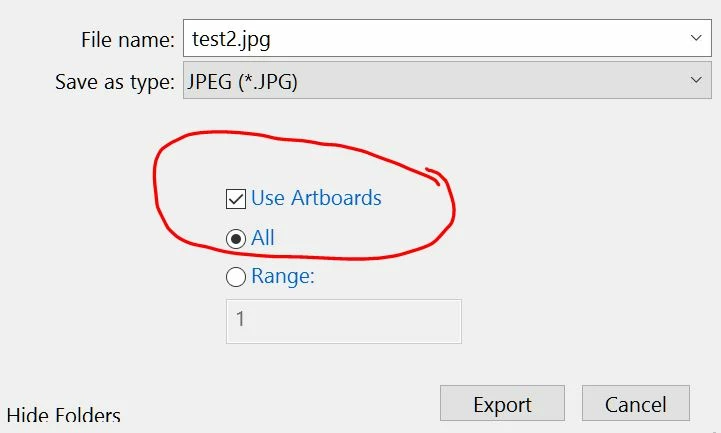
While Exporting to JPEG or any format , if you want artwork to be saved with correct dimensions make sure "Use Artboards" is checked.

Regards

Srishti

2 replies

Srishti Bali
Community Manager
Srishti BaliCommunity ManagerCorrect answer
Community Manager
June 7, 2017

Hi laurab,

While Exporting to JPEG or any format , if you want artwork to be saved with correct dimensions make sure "Use Artboards" is checked.

Regards

Srishti

laurab45391940
Known Participant
June 22, 2017

This worked. Thank you.

Monika Gause
Community Expert
Community Expert
June 7, 2017

When exporting the JPEG check "Use artboards"