
ishfaque.b
Inspiring
February 24, 2017
Answered

Large Scale Print Design Workflow

  • February 24, 2017
  • 3 replies
  • 2008 views

I have to make a 12m by 3m billboard.

Below is my workflow: (correct me if i am wrong)

The photo I have to put on the billboard: (Did not change anything yet, do I need to?)
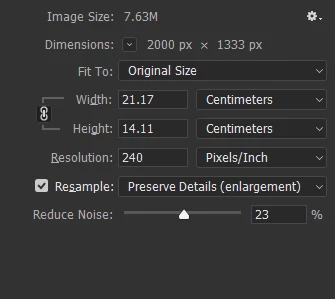
Then I think i will make resolution 300 ppi.

Then I will save the as a PSD file.

Then I will make Illustrator artboard 120cm by 30cm (10%) with bleed.

I will then link the PSD to the artboard, then add other vectors etc...

Then to send for print, i export the whole artboard as PDF.

THEN I SEND TO PRINTER! That's it. Have I got this whole thing wrong or what?
This topic has been closed for replies.
Correct answer MW Design

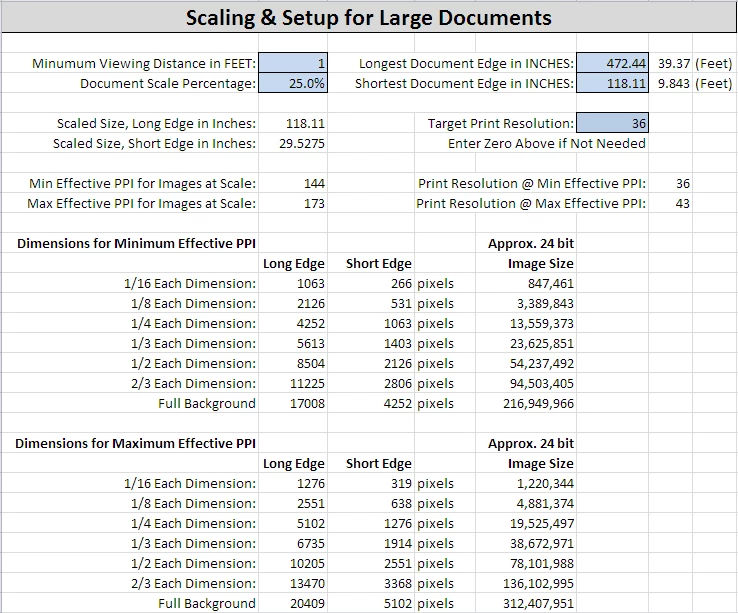
I have targeted 36 dpi effective resolution for billboards in the past, though I often go higher depending upon the images I require.

Your 2000 px wide image will hit 36 dpi effective resolution at about 1/8 of the artboard size. This may be fine for the image and design, I dunno.

The below is a screen shot from the spreadsheet I use for large format work. You can probably figure out what it is reporting for image sizes to hit the target effective resolution for the min/max dpi it calculates. And sorry, I still haven't gotten around to making a switch for metric versus the inches I use. But it's close enough of a conversion for this purpose.

3 replies

rama_ai11751598
Inspiring
April 19, 2017

We are gathering inputs on large canvas, please add your workflows that will benefit from large canvas to the following post

Workflows that need large canvas / artboard

-Rama

Illustrator team

BobLevine
Community Expert
Community Expert
February 24, 2017

A billboard that size could probably be done with an image resolution of 15-25 ppi.

Please note this is the InDesign forum, not Illustrator.

ishfaque.b
Inspiring
February 24, 2017

What do you mean 15-25 ppi. Do i input those at the resolution box in Ps?

Is my workflow ok?

Sorry, will post in app section in the future

MW Design
MW DesignCorrect answer
Inspiring
February 24, 2017

I have targeted 36 dpi effective resolution for billboards in the past, though I often go higher depending upon the images I require.

Your 2000 px wide image will hit 36 dpi effective resolution at about 1/8 of the artboard size. This may be fine for the image and design, I dunno.

The below is a screen shot from the spreadsheet I use for large format work. You can probably figure out what it is reporting for image sizes to hit the target effective resolution for the min/max dpi it calculates. And sorry, I still haven't gotten around to making a switch for metric versus the inches I use. But it's close enough of a conversion for this purpose.

Mike Witherell
Community Expert
Community Expert
February 24, 2017

Many people work at 25% scale. What does the artwork look like? Is it suitable for converting to vector art?

Mike Witherell
ishfaque.b
Inspiring
February 24, 2017

It has the above picture at 300ppi and the rest is text and vectors.

What about my workflow, is it ok? What do you suggest?

BobLevine
Community Expert
Community Expert
February 24, 2017

It sounds good to me but you really need to talk to the printer about what they need.