
Inspiring
February 10, 2017
Answered

Lines become blurry & distorted when exporting to JPG.

  • February 10, 2017
  • 2 replies
  • 6238 views

Hi Guys,

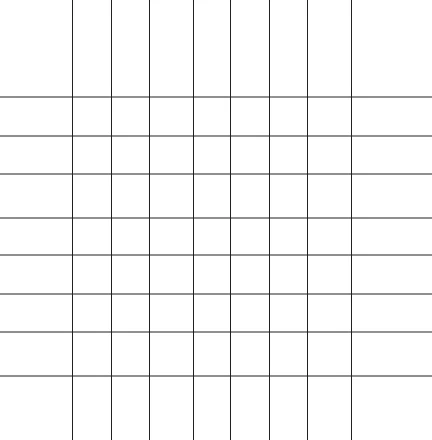
I am having a problem with exporting files for web.   I am creating my new documents at 72dpi.  I make a series of lines with a 1pt stroke and export the image (for web) at 72dpi.  I am also exporting my images at 100%, so there shouldn't be any distortion from scaling.  The resulting image has lines that appear to be 2pt gray lines while other lines look okay.  I've attached the image below, and you can see the horizontal lines are thicker and gray (appearing blurry).  Why is this happening?

Thanks!

Matt
This topic has been closed for replies.
Correct answer Mike_Gondek10189183

Turn on align to align to pixel grid and recreate you art.

If you are new to align to pixel grid, you may have an easier time creating this in photoshop or consult this Draw pixel-aligned paths for web workflows in Illustrator

2 replies

Jacob Bugge
Community Expert
Community Expert
February 10, 2017

Matthew,

I believe your lines may simply be off the whole pixels that would give crisp and clear images.

With a 1pt stroke, the (centres of the) lines should be at half pixel values (X and Y respectively) as you can ascertain in the Transform palette.

You can use align to pixel grid as suggested by Mike, or just ensure the half pixel values.

Simmer1
Community Expert
Community Expert
February 10, 2017

Hi Matthew,

Sometimes this does happen with Jpgs.

Try exporting the file as a PNG-24. If you do not want a transparent background, simply uncheck the transparency option.

Thanks,

Sim

Inspiring
February 10, 2017

Sim,

I tried this method, but the problem still exists.  I did try to change  "Art Optimized" to "None," which corrected the issue, but any other artwork or text I include in the illustration becomes extremely rough around the edges.

-Mat

Mike_Gondek10189183
Community Expert
Mike_Gondek10189183Community ExpertCorrect answer
Community Expert
February 10, 2017

Turn on align to align to pixel grid and recreate you art.

If you are new to align to pixel grid, you may have an easier time creating this in photoshop or consult this Draw pixel-aligned paths for web workflows in Illustrator