- Home
- Illustrator
- Discussions
- Re: Lineweight becoming too thin when file saved a...
- Re: Lineweight becoming too thin when file saved a...
Lineweight becoming too thin when file saved as a PDF

Copy link to clipboard
Copied
Howdy:
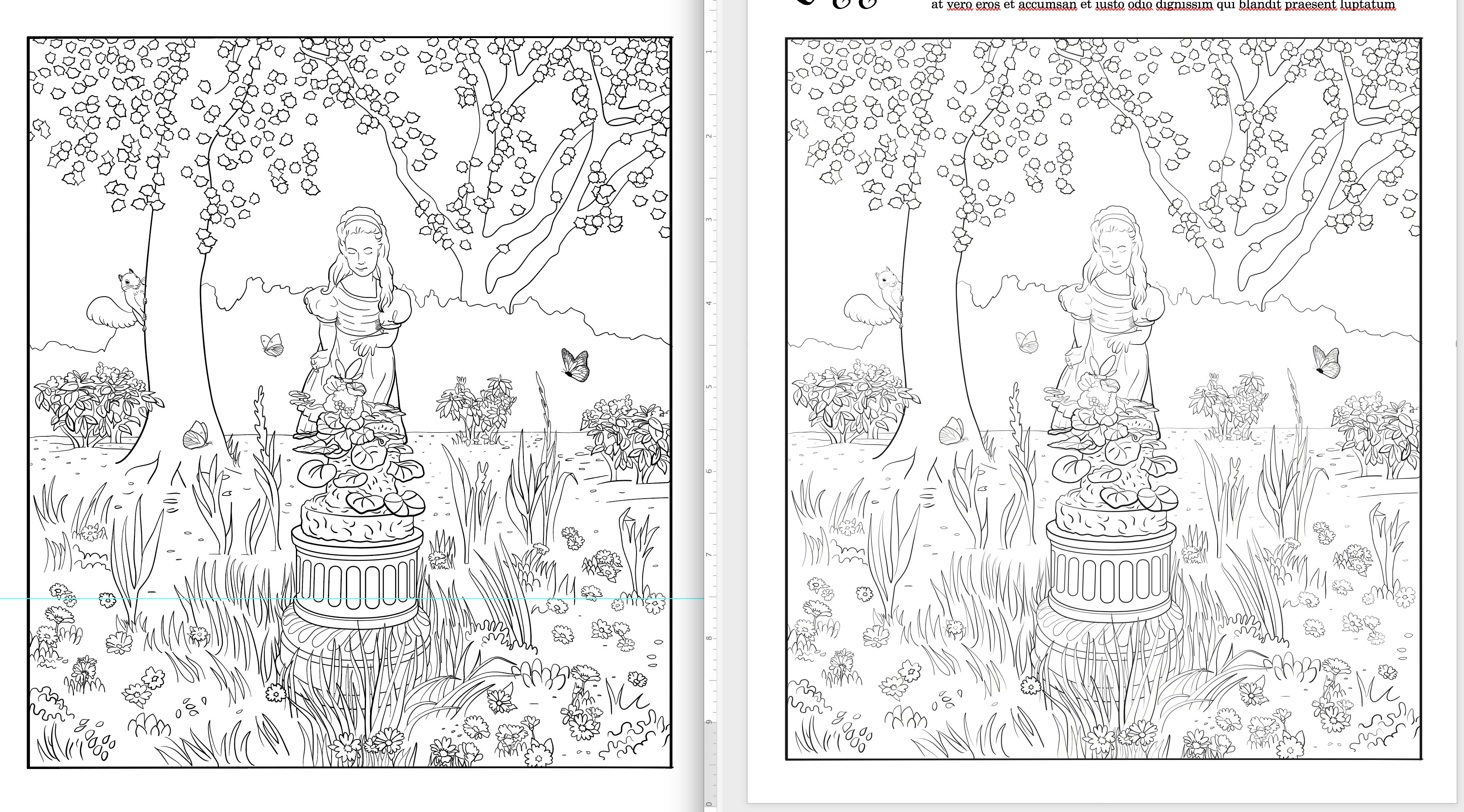
I'm drawing some coloring book pages for a client. They complained that some of the linework was too thin when they printed the page. So I went in and thickened the lines, saved the file as a PDF and re-sent it, and they said the lines looked exactly the same as before. I noticed the lines did indeed look thinner if I opened the PDF in Acrobat or if I placed it inside a Word file. Here's a screenshot showing the same file in the Illustrator window (left) next to the Microsoft Word window (right). You can see the lines in Word are thinner (it's especially noticeable in the little squirrel at the left, on the tree trunk).
Most of these lines are drawn with a brush and stroked, so I tried expanding all those lines and resaving to the PDF (at Press Quality)--no difference. I tried resaving as an EPS and importing that into Word--no difference.
I don't know how to make the lines the thickness they want, because what I see in Illustrator is not what they're getting in the end. I guess I could just make everything thicker than I think it should be, and hope the thinning in the conversion to EPS/PDF balances out, but that's a very annoying, slow workaround. Does anyone have any advice?
Is there some preference in Illustrator I need to change? Maybe the lines are being "artificially" thickened on my Illustrator artboard, the way some people are seeing too-thick lines in Acrobat because of the "smooth line art" preference? I don't know what preference that would be, though.



Explore related tutorials & articles
 18
Replies
18
18
Replies
18




Copy link to clipboard
Copied
How thin are those thin lines?
Copy link to clipboard
Copied
They're not all the same, because the different brushes I used have weights that change with pressure. Quite a few of them are .5 pts, though.
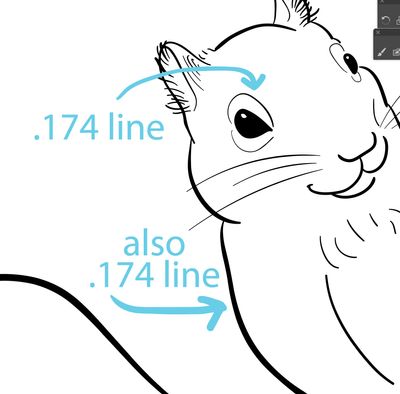
The difference in weights doesn't quite make sense--for example, the lines above the squirrel's eyes are the same tiny lineweight as the much thicker line of its lower arm. (Screenshot attached.)
Because of this, I thought there might be a problem with the way the brushes I'm using render strokes, so that's why I tried expanding the strokes, but that didn't fix it.
Copy link to clipboard
Copied
I see, a .5 or .174 pt line is very thin indeed.
I see variable line widths, you are probably using a tablet with variable pen pressure, so the linewidth will even become smalller depending on pressure.
How do your drawings look if you open them in Photoshop at 72 or 144 ppi?
Maybe that will give you an indication how Word renders the file
Copy link to clipboard
Copied
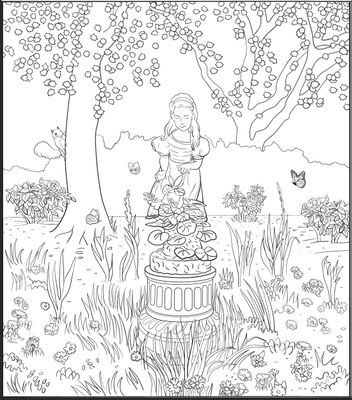
Interesting idea. At 144 dpi, it looks kind of in-between the Illustrator and the Word versions. BTW, the thinner lines also appear when I open a PDF version of the file in Acrobat.

Copy link to clipboard
Copied
Without the real PDF and Illustrator and all the exported original file and without even knowing exactly how it got printed (which PDF reader, which printer, which settings) and without seeing photos of the print, how should we be able to help you?
Copy link to clipboard
Copied
The printer settings/photos of the print aren't necessary, because the problem shows onscreen, as I demonstrated with the screenshots I posted in my last reply to you. (A larger version of a similar image is attached to my original post.) If I can see in Illustrator the same thing that Acrobat shows onscreen, I can fix the lines.
"Without the real PDF and Illustrator..."
I was not aware that posting the actual files would be something anyone would want. They're too large as is, but I can probably cut them down and post a modified version if you want to look at them.
Copy link to clipboard
Copied
Who marked this the "correct" answer? It didn't solve the problem.

Copy link to clipboard
Copied
I'm not seeing anything in this thread indicating a correct answer…
Did you or persons viewing this PDF try turning off Smooth Line Art in the Preferences? If it is printing out the same on one printer it may be a screen viewing issue in Acrobat.
Copy link to clipboard
Copied
I got an alarming email yesterday morning saying I had marked it correct, which I didn't, so I went in and unchecked the "correct answer" mark. I don't know who was able to do it in my stead. I guess I should change my password.
Re: Smooth Line Art preference
The lines do look thicker when this is turned off, but the page prints out with the thinner lines on the client's end, so it doesn't fix the problem. The main issue for me is that Illustrator's preview and Acrobat/Microsoft Word's don't line up. Word does a better job of showing how the file prints than Illustrator does, even though it was created in Illustrator.
Copy link to clipboard
Copied
Moderators and staff can mark answers correct.
They check threads regularly and if it hasn't been visited for a few days and there's no feedback, they usually ask if the issue is solved and when you don't answer then it gets the checkmark (provided the solution is reasonable).
BTW: it's not at all clear what exactly you are doing step by step and what exactly is OK in which application and what you expect to happen or how your artwork will go into production.
Copy link to clipboard
Copied
Dear Monika:
Thanks for the response. I was never asked if the issue was solved. (I just went back through my messages and double-checked.) I see now that a moderator could have been the one to mark the message as correct, so thanks for explaining that. There was a later message saying that I had done it, which confused me. That must have been me trying to undo the "correct" mark.
I don't know why the moderator would have marked that particular answer as correct, though, since to me it appeared to suggest a way to gather more information; it wasn't really providing a solution.
re: "BTW: it's not at all clear what exactly you are doing step by step and what exactly is OK in which application and what you expect to happen or how your artwork will go into production."
1) I created line art in Illustrator. I am working in an .ai file.
2) I sent a test PDF version of the file to the client. They complained that some of the lines were too thin. I thickened the strokes in Illustrator, resent as a PDF to the client, and they said they looked exactly the same. I checked the PDF preview and saw that the PDF and the Illustrator views of the file do not match.
3) I expanded the strokes, and it made no difference in the PDF. I changed the brush's thickness very slightly and applied the difference to the strokes, and it had uneven results--too thick in some places, still too thin in others. I tried re-opening the original PDF version of the file as an .ai, in hopes that would allow me to start over with the thinner-looking lines, but that didn't help; it reverted back to the deceptively thicker-seeming lines.
The final images will be dropped into Microsoft Word for the client to add text and print. I tried putting both the PDF and an EPS version of the Illustrator file into Word as a test, and the too-thin lines are what show and print.
It seems that the problem might be either with Illustrator's preview (since the Acrobat and Word previews agree) or with the third-party brush I'm using. I wonder if there's some Illustrator viewing preference I should change, but I don't know what. The brush looks normal in the Calligraphic Brush Options, and making adjustments there just caused new problems, so I don't know what to do about that, other than just assign a different brush to every stroke that used it, which will be quite tedious.
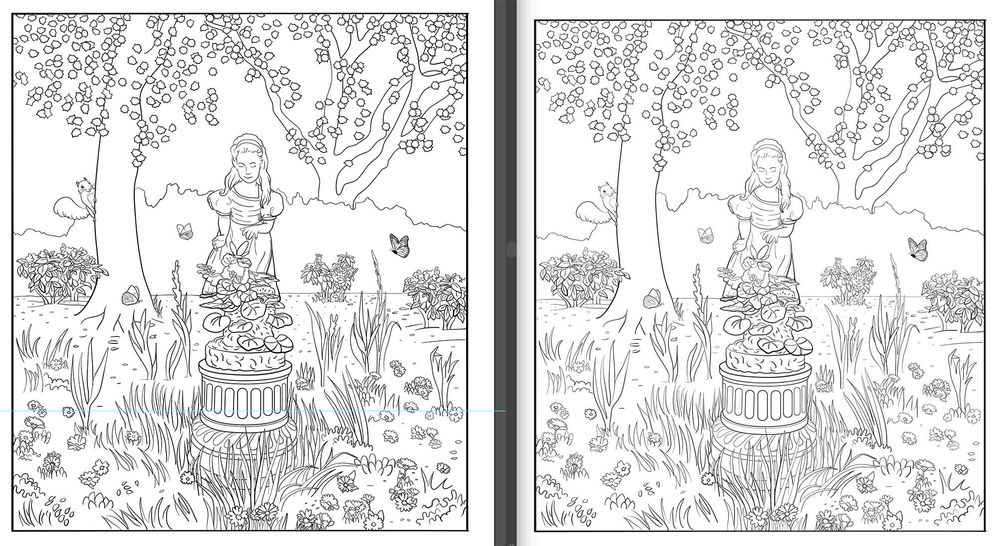
Attached is a screenshot--the Illustrator view is on the left, and the Acrobat view of the same file on the right. (The difference is most apparent in the squirrel and the girl's face and dress.) What I would like is WYSIWYG capability when I draw a line or thicken a stroke's weight.

Copy link to clipboard
Copied
Smooth Line Art is a user controlled preference. Can you ask the final user to adjust this preference in their version of Acrobat and then report the results?
Copy link to clipboard
Copied
Turning off the Smooth Line Art preference helps when I print the file, but the final image will not be in Acrobat (but Word), so that doesn't matter. But thanks for the suggestion; I didn't know about this preference before I posted about my problem.
Copy link to clipboard
Copied
Will the image be printed from Word?
Depending on the version of Word, you can import a PDF into it. What Word makes of the linewidth, is beyond my knowledge. I don't know how Word interprets this information when sending stuff to the printer.
As for brushes: There are 2 possibilities to control the linewidth of brushes. One is in the brush options, which sets the rules. The second is the stroke width, which acts as a multiplier to the thickness of the brush stroke. You can really mess it up when you use both of them.
If you don't import PDF, but PNG or other raster formats into Word, then Illustrator will convert them to pixels, which will be quite coarse, since higher resolution than 150 ppi doesn't make a lot of sense. So some very precise sifferentiations of line weights in order to emphasize some elements but not others, doesn't make a lot of sense. It gets lost when rasterizing.
The whole thing gets even more difficult when you draw the image at a much higher size than it gets used later, like for instance you draw it in A2, but only print it on A4.
All in all maybe you made this much more complicated than needed from the beginning.
Copy link to clipboard
Copied
"All in all maybe you made this much more complicated than needed from the beginning."
I resent this. The line drawing was intended to be vector, and printed as a PDF from the start. It was only decided to drop it in Word at the last second, when the client decided they wanted to be able to edit some text on the page themselves. And from the standpoint of how the artwork is created, it made a lot more sense for me to do it in Illustrator than Photoshop. But the Word issue is somewhat of a red herring--the problem with the line weights came up in the PDF. I find it problematic that Illustrator's preview doesn't show the same thing that Acrobat's does. I only mentioned the Word aspect here because the Word preview and the Acrobat preview showed the same thing, which indicated to me that the problem might lie somewhere in Illustrator's preview.
"You can really mess it up when you use both of them."
Strange. In that case, Illustrator shouldn't allow the user to make this adjustment. I have seen nothing in the Illustrator documentation that says to avoid this. (It might be there, but it doesn't appear to be prominent; it's not on the two pages about brushes that I just checked.) And it doesn't seem to be a problem with every stroke or every brush. I've done quite a few of these silly line drawings, and the client has only complained about the weights in this one.
Copy link to clipboard
Copied
I answered that part yesterday via email, but obviously that didn't work.
QUOTE:
"You can really mess it up when you use both of them."
Strange. In that case, Illustrator shouldn't allow the user to make this adjustment. I have seen nothing in the Illustrator documentation that says to avoid this.
END OF QUOTE
That is not what I meant. It's not that Illustrator produces wrong results, but you mess it up for yourself. If you control lineweight by using BOTH stroke width and the calligraphy brush settings, in the end you will have a hard time telling what lineweight exactly you will get.
Copy link to clipboard
Copied
Like Monika said, staff and moderators can mark an answer as correct.
As you could see when you rasterize the file, it comes close to what Word makes of it.
You cannot control the way Word interprets the PDF, so you need to design around it.
Copy link to clipboard
Copied
The test version the client printed was actually the PDF, not the Word version. I still think it's a problem that Illustrator doesn't show what a PDF is previewing, whether or not this particular project will be printed in Word--shouldn't Illustrator/Acrobat be the same???!


Find more inspiration, events, and resources on the new Adobe Community
Explore Now
 AdChoices