Inspiring
January 11, 2017
Answered

loading more strokes

  • January 11, 2017
  • 2 replies
  • 3582 views

When I use Illustrator strokes in my drawings, I see 7 width profiles to choose from.  I need more choices.  How can I load more profile choices to Illustrator? ~Thanks.
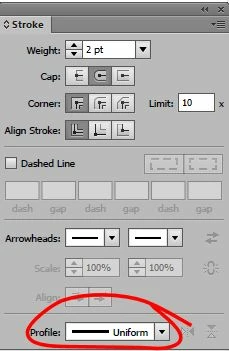
    This topic has been closed for replies.
    Correct answer Barb Binder

    You can create variable width profiles using the Width tool, and then add them to the list:

    https://iamsteve.me/blog/entry/creating-custom-stroke-width-profiles-in-illustrator

    Using variable-width profiles

    2 replies

    Barb Binder
    Community Expert
    Community Expert
    January 12, 2017

    Just turn on the rounded end cap:

    ~Barb at Rocky Mountain Training
    pslane1Author
    Inspiring
    January 15, 2017

    Great!  Thank you for helping me learn these things!   I mostly do tutorials to learn.

    Pauline

    Barb Binder
    Community Expert
    Community Expert
    January 15, 2017

    Happy to help, Pauline.

    ~Barb at Rocky Mountain Training
    Barb Binder
    Community Expert
    Barb BinderCommunity ExpertCorrect answer
    Community Expert
    January 11, 2017

    You can create variable width profiles using the Width tool, and then add them to the list:

    https://iamsteve.me/blog/entry/creating-custom-stroke-width-profiles-in-illustrator

    Using variable-width profiles

    ~Barb at Rocky Mountain Training
    pslane1Author
    Inspiring
    January 11, 2017

    I would love to do that but when I try, my "add to profiles" s grayed out.   Also, can I make a new profile by using a shape?

    Thank you.

    Oh, wait a minute, when I use the width tool on the left side bar, it Does become active!  (duh, that's what you said to do) I will play around with this now and see what I can make. Thanks again.

    Barb Binder
    Community Expert
    Community Expert
    January 11, 2017

    LOL! Glad it is working now!

    When I teach how to use the width tool, we assign the same width to open paths (i.e., lines) and close paths (i.e., circles and rectangles) because the same width profile looks very different on the open and closed paths.

    ~Barb at Rocky Mountain Training
