
Answered
Need to edit this script ...Ai ASE Colors & Convert to RGB Values Excel Sheet Script
I am using the script below to extract RGB values in an Ai document using the ASE swatch color and placing each R G B value in a separate column inside a CVS Excel sheet. I want to assign the names of the swatches to the swatche's RGB values instead of the sequenced numbering [Column A = I.D.] that is currectly in the script but I don't know how to do this.
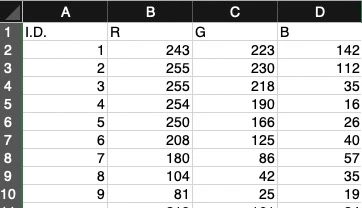
var listfile = "/Users/Name/Desktop/Name.csv";  //add Filename
var doc = activeDocument;
var col = doc.swatches;
var info = new Array();
if(doc.documentColorSpace == DocumentColorSpace.CMYK)
{
   info.push("I.D.,C,M,Y,K");
   for(var i = 0; i < col.length;i++)
   {
        if(col[i].color=="[CMYKColor]")
        {
            var c = Math.round(col[i].color.cyan);
            var m = Math.round(col[i].color.magenta);
            var y = Math.round(col[i].color.yellow);
            var k = Math.round(col[i].color.black);
           info.push(i+","+c+","+m+","+y+","+k);
        } else {info.push(i);}
    }
}
if(doc.documentColorSpace == DocumentColorSpace.RGB)
{
   info.push("I.D.,R,G,B");
   for(var i = 0; i < col.length;i++)
   {
        if(col[i].color=="[RGBColor]")
        {
            var r = Math.round(col[i].color.red);
            var g = Math.round(col[i].color.green);
            var b = Math.round(col[i].color.blue);
            info.push(i+","+r+","+g+","+b);
        }  else {info.push(i);}
    }
}
var thefile = new File(listfile); //pass the file to a Variable
var isopen = thefile.open("w"); //open file for editing
if (isopen)//test file is open
{
   thefile.seek(0,0);
   for(var j = 0; j < info.length; j++)
   {
   thefile.writeln(info[j]);
   }
   thefile.close();
}
 AdChoices