
Xaarnak
Participant
November 9, 2020
Answered

New feature suggestion - if at all possible

  • November 9, 2020
  • 4 replies
  • 2107 views

Hi,

Long time user of the product, first time poster 🙂
I had an idea about an option that could be incorporated into illustrator - I mean, it would be nice if it could be done. What had in mind is - is it in any way possible to make the gradient follow a guideline..? Like in the attached image, it would be very helpful if an option existed to make the gradient follow the purple line like the one in object C...
Probably not an original idea but it had to be mentioned.

Best regards...
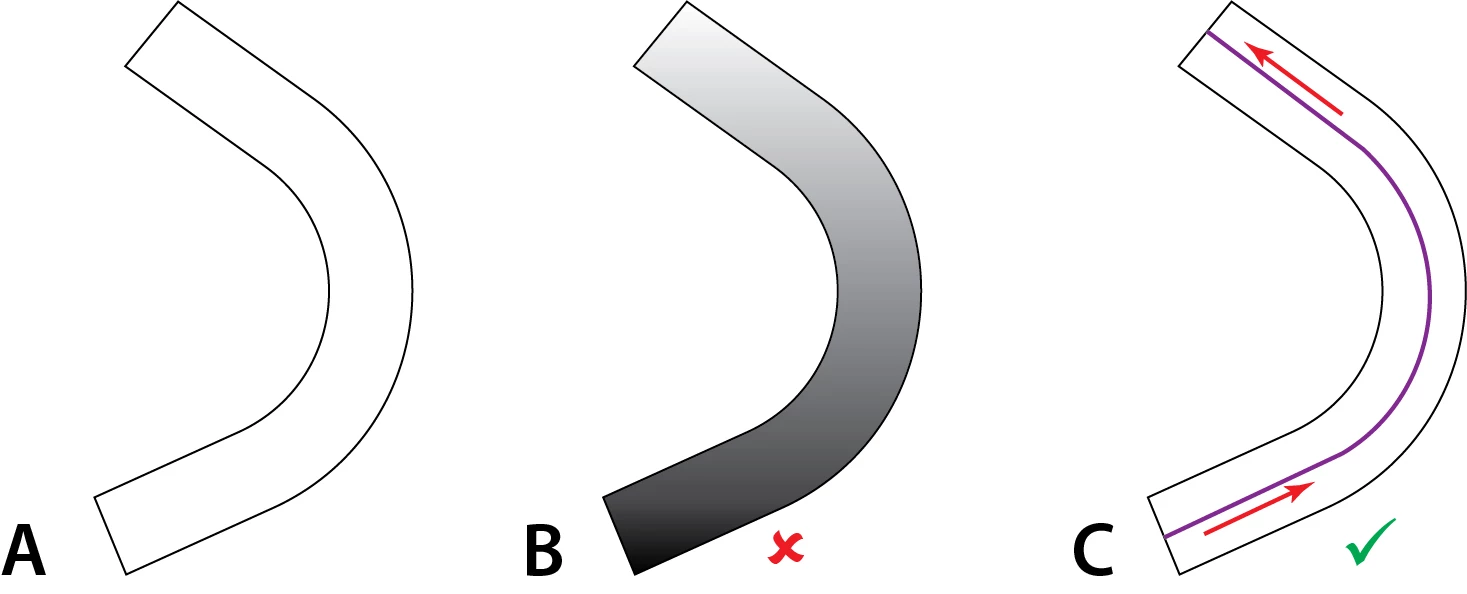


[ attachment inserted as inline image by moderator ]

This topic has been closed for replies.
Correct answer Manan Joshi

Hi @Xaarnak,

These forums are peer to peer and have very little participation of Adobe staff. Feature requests are better posted at the following, this is where the Project managers visit and look at the requests

https://illustrator.uservoice.com/forums/333657-illustrator-desktop-feature-requests

-Manan

4 replies

pixxxelschubser
Community Expert
Community Expert
November 9, 2020

@Xaarnak wrote: "…  I dont want concentric "layers" of gradient …"

Sorry, but I think you are totally wrong.


There are no "concentric gradient layers". Maybe my example wasn't the best. With the settings shown, the color gradient follows the line "from the left side of the line to the right" (Please do not take this literally.)


another gradient with the same settings - I changed the line a little earlier


@Xaarnak wrote: "… but actually, no, that was not my intention … but rather one that would follow the direction of the arrows in my image …"


Use the middle button - and the gradient follows your line from "top to bottom" - or better: from the beginning of the line to the end of the line. And IMHO this is what you want:


I think you are asking for a new feature - but this feature is already there in Illustrator!


pixxxelschubser
Community Expert
Community Expert
November 9, 2020

Like @Monika Gause wrote before:

apply the gradient on the stroke of your purple line (increase the line width beforehand)

result:

Xaarnak
XaarnakAuthor
Participant
November 9, 2020

Thank you for your answer - but actually, no, that was not my intention. I dont want concentric "layers" of gradient, but rather one that would follow the direction of the arrows in my image. The gradient would be the darkest, i.e., in the lower left part of the image, then get lighter along the length of the purple line and be the lightest in the upper left part of the curved shape...

Monika Gause
Community Expert
Community Expert
November 9, 2020

There are other modes of applying the gradient. I would suggest you just read the documentation and see for yourself.

Monika Gause
Community Expert
Community Expert
November 9, 2020

Looks like you want to apply a gradient to a stroke.

That is possible.

Or you might be referring to freeform gradients. They exist as well.


https://helpx.adobe.com/illustrator/using/gradients.html

Manan JoshiCommunity ExpertCorrect answer
Community Expert
November 9, 2020

Hi @Xaarnak,

These forums are peer to peer and have very little participation of Adobe staff. Feature requests are better posted at the following, this is where the Project managers visit and look at the requests

https://illustrator.uservoice.com/forums/333657-illustrator-desktop-feature-requests

-Manan

-Manan
Xaarnak
XaarnakAuthor
Participant
November 9, 2020

Thank you very much - as I pointed out, I am new in communicating 🙂