Exit
  • Global community
    • Language:
      • Deutsch
      • English
      • Español
      • Français
      • Português
  • 日本語コミュニティ
  • 한국 커뮤니티
0

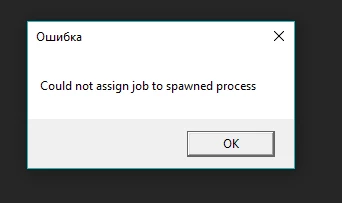
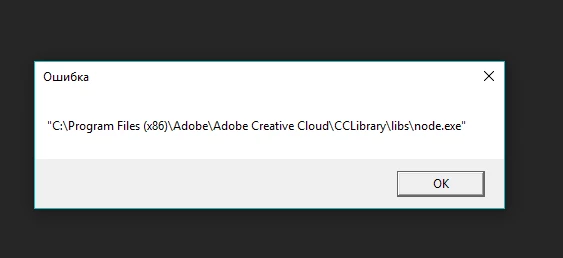
node.exe error

New Here ,
Aug 17, 2017 Aug 17, 2017

When I open Ai error window of Creative Cloud appears and when I close it it appears again and again. What can I do with it?

4.1K
Translate
Report
Community guidelines
Be kind and respectful, give credit to the original source of content, and search for duplicates before posting. Learn more
community guidelines

correct answers 1 Correct answer

Community Expert , Aug 17, 2017 Aug 17, 2017

Check to see you do not have winthruster / win sweeper or any other solvusoft products, as they have been know to implant node.exe errors.

Remove WinThruster virus (updated Jul 2017) - Removal Guide

Then check the Adobe Cloud is running without any errors.

Ultimately you can try:

run  Use the Creative Cloud Cleaner Tool to solve installation problems 

and reinstall

Translate
Adobe
Community Expert ,
Aug 17, 2017 Aug 17, 2017
LATEST

Check to see you do not have winthruster / win sweeper or any other solvusoft products, as they have been know to implant node.exe errors.

Remove WinThruster virus (updated Jul 2017) - Removal Guide

Then check the Adobe Cloud is running without any errors.

Ultimately you can try:

run  Use the Creative Cloud Cleaner Tool to solve installation problems 

and reinstall

Translate
Report
Community guidelines
Be kind and respectful, give credit to the original source of content, and search for duplicates before posting. Learn more
community guidelines