Participant
June 30, 2020
解決済み

numbers disappeared after create outline illustrator!

  • June 30, 2020
  • 返信数 8.
  • 7741 ビュー

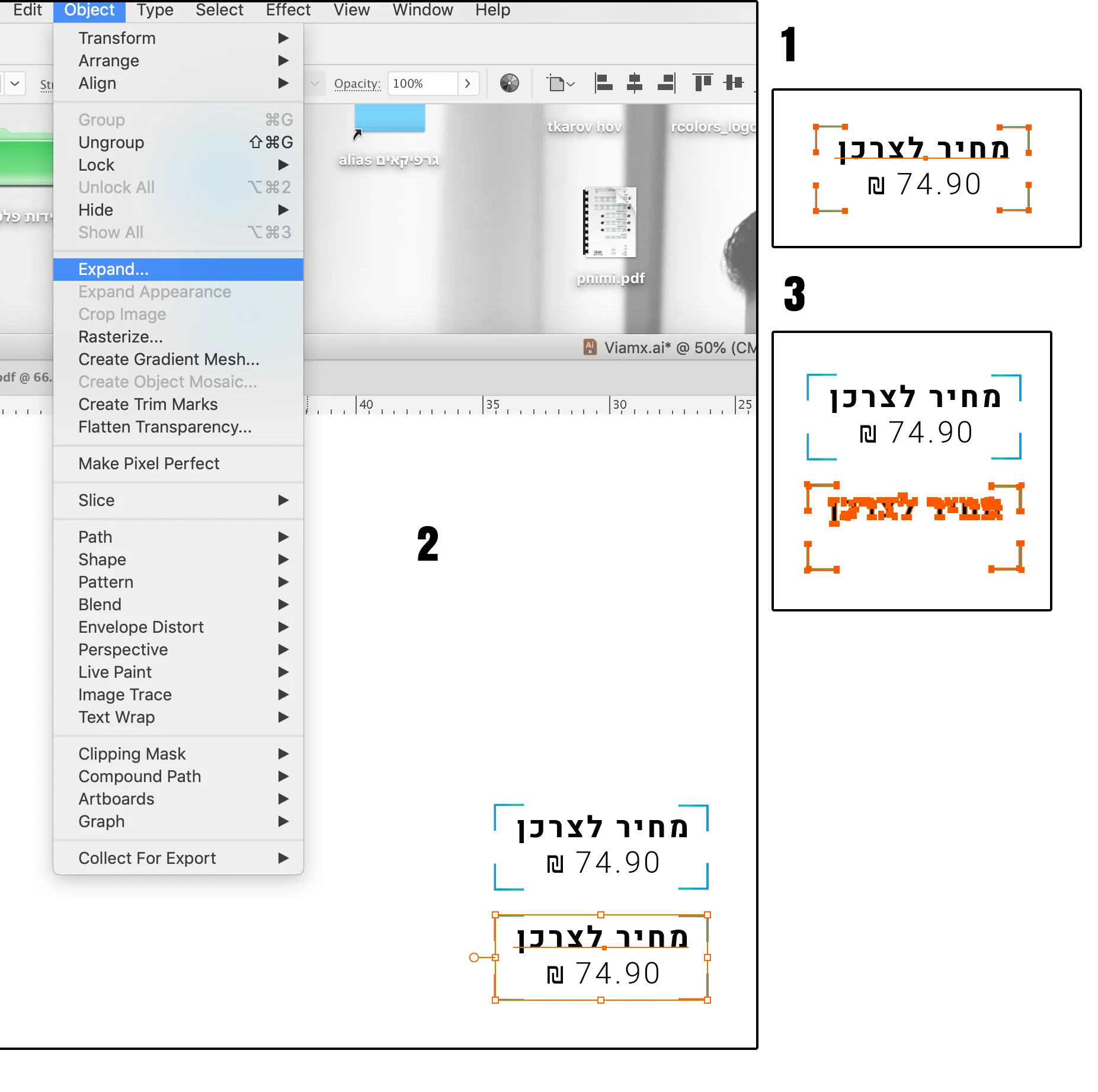
when i type numbers in illustrator and mix it with language that is not english it disappeared after create outline...



このトピックへの返信は締め切られました。
解決に役立った回答 Monika Gause

Does it also happen when you use Object > Flatten transparency to outline fonts? You need to check the option "Outline text"

返信数 8

Participant
November 26, 2021

I believe it's been fixed in Illustrator 26.01!
This issue arose in version 23 AFAICR

Participant
January 13, 2022

Sadly, we still encounter this issue in 26.0.2


A second solution we have is to copy the text -> paste in place en then convert to outline. 


Participant
January 27, 2022

Try uninstalling and setting the App Language to "English תומך עברית"  == "English with hebrew Support".
It works on my machine 🙂

Participant
October 18, 2021

WOW, thank you so much! it's working 

Participant
October 5, 2021

Had the same problem and found a solution.  I went to my fonts in Adobe Cloud and deactivated and reactivated the font that was disappearing when I tried to create outlines.  Worked after reactivating.

Eliyah Gevalt
Participating Frequently
June 20, 2021

happens to me too (hebrew. also in prices! but not only) but seldom...

Participant
November 17, 2020

Guys, I am also facing the same issue but not in Hebrew, its in English (number) itself. After creating "Threaded text" of the numbers for calendar I wanted to make creat outline and all the numbers dissapares. Here I've uploaded a few screen shots. Please help me with effective solutions. I'm using latest version of Illustrator in MAC. Thanks

Monika Gause
Community Expert
Community Expert
November 17, 2020

Did you read the complete thread? And try out everything?

Participating Frequently
July 13, 2020

This is a big problem.
I know a lot of people on Windows and Mac who have the same problem.
It causes a lot of errors, a waste of time, rejects, and loss of money.
I don't understand why Adobe is not fixing this huge bug.
Please help

Monika Gause
Community Expert
Monika GauseCommunity Expert解決!
Community Expert
July 13, 2020

Does it also happen when you use Object > Flatten transparency to outline fonts? You need to check the option "Outline text"

Participating Frequently
July 14, 2020

OMG! You've solved the problem. Hurray!

Thank you very much. I will spread the gospel until Adobe fixes the issue from within Create Outlines.

Thank you so much

Participating Frequently
July 7, 2020

It happened to me too. I worked around that by creating the numbers in seperate text box  but that's not really a solution

Mylenium
Legend
June 30, 2020

Might be a specific issue with your Hebrew and RTL writing vs. conventional Western fonts. I'd start by checking the relevant font/ glyph panels for automatic substitutions and that. If the layout changes as you toggle these options you may be able to figure out what triggers the behavior. Of course also do the obvious - try with different fonts.


Mylenium

RCOLORS作成者
Participant
June 30, 2020

thank you,

but it's happening with every font , even with google fonts...