
Inspiring
May 15, 2017
Answered

Opacity Mask Looks Washed Out / Dull

  • May 15, 2017
  • 4 replies
  • 6303 views

Hi

When I make a clipping mask the resulting object remains at 100% opacity and retain the original color.

I've started using the transparency panel, and when i make a mask here the resulting object looks washed out, as if some kind of blend mode has been added.  Surely there must be a way of using this method so the resulting objects retains the color of the original object that is going to be masked?

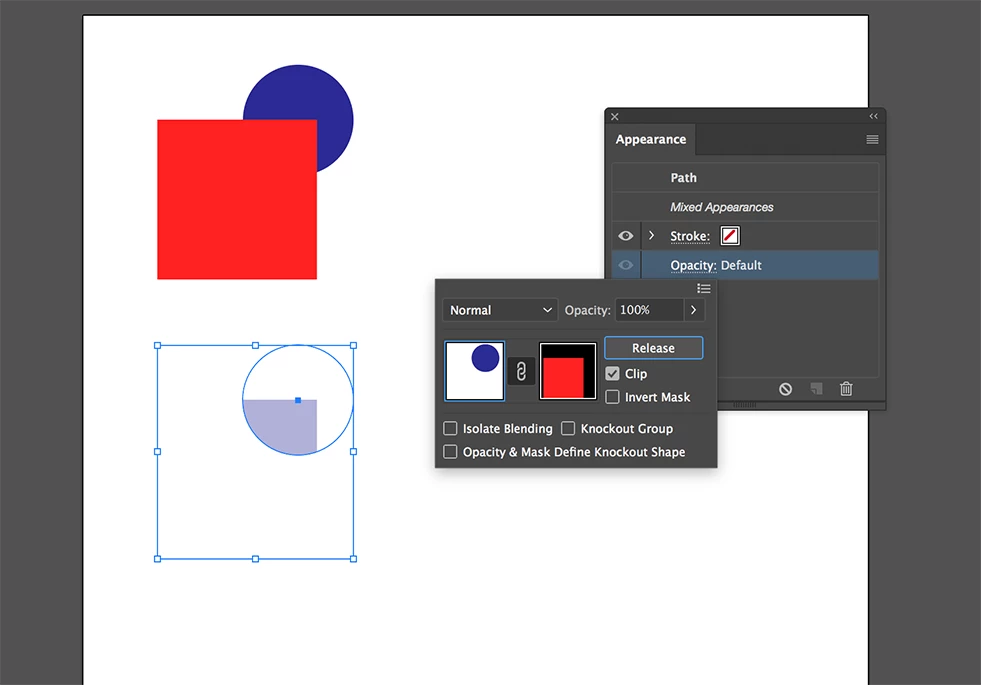
Example with Image below:

Why doesn't the resulting shape show as the dark blue of the original. I haven't added any blend modes or adjusted the opacity at all?
Thanks

Paul.

Correct answer Doug A Roberts

Yes... but my point is... make a red circle and a blue square... and then create an opacity mask? Is the mask in colour or black and white?


the mask is the equivalent grayscale shade, just like in PS.

4 replies

Inspiring
May 15, 2017

Actually, now I understand how it's works Doug's answer was correct.  It's just Eternal Warrior's was explained in a way I could understand having only just started using the transparency panel / opacity mask.  It was a lot clearer with a screenshot explaining it how it works. 

Thanks to all though for helping me understand this!

Paul.

Inspiring
May 15, 2017

Hi

Eternal Warrior's answer was the one that I needed.  It was because fill of the mask was using the color of the selected object, as opposed to white. 

When I change the mask to white as suggested it solved the problem. 

Thanks for the answers, and thanks again Eternal Warrior you were right !!!

Eternal Warrior
Inspiring
May 15, 2017

FWIW it could be a bug but I could repeat this..

For some reason... Illustrator doesn't make the standard mask in black and white... it seems to mask in the colours of the actual objects..Which means that it interprets the transparency incorrectly...

Alt clicking on the mask and then changing the shapes to either fill white or fill black seems to solve this issue:

Doug A Roberts
Community Expert
Community Expert
May 15, 2017

this isn't a bug, this is how opacity masks are supposed to work.

Eternal Warrior
Inspiring
May 15, 2017

Yes... but my point is... make a red circle and a blue square... and then create an opacity mask? Is the mask in colour or black and white?

Doug A Roberts
Community Expert
Community Expert
May 15, 2017

the tone of the red is masking the tone of the blue, resulting in the colour you see. that's what an opacity mask does. if you want to completely mask things, use RGB black or white.

Eternal Warrior
Inspiring
May 15, 2017

I noticed this and also that Illustrator didn't seem to default to a black and white mask as it would do in most other adobe programs such as Photoshop.