Calleja_es
Participant
March 5, 2019
Answered

Paso de Ai a Psd modificable

  • March 5, 2019
  • 1 reply
  • 885 views

Hola,

tenemos Ai en nuestra empresa recientemente, y no sabemos muy bien si esto es posible:

nos gustaría poder pasar los archivos ai a psd y modificarlos

ahora mismo no aparecen las capas de ai en psd, busco tutoriales y faqs y no veo nada, puede que esté poniendo las búsquedas mal o que no exista esta posibilidad

si me podeis ayudar, os lo agradezco

pd: no puedo bajarme conversores si los hubiera, poilitica de empresa

en concreto es el logo de nuestra nueva web:

gracias a tod@s
This topic has been closed for replies.
Correct answer barbara_a7746676

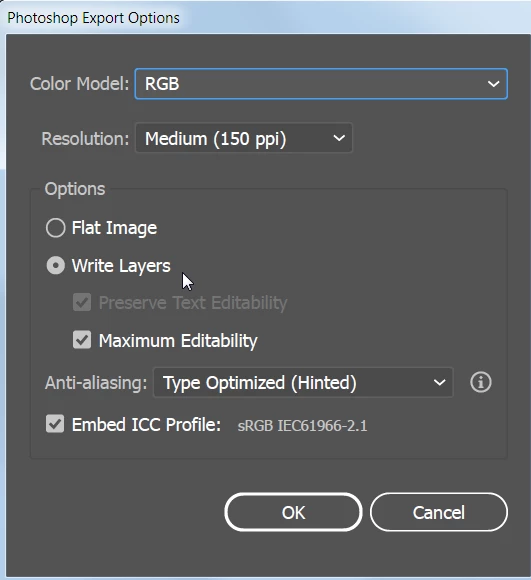
In Illustrator you can choose File > Export > Export As > and choose Photoshop for Save As Type. If you choose Write Layers, only top level layers will be preserved, not sub-layers.

When you choose File > Open in Photoshop, the Illustrator files will be rasterized and will no longer be vector. Each top level Illustrator layer will become a Photoshop layer.

--

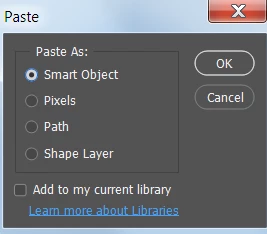
Another way that you can get Illustrator files into Photoshop is to copy the Illustrator file and paste it into Photoshop. When you do that you'll be given a choice to paste as Smart Object, Pixels, Path, or Shape Layer.

If you choose Smart Object all the objects will be on one single layer. If you want them on separate Photoshop layers, you'll need to copy and paste them one at a time and line them up in Photoshop. If you want to edit the smart object layer you can double-click on it and it will open in Illustrator. After you save changes in Illustrator, Photoshop will automatically update the Photoshop layer.

I hope this helps.

1 reply

barbara_a7746676
Community Expert
barbara_a7746676Community ExpertCorrect answer
Community Expert
March 5, 2019

In Illustrator you can choose File > Export > Export As > and choose Photoshop for Save As Type. If you choose Write Layers, only top level layers will be preserved, not sub-layers.

When you choose File > Open in Photoshop, the Illustrator files will be rasterized and will no longer be vector. Each top level Illustrator layer will become a Photoshop layer.

--

Another way that you can get Illustrator files into Photoshop is to copy the Illustrator file and paste it into Photoshop. When you do that you'll be given a choice to paste as Smart Object, Pixels, Path, or Shape Layer.

If you choose Smart Object all the objects will be on one single layer. If you want them on separate Photoshop layers, you'll need to copy and paste them one at a time and line them up in Photoshop. If you want to edit the smart object layer you can double-click on it and it will open in Illustrator. After you save changes in Illustrator, Photoshop will automatically update the Photoshop layer.

I hope this helps.

Calleja_es
Participant
March 7, 2019

muchísimas gracias por vuestra ayuda de parte de todo el equipo

barbara_a7746676
Community Expert
Community Expert
March 7, 2019

De nada. Me alegra que haya respondido la pregunta por ti.