Participant
April 8, 2020
Answered

pattern maker tool

  • April 8, 2020
  • 3 replies
  • 560 views

hello everyone,

I have a question about the pattern maker tool in AI.  I love this feature, just adore it.

I am a apparel designer so I have been using this a lot to work on patterns to be ready for production.


My big stumper is this. I make my patterns, they are all ready to go in the swatches, I know the size etc.

But when I want to make sure I have a full repeat showing for my vendor... I dont know how to show it because the pattern on my artboard is not exactly the same tile I was working in, inside the pattern tool.


Usually what I do is make a square the size of my repeat, and then fill the square. But what I notice for me is that I dont see my full repeat. So, red flag.


Does anyone get what I am saying? 😉 


Thanks for the help.
 

This topic has been closed for replies.
Correct answer Ton Frederiks

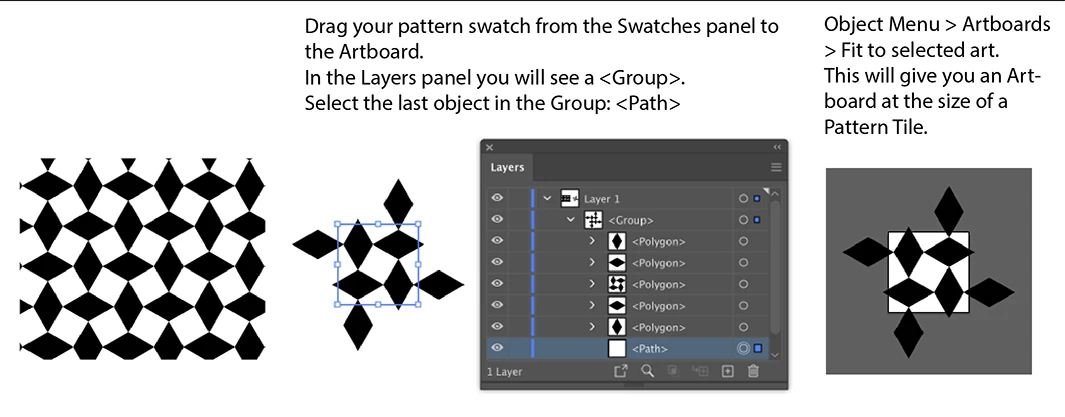
If you want to show / export only the repeat (single pattern tile), you could create an artboard the same size as your pattern.

Export the artboard as an image or save as PDF


3 replies

キィィ─!!!
Participating Frequently
April 8, 2020

Hello, nastfreeman.

Please forgive me if I am wrong in my understanding of your question.
If you want to extract one block of the pattern, you can do so with Expanding.

Ton Frederiks
Community Expert
Ton FrederiksCommunity ExpertCorrect answer
Community Expert
April 8, 2020

If you want to show / export only the repeat (single pattern tile), you could create an artboard the same size as your pattern.

Export the artboard as an image or save as PDF


Monika Gause
Community Expert
Community Expert
April 8, 2020

Illustrator applied the pattern tiles to a shape by starting the pattern in the top left of the artboard and then tiling it, no matter where your object happens to be.  But if your object has the exact same size as the pattern tile you drew than it shouldn't matter where the object is.