Known Participant
November 30, 2017
Answered

Pen tool line profile

  • November 30, 2017
  • 2 replies
  • 1033 views

Hi there,

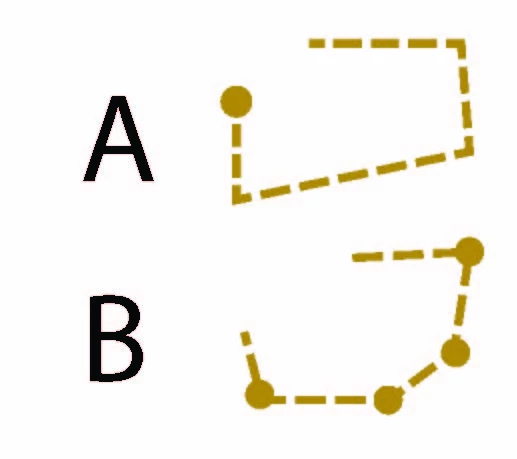
Please let me know how to achieve the line type which looks like the "B" type on an example below. I want to use the one line which has dots in the each anchor.

Thank you

Kamila
This topic has been closed for replies.
Correct answer Monika Gause

When doing this with a pattern brush, you will need to build the corners in a very specific way:

First draw a line, then move both the points in the same position, then apply the rounded stroke end and increase the stroke width. This needs to be put into the brush.

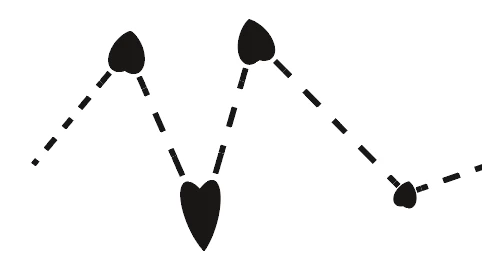
Otherwise the stroke would look like this:
2 replies

Monika Gause
Community Expert
Monika GauseCommunity ExpertCorrect answer
Community Expert
November 30, 2017

When doing this with a pattern brush, you will need to build the corners in a very specific way:

First draw a line, then move both the points in the same position, then apply the rounded stroke end and increase the stroke width. This needs to be put into the brush.

Otherwise the stroke would look like this:

KamilaBAuthor
Known Participant
December 11, 2017

I got top the funny shaped harts and dont know how to built the corners any help?

Doug A Roberts
Community Expert
Community Expert
December 11, 2017

i'll break down monica's post a bit:

one flaw i notice is that corners close to the limit of obtuse count as straight portions as far as the brush is concerned, so don't get a corner element.

@mj
Community Expert
Community Expert
November 30, 2017

You could try a pattern brush with the dots at the inner and outer corners.

Here's how: Create a Pattern brush |

HTH

KamilaBAuthor
Known Participant
December 11, 2017

Thanks i will try to make the patterns...
