
Inspiring
February 20, 2019
Question

Position on script seems to be off
  • February 20, 2019
  • 4 replies
  • 1914 views

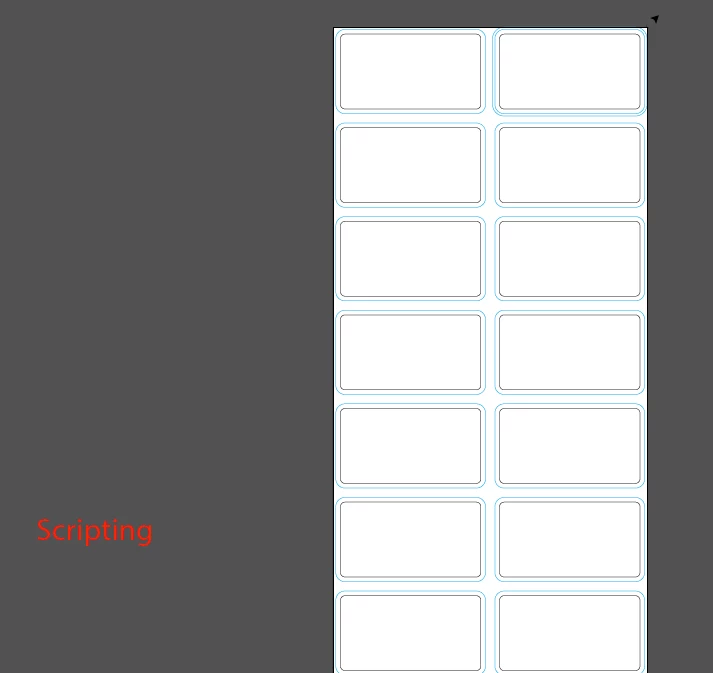
I have the above file and when I run my script.  The text appears all the way to the left.  The rulers show that 0, 0 is supposed to be at the beginning of the document.

This is my code:

var text = doc.textFrames.add();

text.position = [0,0];

text.textRange.size = 60;

text.textRange.characterAttributes.fillColor = col;

text.contents = "Scripting";

I have also tried

text.top = 0;

text.left = 0;

Neither of these work, the script type is positioned in the same place.  Any ideas what I'm doing wrong?

This topic has been closed for replies.

4 replies

rcraighead
Legend
February 25, 2019

Have you checked the "Artboard" x,y position? I had an instance where everything looked good in the file, but ".position = [0,0];"m did not work. Opening "Edit Artboard" revealed the Artboard was not aligned to the top, left corner. Fixing that fixed the script.

renél80416020
Inspiring
February 25, 2019

Bonjour rcraighead,

Si c'est à moi que le message est adressé, je ne comprend pas de quoi il s'agit ??

Pour info, il y a deux sortes de règles :

- Du plan de travail en vert

- Globales en noir

A +

LR

rcraighead
Legend
February 25, 2019

Sorry, rené. No, it's to "whom it may concern". You are WAY beyond my level. Thanks for all your help here.

I just ran into this situation today and was confused why a selection did not move to "0,0" as expected. Then I found the Artboard was offset. Thought it might apply here.

renél80416020
Inspiring
February 23, 2019

Bonjour OhmsG ,

C'est bien de vouloir comprendre le problème des origines (rulerOrigin, pageOrigin)

Sauf dans des cas spécifiques, il vaut mieux ne pas opérer de modifications dans les scripts,

je te conseille (par expérience) de ne pas trop te préoccuper des origines lors de la rédaction de scripts.

Voici un script qui édite des étiquettes sur une page,

il te suffit de créer un nouveau document (A4, B4 ou B5)

avec 1 ou plusieurs plans de travail (artboard),

modifier manuellement à la volée les origines de règles pour constater que le script fonctionne dans tous les cas,

d'activer un plan de travail si plusieurs,

de lancer le script.

Remarque: on peut utiliser la même méthode pour remplir plusieurs pages.

// JavaScript Document for Illustrator

// elleere Sat, 23 February 2019 20:33:04 GMT

//INIT-----------------

var decX = 100,

    decY = 30,

    gout = 200,

    rangY = 80,

    nbcol = 2,

    nbRang = 8;

//---------------------

var docRef = app.activeDocument;

var Origin = docRef.rulerOrigin;

var hauteur = docRef.height;

var origX = -Origin[0];

var origY = -Origin[1]+hauteur;

var X, Y0, Y, nt;

    X = origX+decX ;

    Y = origY-decY;

    Y0 = Y;

var text = docRef.textFrames.add() ;

    text.textRange.size = 60;

    //text.textRange.characterAttributes.fillColor = col ;

    text.contents = " Script ";

    for (var k = 0; k < nbcol; k++) {

      for (var r = 0; r < nbRang; r++) {

        nt = text.duplicate();

        nt.left = X;

        nt.top = Y;

        Y -= rangY;

      }

     X += gout;

     Y = Y0;

    }

    text.remove();

De elleere LR

Mike_Gondek10189183
Community Expert
Community Expert
February 20, 2019

Illustrator has both artboard rulers and global rulers. If one of them was offset you might have this issue

You can also  try posting here, as they are more experienced with scripting.

Illustrator Scripting

pixxxelschubser
Community Expert
Community Expert
February 20, 2019

That sometimes may help. But does not help, if the zero point has changed.

See here:

Change origin of artboard rulers

and

Move RulerOrigin to specific location

Have fun

OhmsGAuthor
Inspiring
February 21, 2019

I posted this on one of the links you gave me:

aDoc.rulerOrigin = [0, 0];

aDoc.pageOrigin = [0, 0];

alert(aDoc.rulerOrigin);

alert(aDoc.pageOrigin);

This alerts me of 0,0 as the coordinates for both rulerOrigin and pageOrigin.

However when I go to place something.

like placeFiles.top = 0

placeFiles.left = 0

It places it at the bottom of the page.

pixxxelschubser
Community Expert
Community Expert
February 20, 2019