
Milomolly
Known Participant
January 15, 2020
Answered

Problem with scaling in Illustrator

  • January 15, 2020
  • 3 replies
  • 2400 views

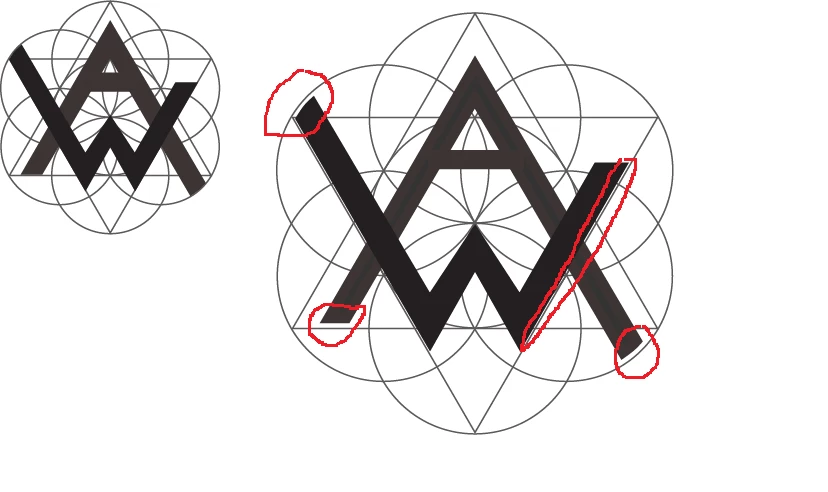
I am trying to scale up this logo. But everytime i do (by dragging bounding box and holding down shift), it seems a few elements do not scale up by the same proportions as other elements. This leaves me with elements having moved out of position/gaps where there were none  (see images below). 


I've tried grouping all elements first, and ungrouping, and ive tried putting all elements on their own layer. None of this worked. Please help.


ps. i know i could rasterise etc but i want to keep it all easily editable 
{Renamed by MOD}
 

This topic has been closed for replies.
Correct answer Srishti Bali

Hi there,


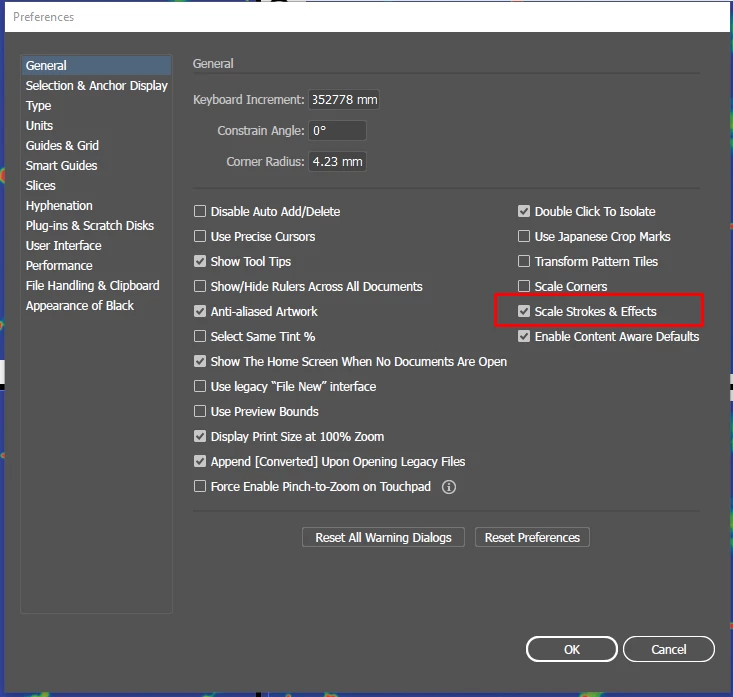
Thanks for reaching out. I agree with the suggestions shared by Ton. Open Illustrator Preferences (Go to Illustrator (MAC)/ Edit (Windows) > Preferences > General) and check Scale Strokes and Effects.


If that doesn't help, will it be possible to share the file with us? If yes, simply upload it to the Creative Cloud and share the download link with us.


Regards,

Srishti

3 replies

Jacob Bugge
Community Expert
Community Expert
January 16, 2020

Molly,


I am afraid the matter is more complicated than it might appear, owing to the nature of the artwork, and that merely ticking Scale Strokes & Effects will fail to solve it.


Obviously, the bar in the A is stroked in contrast to the rest of the A, so you should Object>Path>Outline Stroke before scaling.


Also, the circles are obviously stroked and would become much thicker by scaling up with Scale Strokes & Effects ticked; since (it seems that) you are satisfied with their remaining thin, that would cause a new issue.


I will post my assumptions about the issue and suggestions to solve it in your other thread here (it will be a wee while because of a(nother) urgent matter),


https://community.adobe.com/t5/illustrator/pathfinder-exlude-etc-how-do-i-trim-using-the-edge-of-a-shape/td-p/10855822


Srishti Bali
Community Manager
Srishti BaliCommunity ManagerCorrect answer
Community Manager
January 16, 2020

Hi there,


Thanks for reaching out. I agree with the suggestions shared by Ton. Open Illustrator Preferences (Go to Illustrator (MAC)/ Edit (Windows) > Preferences > General) and check Scale Strokes and Effects.


If that doesn't help, will it be possible to share the file with us? If yes, simply upload it to the Creative Cloud and share the download link with us.


Regards,

Srishti

Milomolly
MilomollyAuthor
Known Participant
January 16, 2020

Legend. this worked. thank you

Ton Frederiks
Community Expert
Community Expert
January 15, 2020

Did you check "Scale Strokes & Effects"?

Milomolly
MilomollyAuthor
Known Participant
January 16, 2020

it worked thank you