
Known Participant
December 3, 2020
Answered

Recolor artwork not working

  • December 3, 2020
  • 3 replies
  • 11908 views

I'm on a very tight deadline and struggling with the new Recolor Artwork window. It was working yesterday.

I am trying to change the white objects in this pattern to light blue. I go through all the steps but it just doesn't happen. The attached screen shot shows the light blue in the round color wheel and no white but the white is still white. I have Saved All Colors and closed the window and they are still white. Any ideas?
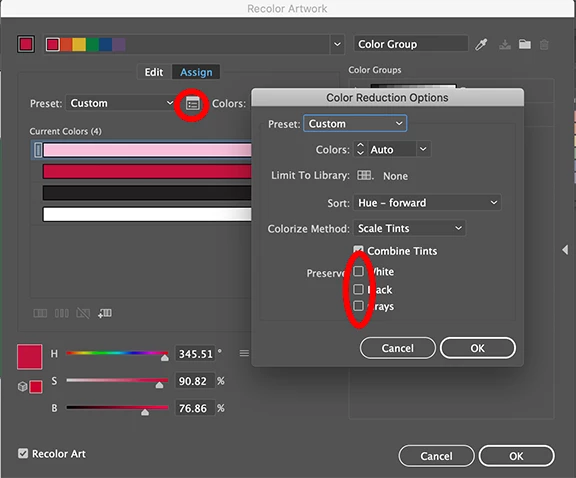
Correct answer michelew83603738

See below

3 replies

Participant
March 27, 2023

Thanks for the solution! This is a very annoying hidden menu

Caroline Stafford
Adobe Employee
Adobe Employee
August 7, 2023

Hi @Howard Liss - I’m Caroline, a Product Marketing Manager at Adobe. 


I'm conducting some research on recoloring assets and think you'd provide some super valuable insights -  would you be interested in a brief interview? We'd also offer a gift card for your time! 


Let me know if you'd like to proceed and can send over a calendly link (or feel free to email me directly at cstafford@adobe.com

Known Participant
December 3, 2020

Hi,

I can’t find the pop up you’re referring to but I’ve been able to change other whites in the artwork through the Recolor Artwork window.

Thanks, Liz


Monika Gause
Community Expert
Community Expert
December 3, 2020

The popup is only in the Extended Recolor artwork dialog. Click on the button to first get there. The setting is then sticky for the remaining Illustrator session.

michelew83603738
Community Expert
Community Expert
December 3, 2020

Next to the Preset there is a pop up, make sure that Preserve White is not checked.