
Inspiring
December 5, 2020
Answered

Removing grey checkered background makes image weirder

  • December 5, 2020
  • 2 replies
  • 2141 views

I downloaded a vector image that came with grey checkered background. normally that means the image will have a transparent background and all i have to do to remove that grey checkered background was to delete that layer. But when I removed that grey checkered layer, it made the image weirder. 


Appreciate all help and inputs. Thank you
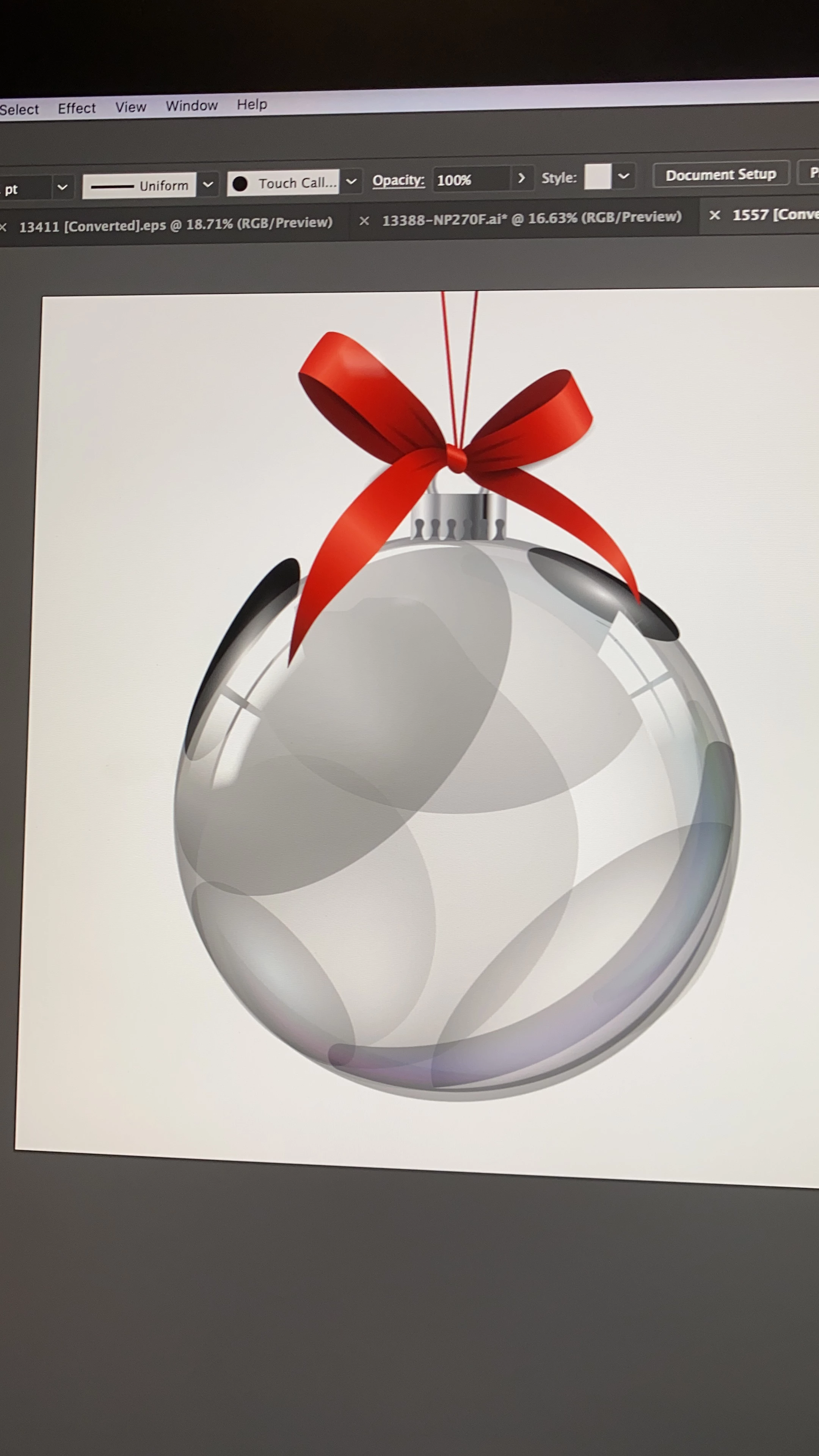


[ attachment inserted as inline image by moderator ]

This topic has been closed for replies.
Correct answer Monika Gause

This is a typical "glowing" clip art image. It will only work with a background image that you place below it inside Illustrator.

See explanation:

https://youtu.be/Tiqm5hdQA5A

2 replies

Monika Gause
Community Expert
Monika GauseCommunity ExpertCorrect answer
Community Expert
December 5, 2020

This is a typical "glowing" clip art image. It will only work with a background image that you place below it inside Illustrator.

See explanation:

https://youtu.be/Tiqm5hdQA5A

pixxxelschubser
Community Expert
Community Expert
December 5, 2020

Hi @Lydia Yee 

is there somewhere in the file a layer or a sublayer with an "checkered background image" or is this the "real" Ilustrator checkered background = Transparency Grid (can toggled on or off with [Ctrl+Shift+D] )


Please:

always embed you own images in this way


and furthermore please give us complete screenshots - artwork with opened Layers Panel

Lydia YeeAuthor
Inspiring
December 6, 2020

Hi @pixxxelschubser  the checkered boxes are not illustrator's transparency grid that can be toggled off. it is in the layer itself. Attached is the whole screenshot along with a close up of the layer and a shot of the checkered layer being toggled off: 

the lowest group is the checkered layer


checkered boxes in a layer of its own.


when toggled off: 

image does not have a glass ball effect anymore


@Monika Gause 's video was extremely helpful in explaining the issue and offered some fixes. but the fix only applied to illustrator projects. what i want to do is to extract the glass image and put it on top of a video (ex premier pro) so that the video looks like it is in a glass ball. so my intention was to first export this as a transparent png. but without the checkered layer, it does not look like a glass at all


Thank you for your input and help. 

Monika Gause
Community Expert
Community Expert
December 6, 2020

"my intention was to first export this as a transparent png"


As I said: this won't work. The file is not built in a way to support that.