
jjjnyt
Inspiring
August 23, 2017
Answered

Renaming artboards

  • August 23, 2017
  • 3 replies
  • 14647 views

When you double-click an artboard name in the artboard palette, the screen zooms to fit that artboard on screen.

How do you stop the zoom from happening?

***The reason I don't desire this functionality is that during the naming process I need to see other artboards and objects on screen
This topic has been closed for replies.
Correct answer JonathanArias

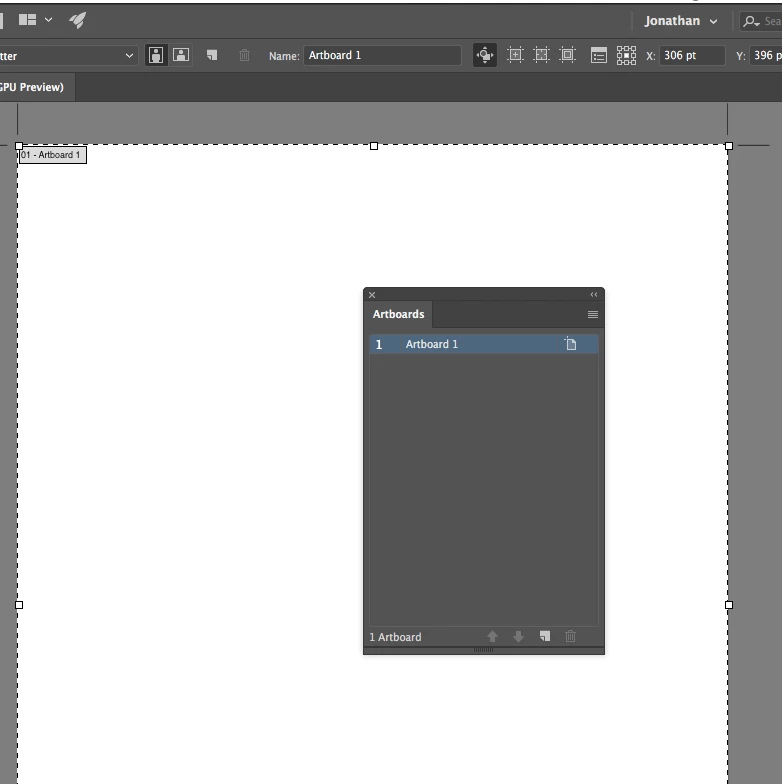
if you use the artboard tool,  on the arboard you are on. on the top you will see the space to rename the artboard. look at my screenshot below. it says "name: black space for you to type"

3 replies

Kurt Gold
Community Expert
Community Expert
August 23, 2017

In the Artboard palette there are three columns. The third column contains icons that look like a wheezing pig (in CC 2017; if you are using a different version it may not look like that).

If you single-click the pig, the Artboard Options dialog appears focussed on the Name field, so you can immediately change the name. Without changing the actual Zoom level. Would that be a good way?

Mike_Gondek10189183
Community Expert
Community Expert
August 23, 2017

Switch to the artboard tool, and rename the file in the control frame up on top.

JonathanArias
JonathanAriasCorrect answer
Legend
August 23, 2017

if you use the artboard tool,  on the arboard you are on. on the top you will see the space to rename the artboard. look at my screenshot below. it says "name: black space for you to type"

jjjnyt
jjjnytAuthor
Inspiring
August 23, 2017

Thanks fellas!

These are all correct but JonathanArias​ was in like Flynn for the win

Mike_Gondek10189183
Community Expert
Community Expert
August 23, 2017

Sorry Jonathan for repeating you answer did not show up until after I posted.