
RIPTHAGOAT.
Participant
November 23, 2019
Question

Resizing Images via Illustrator or Photoshop

  • November 23, 2019
  • 2 replies
  • 1609 views

What's up Community,


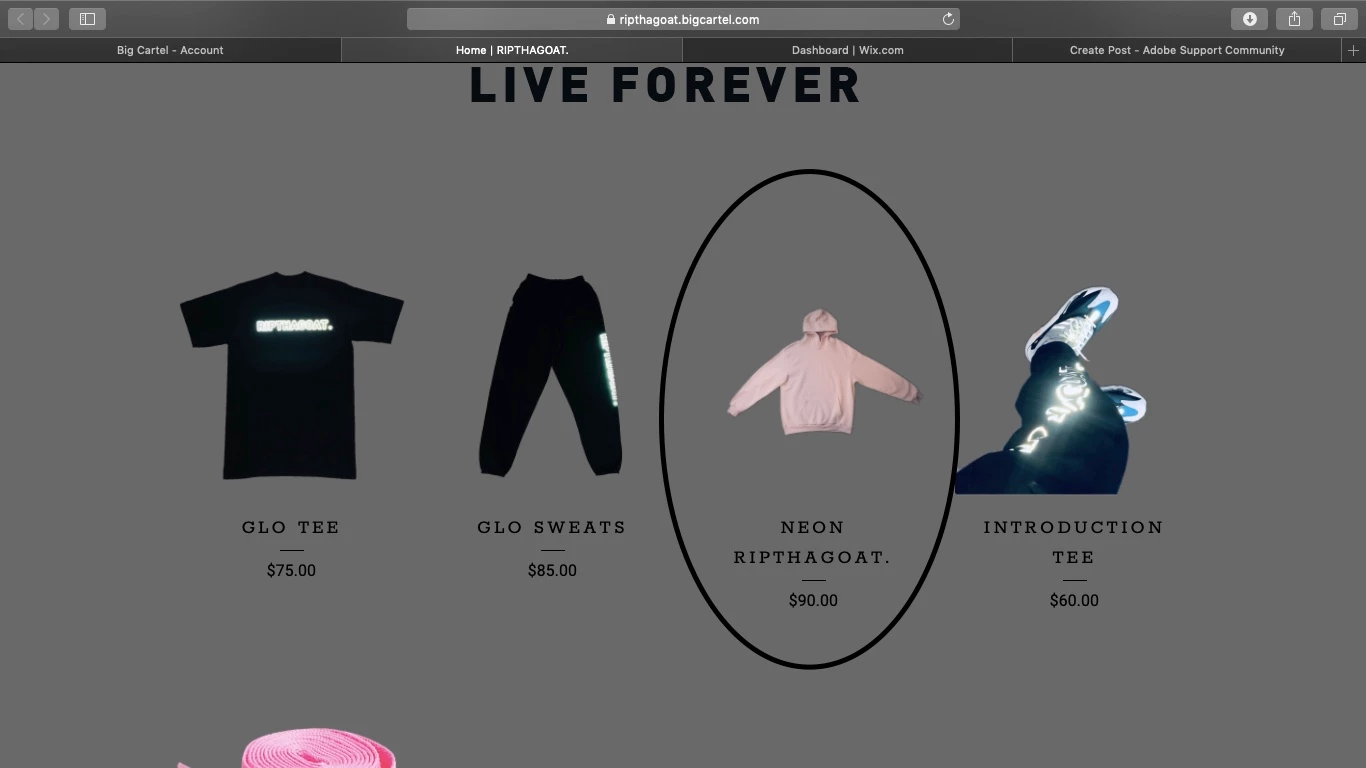
May someone walk me through how to resize images (for website purposes) through illustrator or photoshop? I've tried to chang the dimensions in the Image Size Panel on photoshop, but it doesnt adjust when I put them on the website.  Below I attached a photo of the website, and the Hoodie picture is what I wish to enlarge so it can resemble the size of the other garments. 
This topic has been closed for replies.

2 replies

Inspiring
November 24, 2019

Illustrator?  Are you creating a UI in Illustrator?  Is there a "live" web page currently online?  If there is, you need to find the code or JPG size referenced in the site.  If not, just scale the image in Illustrator using the scale tool.  Ideally, you'd want to size the image(s) in Photoshop ( even if it is just a layout UI ).  Scaling up is more difficult than scaling down.  Make sure your original image has enough resolution for enlargement(s).

Mylenium
Legend
November 24, 2019

Long and short: This may have nothing to do with AI or PS at all. To me it looks like the web site is simply fitting the image horizonatlly into the pre-defined content box, which naturally will make it look small due to the expanded long sleeves determing this. You need to change the parameters of the web skin and/ or use a different presentation approach for the hoodie liek showing it with folded sleeves. Also note that your web server may take a few moments to refresh images and could still be displaying an outdated version from its cache, so that will need checking, too.


Mylenium