Inspiring
October 16, 2012
Answered

Reworking Photoshop layer renaming script for Illustrator

  • October 16, 2012
  • 3 replies
  • 10366 views

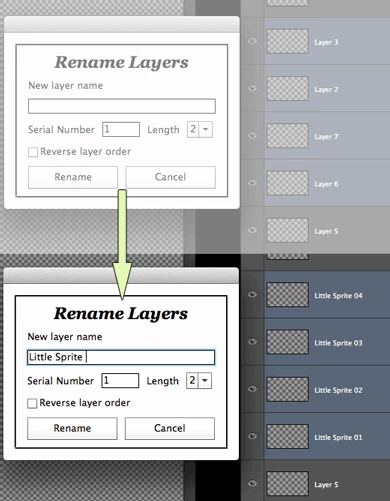
The Photoshop scripting guru Paul R over at RetouchPro has created a really cool script to batch rename and number selected Photoshop layers. I haven't found anything similar on the Illustrator side.

He's given permission for me to post it here in my hopes that some Illustrator scripting genius could come up with a similar script for Illustrator. Would it be terribly difficult to convert this into something Illustrator could use?

http://www.mediafire.com/file/g7usr73u0236p0a/Rename_&_Renumber_Selected_Layers.jsx

http://www.mediafire.com/file/dbah74x13bsa74c/Rename_&_Renumber_Selected_Layers.jsx.zip

This topic has been closed for replies.
Correct answer CarlosCanto

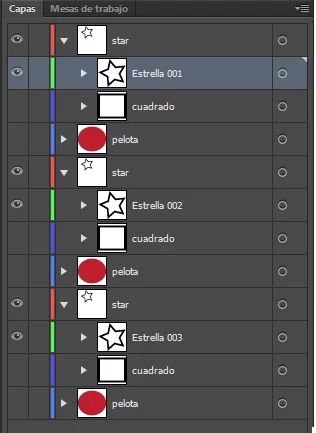
I need rename only visible sublayers, It's possible? thanks carlos

Necesito solo renombrar las subcapas visibles, es eso posible? gracias


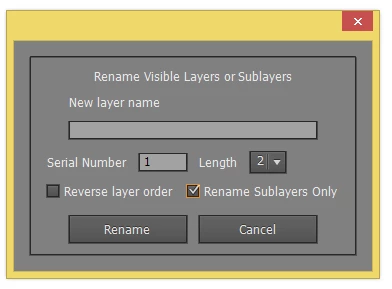
Hola Julio, I updated the script to rename visible Layers or Sublayers, and also fixed the Color

#target illustrator

main();

function main(){

    if(!documents.length) return;

    //var allLayers = app.activeDocument.layers;

    var win = new Window( 'dialog', '' );

    g = win.graphics;

    //  var myBrush = g.newBrush(g.BrushType.SOLID_COLOR, [0.99, 0.99, 0.99, 1]); // CS5

    var myBrush = g.newBrush(g.BrushType.SOLID_COLOR, [0.50, 0.50, 0.50, 1]); // CS6

    g.backgroundColor = myBrush;

    win.orientation='stack';

    win.p1= win.add("panel", undefined, undefined, {borderStyle:"black"});

    win.g1 = win.p1.add('group');

    win.g1.orientation = "row";

    win.title = win.g1.add('statictext',undefined,'Rename Visible Layers or Sublayers');

    win.title.alignment="fill";

    var g = win.title.graphics;

    g.font = ScriptUI.newFont("Georgia","BOLDITALIC",22);

    win.g5 =win.p1.add('group');

    win.g5.orientation = "column";

    win.g5.alignChildren='left';

    win.g5.spacing=10;

    win.g5.st1 = win.g5.add('statictext',undefined,'New layer name');

    win.g5.et1 = win.g5.add('edittext');

    win.g5.et1.preferredSize=[250,20];

    win.g10 =win.p1.add('group');

    win.g10.orientation = "row";

    win.g10.alignment='fill';

    win.g10.spacing=10;

    win.g10.st1 = win.g10.add('statictext',undefined,'Serial Number');

    win.g10.et1 = win.g10.add('edittext',undefined,'1');

    win.g10.et1.preferredSize=[50,20];

    win.g10.et1.onChanging = function() {

      if (this.text.match(/[^\-\.\d]/)) {

        this.text = this.text.replace(/[^\-\.\d]/g, '');

      }

    };

    win.g10.st1 = win.g10.add('statictext',undefined,'Length');

    var nums=[2,3,4,5];

    win.g10.dl1 = win.g10.add('dropdownlist',undefined,nums);

    win.g10.dl1.selection=0;

    win.g15 =win.p1.add('group');

    win.g15.orientation = "row";

    win.g15.alignment='fill';

    win.g15.cb1 = win.g15.add('checkbox',undefined,'Reverse layer order');

    win.g15.cb2 = win.g15.add('checkbox',undefined,'Rename Sublayers Only');

    win.g100 =win.p1.add('group');

    win.g100.orientation = "row";

    win.g100.alignment='center';

    win.g100.spacing=10;

    win.g100.bu1 = win.g100.add('button',undefined,'Rename');

    win.g100.bu1.preferredSize=[120,30];

    win.g100.bu2 = win.g100.add('button',undefined,'Cancel');

    win.g100.bu2.preferredSize=[120,30];

    win.g100.bu1.onClick=function(){

        if(win.g5.et1.text == ''){

            alert("No layer name has been entered!");

            return;

        }

        win.close(0);


        var sublayersOnly = win.g15.cb2.value;

        var visibleLayers = [];

        getVisibleLayers (app.activeDocument, visibleLayers, sublayersOnly);

        if(win.g15.cb1.value) visibleLayers.reverse();

        for(b=0; b<visibleLayers.length; b++){

            var LayerName = win.g5.et1.text + zeroPad((Number(win.g10.et1.text)+Number(b)), Number(win.g10.dl1.selection.text));

            visibleLayers.name = LayerName;

        }

    }

    win.center();

    win.show();


    function getVisibleLayers(container, visibleLayers, sublayersOnly) {

        for(var a=0; a<container.layers.length; a++){

            var ilayer = container.layers;

            if (ilayer.visible) {

                if (sublayersOnly) {

                    getVisibleLayers (ilayer, visibleLayers, false); // false to process only 1 sublayer depth

                }

                else

                visibleLayers.push(ilayer);

            }

        }

    }

}

function zeroPad(n, s) {

    n = n.toString();

    while (n.length < s) n = '0' + n;

    return n;

};

julioc4816867
Known Participant
February 14, 2015

it's possible rename sublayers? thanks, sorry my bad english

CarlosCanto
Community Expert
Community Expert
February 14, 2015

you can write in your language (español?)

it might be possible, show a screen shot of your layers expanded

ananggadipa
Participating Frequently
August 27, 2016

Hola Julio, I updated the script to rename visible Layers or Sublayers, and also fixed the Color

#target illustrator

main();

function main(){

    if(!documents.length) return;

    //var allLayers = app.activeDocument.layers;

    var win = new Window( 'dialog', '' );

    g = win.graphics;

    //  var myBrush = g.newBrush(g.BrushType.SOLID_COLOR, [0.99, 0.99, 0.99, 1]); // CS5

    var myBrush = g.newBrush(g.BrushType.SOLID_COLOR, [0.50, 0.50, 0.50, 1]); // CS6

    g.backgroundColor = myBrush;

    win.orientation='stack';

    win.p1= win.add("panel", undefined, undefined, {borderStyle:"black"});

    win.g1 = win.p1.add('group');

    win.g1.orientation = "row";

    win.title = win.g1.add('statictext',undefined,'Rename Visible Layers or Sublayers');

    win.title.alignment="fill";

    var g = win.title.graphics;

    g.font = ScriptUI.newFont("Georgia","BOLDITALIC",22);

    win.g5 =win.p1.add('group');

    win.g5.orientation = "column";

    win.g5.alignChildren='left';

    win.g5.spacing=10;

    win.g5.st1 = win.g5.add('statictext',undefined,'New layer name');

    win.g5.et1 = win.g5.add('edittext');

    win.g5.et1.preferredSize=[250,20];

    win.g10 =win.p1.add('group');

    win.g10.orientation = "row";

    win.g10.alignment='fill';

    win.g10.spacing=10;

    win.g10.st1 = win.g10.add('statictext',undefined,'Serial Number');

    win.g10.et1 = win.g10.add('edittext',undefined,'1');

    win.g10.et1.preferredSize=[50,20];

    win.g10.et1.onChanging = function() {

      if (this.text.match(/[^\-\.\d]/)) {

        this.text = this.text.replace(/[^\-\.\d]/g, '');

      }

    };

    win.g10.st1 = win.g10.add('statictext',undefined,'Length');

    var nums=[2,3,4,5];

    win.g10.dl1 = win.g10.add('dropdownlist',undefined,nums);

    win.g10.dl1.selection=0;

    win.g15 =win.p1.add('group');

    win.g15.orientation = "row";

    win.g15.alignment='fill';

    win.g15.cb1 = win.g15.add('checkbox',undefined,'Reverse layer order');

    win.g15.cb2 = win.g15.add('checkbox',undefined,'Rename Sublayers Only');

    win.g100 =win.p1.add('group');

    win.g100.orientation = "row";

    win.g100.alignment='center';

    win.g100.spacing=10;

    win.g100.bu1 = win.g100.add('button',undefined,'Rename');

    win.g100.bu1.preferredSize=[120,30];

    win.g100.bu2 = win.g100.add('button',undefined,'Cancel');

    win.g100.bu2.preferredSize=[120,30];

    win.g100.bu1.onClick=function(){

        if(win.g5.et1.text == ''){

            alert("No layer name has been entered!");

            return;

        }

        win.close(0);


        var sublayersOnly = win.g15.cb2.value;

        var visibleLayers = [];

        getVisibleLayers (app.activeDocument, visibleLayers, sublayersOnly);

        if(win.g15.cb1.value) visibleLayers.reverse();

        for(b=0; b<visibleLayers.length; b++){

            var LayerName = win.g5.et1.text + zeroPad((Number(win.g10.et1.text)+Number(b)), Number(win.g10.dl1.selection.text));

            visibleLayers.name = LayerName;

        }

    }

    win.center();

    win.show();


    function getVisibleLayers(container, visibleLayers, sublayersOnly) {

        for(var a=0; a<container.layers.length; a++){

            var ilayer = container.layers;

            if (ilayer.visible) {

                if (sublayersOnly) {

                    getVisibleLayers (ilayer, visibleLayers, false); // false to process only 1 sublayer depth

                }

                else

                visibleLayers.push(ilayer);

            }

        }

    }

}

function zeroPad(n, s) {

    n = n.toString();

    while (n.length < s) n = '0' + n;

    return n;

};

Great script, instead of visible layer could it set for layer with object selected?

Btw update color for CC 2015:

var myBrush = g.newBrush(g.BrushType.SOLID_COLOR, [0.28, 0.28, 0.28, 1]);

CarlosCanto
Community Expert
Community Expert
October 16, 2012

it seems posible, we can't tell if more than one layer is active, but there are work arounds like in the thread posted above.

but yeah, it seems very doable.

CarlosCanto
Community Expert
Community Expert
October 17, 2012

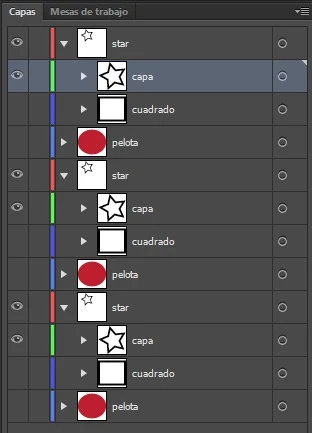
here you go, as I said, there's no access to "active layers" in illustrator, so we have to resort to workarounds. In this case the script will change the "visible" layers, hide layers you want to keep unchanged.

#target illustrator

main();

function main(){

    if(!documents.length) return;

    var allLayers = app.activeDocument.layers;

    var win = new Window( 'dialog', '' );

    g = win.graphics;

    var myBrush = g.newBrush(g.BrushType.SOLID_COLOR, [0.99, 0.99, 0.99, 1]);

    g.backgroundColor = myBrush;

    win.orientation='stack';

    win.p1= win.add("panel", undefined, undefined, {borderStyle:"black"});

    win.g1 = win.p1.add('group');

    win.g1.orientation = "row";

    win.title = win.g1.add('statictext',undefined,'Rename Layers');

    win.title.alignment="fill";

    var g = win.title.graphics;

    g.font = ScriptUI.newFont("Georgia","BOLDITALIC",22);

    win.g5 =win.p1.add('group');

    win.g5.orientation = "column";

    win.g5.alignChildren='left';

    win.g5.spacing=10;

    win.g5.st1 = win.g5.add('statictext',undefined,'New layer name');

    win.g5.et1 = win.g5.add('edittext');

    win.g5.et1.preferredSize=[250,20];

    win.g10 =win.p1.add('group');

    win.g10.orientation = "row";

    win.g10.alignment='fill';

    win.g10.spacing=10;

    win.g10.st1 = win.g10.add('statictext',undefined,'Serial Number');

    win.g10.et1 = win.g10.add('edittext',undefined,'1');

    win.g10.et1.preferredSize=[50,20];

    win.g10.et1.onChanging = function() {

      if (this.text.match(/[^\-\.\d]/)) {

        this.text = this.text.replace(/[^\-\.\d]/g, '');

      }

    };

    win.g10.st1 = win.g10.add('statictext',undefined,'Length');

    var nums=[2,3,4,5];

    win.g10.dl1 = win.g10.add('dropdownlist',undefined,nums);

    win.g10.dl1.selection=0;

    win.g15 =win.p1.add('group');

    win.g15.orientation = "row";

    win.g15.alignment='fill';

    win.g15.cb1 = win.g15.add('checkbox',undefined,'Reverse layer order');

    win.g100 =win.p1.add('group');

    win.g100.orientation = "row";

    win.g100.alignment='center';

    win.g100.spacing=10;

    win.g100.bu1 = win.g100.add('button',undefined,'Rename');

    win.g100.bu1.preferredSize=[120,30];

    win.g100.bu2 = win.g100.add('button',undefined,'Cancel');

    win.g100.bu2.preferredSize=[120,30];

    win.g100.bu1.onClick=function(){

        if(win.g5.et1.text == ''){

            alert("No layer name has been entered!");

            return;

        }

        win.close(0);

        var visibleLayers = [];

        for(a=0; a<allLayers.length; a++){

            var ilayer = allLayers;

            if (ilayer.visible) {

                visibleLayers.push(ilayer);

            }

        }

        if(win.g15.cb1.value) visibleLayers.reverse();

        for(b=0; b<visibleLayers.length; b++){

            var LayerName = win.g5.et1.text + zeroPad((Number(win.g10.et1.text)+Number(b)), Number(win.g10.dl1.selection.text));

            visibleLayers.name = LayerName;

        }

    }

    win.center();

    win.show();

}

function zeroPad(n, s) {

    n = n.toString();

    while (n.length < s) n = '0' + n;

    return n;

};
Inspiring
October 17, 2012

Nice conversion CarlosCanto.

Inspiring
October 16, 2012

I didn't look at the script you provided, but this thread with code should be helpful as a starting point, by Muppet Mark, Jongware, Larry, etc:

http://forums.adobe.com/message/2639824

You could always add a prompt, or script a UI window, otherwise it seems to have everything (based on the screen grab you posted) to get going. Hope it's helpful.