
Inspiring
May 21, 2019
Question

Rocket seems to be missing

  • May 21, 2019
  • 2 replies
  • 1678 views

I've been following along with a tutorial that state i should have a rocket in the control bar indicating if I am using my graphics prosseor. It doesnt seem to be there. This is all I have.
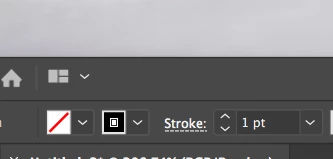
Did something change in AI cc 2019?

    This topic has been closed for replies.

    2 replies

    italosan
    Community Expert
    Community Expert
    May 21, 2019

    Hi, go in Preferences, subsequently in, Performance and GPU Performance.

    COGordonWAuthor
    Inspiring
    May 21, 2019

    It also appears my adobe stock icon and the bridge icon are missing from the same area

    Monika Gause
    Community Expert
    Community Expert
    May 21, 2019

    Things have been moved around quite a lot.

    Instead of clicking the rocket, go to Preferences > GPU-Acceleration (might be named differently, I have a German version). Just click through all those Preferences panels until you get to the one that has GPU options in it.

    You can get to Adobe Stock via the Creative Cloud App.

    tromboniator
    Community Expert
    Community Expert
    May 21, 2019

    Preferences > Performance > GPU Performance