LRockweiler
Participant
November 28, 2018
Answered

Same Pantone swatch showing as two completely different colors.

  • November 28, 2018
  • 2 replies
  • 3792 views

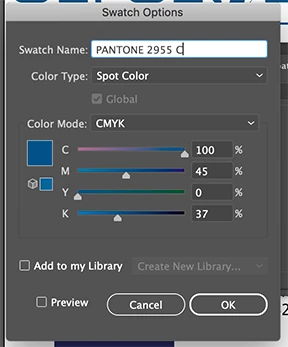
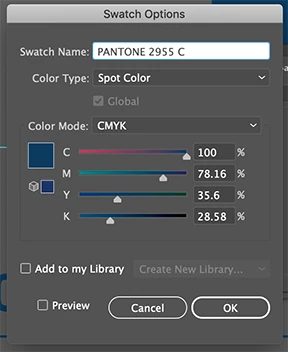
I have two open files and I am using the same logo in each but the Pantone is coming over as two different shades. I am NOT talking visually on the screen I am saying it is two different colors. When I open the color box the CMYK for each is completely different yet it is both the same Pantone. Secondly if I copy and past from one file to the other it converts it to the "shade"for that file. Any clue on what is wrong? I did not create these logo files the previous designer did and I can not figure out what they did to create this issue.
    This topic has been closed for replies.
    Correct answer Mike Sofa

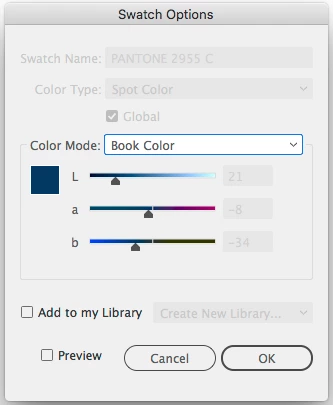
    Your Swatch Options for Pantone 2955 C (from Swatch Library: Color Books: PANTONE+ Coated) should look like this:

    What you have is 2 different CMYK colors that are both named "PANTONE 2955 C."

    2 replies

    Mike SofaCorrect answer
    Inspiring
    November 28, 2018

    Your Swatch Options for Pantone 2955 C (from Swatch Library: Color Books: PANTONE+ Coated) should look like this:

    What you have is 2 different CMYK colors that are both named "PANTONE 2955 C."

    ryan_edwards
    Inspiring
    November 28, 2018

    possibly the color space/profile for each document is a little different... and thats why it globally changes it once you 'paste' into the other document/file

    LRockweiler
    Participant
    November 28, 2018

    Thank you, where do I go to check that setting?

    LRockweiler
    Participant
    November 28, 2018

    ...arg, ignore the photoshop link sorry


    Great thank you, they are two different profiles. I'll see if matching them helps the issue. Thank you for your help.