

sensibleworld
Participating Frequently
March 7, 2014
Answered

Script to Rename Artboards with Layer Names

  • March 7, 2014
  • 6 replies
  • 13721 views

I'm looking to create a script to batch rename a number of artboards.

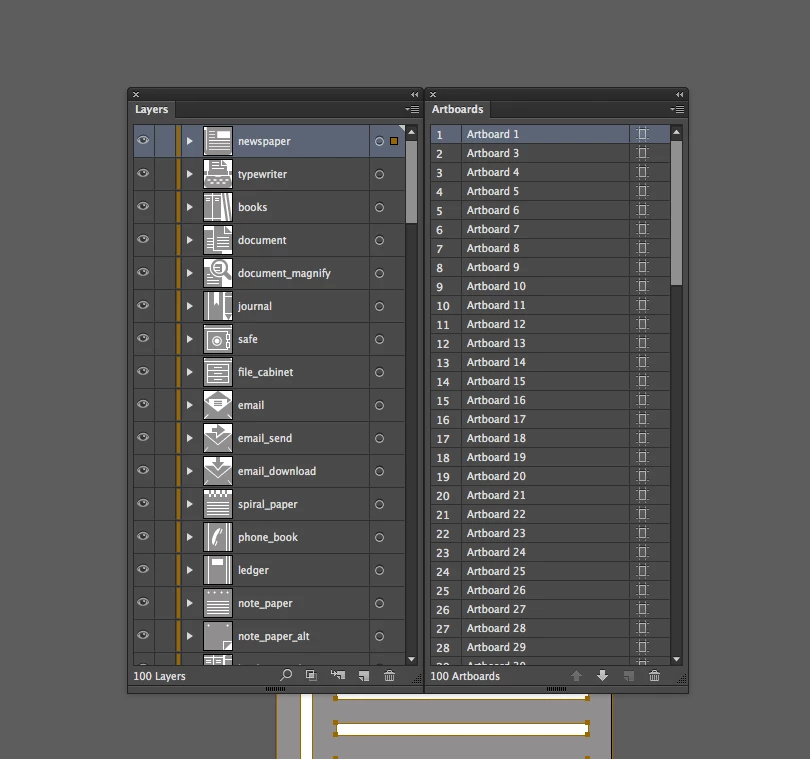
- I have 100 named layers.

- I have 100 artboards.

- I would like to rename the artboards to match the layer names.

- The layers are organized in the same descending orderas the artboards (ignoring the actual artboard names*).

- The topmost artboard (1 in the list) would be renamed "newspaper", the second artboard would be renamed "typewriter", the third artboard would be renamed "books", etc.

*in the example below the artboard named "Artboard 7" is actually the 6th artboard in list.
Any help would be wonderful.

This topic has been closed for replies.
Correct answer W_J_T

Hi sensibleworld, welcome to the forum.


For your case it should be pretty straight forward. The following little script snippet will rename the artboards to match the corresponding layer names as you described in your first post above. It only works if the number of layers and artboards match as shown and talked about in your above description of requirements.


if (app.documents.length == 0) {

    alert("No Open / Active Document Found");

} else {

    var doc = app.activeDocument;

    if (doc.artboards.length == doc.layers.length && doc.layers.length == doc.artboards.length) {

        for (var i = 0, l = doc.artboards.length; i < l; i++) {

            var ab = doc.artboards[i];

            ab.name = doc.layers[i].name;

        }

        alert("Finished:\nRenaming of Artboards to match Layer names is complete");

    } else {

        alert("Opps: This wont work!\n The number of Layers and Artboards do not match");

    }

}


I hope it proves useful to your efforts and requirements. Again welcome to the forum.

6 replies

CarlosCanto
Community Expert
Community Expert
March 20, 2021

Hi shawn, try copying the script again. I just fixed the bug. It wasn't the author's bug just to clarify, it was the forum migration that messed scripts up.

Participant
March 20, 2021

Booyah!!! works like a charm. made my weekend. thanks!

Participant
March 19, 2021

Stumbled across this script and its exactly what i need but doesnt seem to work in CC2020. I get an error saying doc.layers.name; can not be found. has anyone been able to get this to work in CC2020. its been a while since a post in this thread.


screenshot attached.


any help would be appreciated.


Disposition_Dev
Legend
March 20, 2021

"layers" is a collection of items, so when you want to access one, you have to pass in an index or a name.


In the error message you posted, it says that you're trying to access the value of "doc.layers.name". the layers collection doesn't have a name which is why you're getting the error. But besides, you don't want to be changing that anyway. you want to change the individual layers.


you can access a specific layer by zero based index, like so:

ab.name = doc.layers[0].name; //this would name the artboard based on the first layer in the document

ab.name = doc.layers[5].name; //this would name the artboard based on the SIXTH layer in the document


Or you can access a specific layer by name, like so:

ab.name = doc.layers["My Layer Name"].name;


long story short, when you're processing a collection of any kind (layers, groups, artboards, pageItems, textFrameItems, or arrays/objects that you yourself have created), you need to make sure you're referencing specific items of the collection rather than the whole collection by itself.

jeremyt32779971
Participant
August 21, 2018

Thank you !

Is that usable in Photoshop as well?

Disposition_Dev
Legend
August 21, 2018

i'm not sure, but i would guess that it is not. at least in it's current state.

i've never done much scripting for photoshop, but i don't believe that "artboards" is a property of the photoshop document object. so for that reason alone, it would probably fail.

Silly-V
Legend
August 21, 2018

In Ps the artboards are really funky - more of a repurposing of the layers mechanism. There are some scripts which come with Ps for artboard manipulation, they may be worth a look. Without having checked those out though, here's some findings:

#target photoshop

function test(){

    var doc = app.activeDocument;

    alert(doc.layers.length); // 2


    var thisLayer;

    for(var i = 0; i < doc.layers.length; i++){

        thisLayer = doc.layers;

    }

    // first was [LayerSet Artboard 1]

    // 2nd was [ArtLayer Layer 2]

}

test();

So we can tell that the artboard is a layer set. However, so is a simple "group" of layers. If someone were to name their artboard "Group 1" then there's barely any difference as far as the code is concerned except that a group's default blend mode is blendMode.PASSTHROUGH and an artboard's is blendMode.NORMAL. And still it's possible for users to set all of those all different ways.

But for basic needs going through layersets and checking names of contained artLayers could be possible.

sravanp34392559
Participant
August 10, 2017

Hi,

My requirement is the same, but instead of layers it is the Layer Comps.

I'd like to give the Layer Comp names(PS) to the Art boards in Illustrator CC

Could someone please help with this! Thanks

W_J_TCorrect answer
Inspiring
March 7, 2014

Hi sensibleworld, welcome to the forum.


For your case it should be pretty straight forward. The following little script snippet will rename the artboards to match the corresponding layer names as you described in your first post above. It only works if the number of layers and artboards match as shown and talked about in your above description of requirements.


if (app.documents.length == 0) {

    alert("No Open / Active Document Found");

} else {

    var doc = app.activeDocument;

    if (doc.artboards.length == doc.layers.length && doc.layers.length == doc.artboards.length) {

        for (var i = 0, l = doc.artboards.length; i < l; i++) {

            var ab = doc.artboards[i];

            ab.name = doc.layers[i].name;

        }

        alert("Finished:\nRenaming of Artboards to match Layer names is complete");

    } else {

        alert("Opps: This wont work!\n The number of Layers and Artboards do not match");

    }

}


I hope it proves useful to your efforts and requirements. Again welcome to the forum.

sensibleworld
Participating Frequently
March 7, 2014

Worked like a charm! Thank you, thank you, thank you.

Inspiring
March 7, 2014

You're welcome, glad it helped.

Hopefully it might be useful to someone else down the road as well with a similar situation.

Oops, I spelled oops (opps) wrong in my script 

ThinkingThings
Inspiring
March 7, 2014

That's neat. What do you have so far in the way of a script or what questions/problems are you encountering?

sensibleworld
Participating Frequently
March 7, 2014

To be honest, I'm completely new to scripting (much more of a designer than a developer), and am hoping to either be pointed to a script that does something similar that I could fiddle with, or to have someone help me create it.

It was suggested that I should pose the question here (even though asking for someone to create the script for me is frowned upon). So, apologies for that