


- Home
- Illustrator
- Discussions
- Script to Sort Artboard List Alphabetically
- Script to Sort Artboard List Alphabetically

Copy link to clipboard
Copied
I'm on the lookout for a simple script to sort an Illustrator artboard list alphabetically. (I don't need the artboards themselves rearranged on the canvas, just the order of the artboards in the list.)
In the example (image) below, the artboard list reads:
1. life-ring
2. wheelchair-alt
3. wheelchair
4. information
...
30. blind-walking
The desired result would be for the artboard list itself to be sorted to read:
1. assistive-listening
2. assistive-listening-telecoil
3. blind-walking
4. braille
...
30. wheelchair-alt
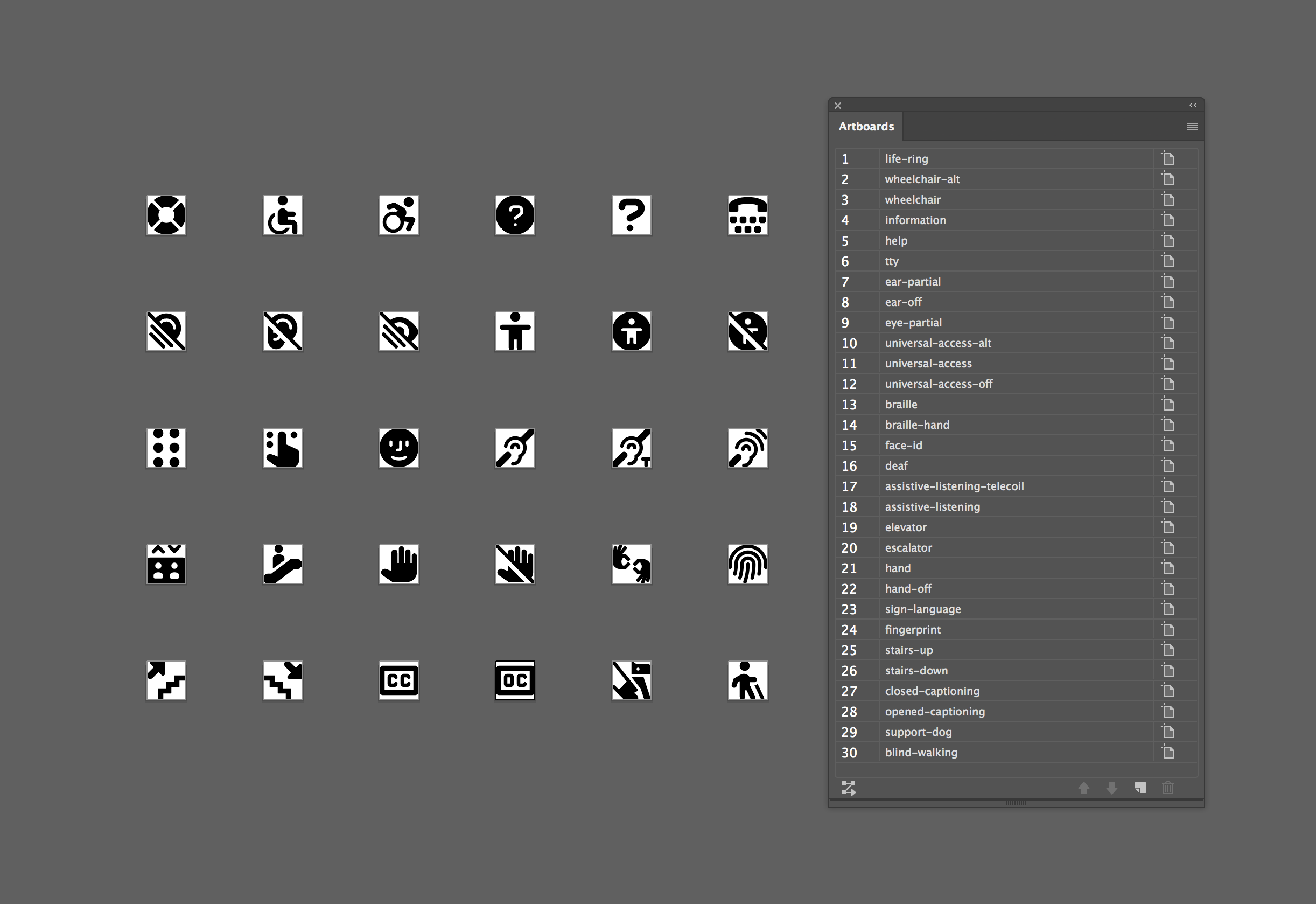
I've scoured the forums for solutions to this. The closest I could find is here: Sort artboards by name, but it doesn't seem to work in Illustrator CC. Also found this (How to sort objects alphabetically (inside of a layer)?), but it is layer-specific, not artboard.
Thanks so much for any help!


 3 Correct answers

Hi,
Artboard object probably has no method for sorting.
Since it does not generate an Artboard object, it may run lightly.
This try it.
...function sortArtboard() {
var doc = app.activeDocument,
properties = [],
i,
max;
function copyProperties(source) {
var props = {},
key;
for (key in source) {
try {
props[key] = source[key];
} catch (e) {
}
}
return props;
}
function pasteProperties



Hi majliniok, transitioning to the new forums ruined all scripts.
Here's the original script posted by OMOTI
function sortArtboard() {
    var doc = app.activeDocument,
        properties = [],
        i,
        max;

    function copyProperties(source) {
        var props = {},
            key;
        for (key in source) {
            try {
                props[key] = source[key];
            } catch (e) {
            }
        }
        return props;
} 
Never mind. It did alphabetize the artboards, it just didn't rearrange them. I forgot that I did that myself last week (using the Rearrange All artboard tool) so I thought it wasn't working at first. All good!

Explore related tutorials & articles
 15
Replies
15
15
Replies
15

Copy link to clipboard
Copied
Hi,
Artboard object probably has no method for sorting.
Since it does not generate an Artboard object, it may run lightly.
This try it.
function sortArtboard() {
var doc = app.activeDocument,
properties = [],
i,
max;
function copyProperties(source) {
var props = {},
key;
for (key in source) {
try {
props[key] = source[key];
} catch (e) {
}
}
return props;
}
function pasteProperties(source, destination) {
var key;
for (key in source) {
destination[key] = source[key];
}
}
function compareName(a, b) {
var comparison = 0;
if (a.name > b.name) {
comparison = 1;
} else if (a.name < b.name) {
comparison = -1;
}
return comparison;
}
for (i = 0, max = doc.artboards.length; i < max; i += 1) {
properties.push(copyProperties(doc.artboards));
}
properties.sort(compareName);
for (i = 0, max = doc.artboards.length; i < max; i += 1) {
pasteProperties(properties, doc.artboards);
}
}
sortArtboard();
Copy link to clipboard
Copied
Awesome! That worked exactly as I needed it to. Thank you so much!

Copy link to clipboard
Copied
Sorry can you help me? I tried this script but it doesnt work. I'm using Illustrator cc.
Copy link to clipboard
Copied
Did you receive an error message when an error occurred?
Which is your "Illustrator cc" CC or CC2018?
It worked with the following versions in my environment. I have not installed CC.
- Illustrator CS6
- Illustrator CC 2017
- Illustrator CC(2018)
Copy link to clipboard
Copied
Thank you! I solved it. Needed to save the script as .js insteD of .jsx. Thank you again.
Von meinem iPhone gesendet
Am 27.07.2018 um 18:37 schrieb OMOTI <forums_noreply@adobe.com>:
Script to Sort Artboard List Alphabetically
created by OMOTI in Illustrator Scripting - View the full discussion
Did you receive an error message when an error occurred?
Which is your "Illustrator cc" CC or CC2018?
It worked with the following versions in my environment. I have not installed CC.
Illustrator CS6
Illustrator CC 2017
Illustrator CC(2018)
If the reply above answers your question, please take a moment to mark this answer as correct by visiting: https://forums.adobe.com/message/10527623#10527623 and clicking ‘Correct’ below the answer
Replies to this message go to everyone subscribed to this thread, not directly to the person who posted the message. To post a reply, either reply to this email or visit the message page:
Please note that the Adobe Forums do not accept email attachments. If you want to embed an image in your message please visit the thread in the forum and click the camera icon: https://forums.adobe.com/message/10527623#10527623
To unsubscribe from this thread, please visit the message page at , click "Following" at the top right, & "Stop Following"
Start a new discussion in Illustrator Scripting by email or at Adobe Community
For more information about maintaining your forum email notifications please go to https://forums.adobe.com/thread/1516624.
This email was sent by Adobe Community because you are a registered user.
You may unsubscribe instantly from Adobe Community, or adjust email frequency in your email preferences

Copy link to clipboard
Copied
Hello
I'm using Illustrator 2020 and while running the script, I'm getting the error "Error:7 Language feature '0' is not supported. Line: 20 destination[key] = source[key];"
Any volonteer to help with this ? I'm not sure if I'm doing something wrong or there is some "new feature" in 2020 version.
Copy link to clipboard
Copied
Hi majliniok, transitioning to the new forums ruined all scripts.
Here's the original script posted by OMOTI
function sortArtboard() {
    var doc = app.activeDocument,
        properties = [],
        i,
        max;

    function copyProperties(source) {
        var props = {},
            key;
        for (key in source) {
            try {
                props[key] = source[key];
            } catch (e) {
            }
        }
        return props;
    }

    function pasteProperties(source, destination) {
        var key;
        for (key in source) {
            destination[key] = source[key];
        }
    }

    function compareName(a, b) {
        var comparison = 0;
        if (a.name > b.name) {
            comparison = 1;
        } else if (a.name < b.name) {
            comparison = -1;
        }
        return comparison;
    }

    for (i = 0, max = doc.artboards.length; i < max; i += 1) {
        properties.push(copyProperties(doc.artboards[i]));
    }

    properties.sort(compareName);

    for (i = 0, max = doc.artboards.length; i < max; i += 1) {
        pasteProperties(properties[i], doc.artboards[i]);
    }

}

sortArtboard(); Copy link to clipboard
Copied
Thank You ! Now working great 🙂

Copy link to clipboard
Copied
is there is any script for reordering artboards by their position?
Copy link to clipboard
Copied
can you elaborate? screenshots would be helpful

Copy link to clipboard
Copied
Hello
I'm using CC2023 and I can't get this to work. I'm just getting a blank modal/dialogue box.
I copied it into Script Editor and exported it as javascript but no joy. Any suggestions?
Thanks
Rob
Copy link to clipboard
Copied
copy the script from here, paste it into a text editor, save it as PLAIN TEXT (not RICH TEXT), save it with a jsx extension.

Copy link to clipboard
Copied
Great it also work prefectly, is there also a Methode to Reorder only one selectet artboard. Not via DragAndDrop (i have over 600 Artboards in the document and by Hand needs a lot of time), so its possible to reorder the ArtboardNumber by script? So- Selectet Artboard is now number 522 and change to number 33? i found nothing about that.
Copy link to clipboard
Copied
Thanks for this. I saved this script as a plain text .js using TextEdit and ran this on a file last week and it worked. Now when I try to run it on the same base file, nothing happens. With the AI file open, I'm going to File › Scripts › Other Scripts... and navigating to the .js and pressing the OPEN button. Nothing happens. I tried restarting illustrator and it didn't help. I tried changing the file extension to .jsx; no difference. Any tips?
Copy link to clipboard
Copied
Never mind. It did alphabetize the artboards, it just didn't rearrange them. I forgot that I did that myself last week (using the Rearrange All artboard tool) so I thought it wasn't working at first. All good!


Get ready! An upgraded Adobe Community experience is coming in January.
Learn more
 AdChoices