


- Home
- Illustrator
- Discussions
- Re: Select the strings that uses a specific font
- Re: Select the strings that uses a specific font
Select the strings that uses a specific font

Copy link to clipboard
Copied
I have not found a solution for aligning strings for specific font
I searched for information on Google. Some people said that I can use a script to solve it. I haven't used it yet. Any suggestions are welcome.
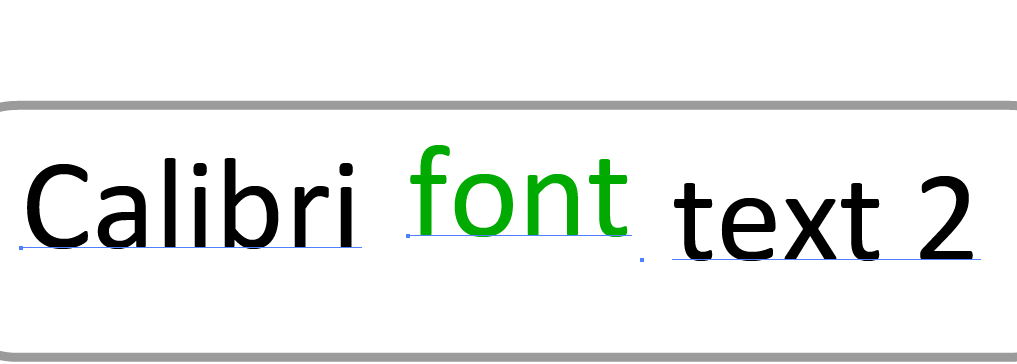
In my file, there are two font strings, I need to select them separately then align them.
E.g:
- Select the strings that use the calibri font
- Align bottoms
- Move the strings right 3 pixels
4.Select the strings that use Arial fonts
- Align bottoms
- Move the strings down 3 pixels
Please see the picture below




Explore related tutorials & articles
 17
Replies
17
17
Replies
17


Copy link to clipboard
Copied
L'image n'est pas significative,
Trois textes ou un seul texte ??

Copy link to clipboard
Copied

Copy link to clipboard
Copied
you can using this script:
var doc=app.activeDocument;
var targetfont=doc.selection.characterAttributes.textFont.name;
var targetalign=doc.selection.characterAttributes.alignment;
for (var i=0;i<doc.textFrames.length;i++)
{
for(var j=0;j<doc.textFrames.characters.length;j++)
{
if(doc.textFrames.characters
doc.textFrames.characters
}
}
Copy link to clipboard
Copied
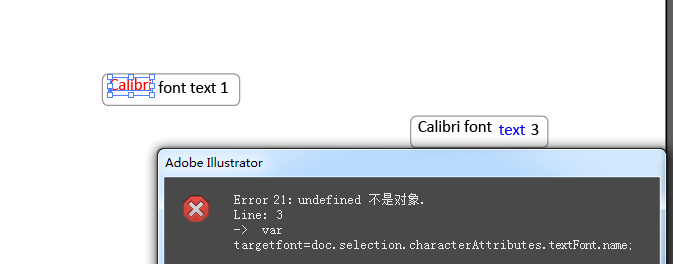
Hello, thank you for your reply, can't run successfully, prompt the following error
Error 1220: Illegal Argument
Line: 3
-> var targetfont=doc.selection.characterAttributes.textFont.name;
Copy link to clipboard
Copied
You must select a character before excute script.
Copy link to clipboard
Copied
I have already selected, please see the picture below
Sample file link:
https://yadi.sk/i/cAqAOqfr7fa5TQ
Copy link to clipboard
Copied
This script will set alignment of character you selected to characters have font name the same.
Copy link to clipboard
Copied
I tried it many times and still can't succeed. 
Copy link to clipboard
Copied
Please select character (Text), not select textframe.
Copy link to clipboard
Copied
There are no more error tips this time, but there is no alignment effect.
Copy link to clipboard
Copied
This script only set to font you selected, if you want set other font, you must select next font and run script.
Ex: if data have 2 font: you must select 2 that fonts and run 2 times.
Copy link to clipboard
Copied
No effect, the version I am using is cs6
Copy link to clipboard
Copied
you can up file sample.
Copy link to clipboard
Copied
I didn't find the button to upload the attachment, I uploaded it to the network drive.
Sample file link:
Copy link to clipboard
Copied
Hi, i think you must 2 scipt to up or down text.
1 . move up 3px:
var doc=app.activeDocument;
var targetfont=doc.selection.characterAttributes.textFont.name;
for (var i=0;i<doc.textFrames.length;i++)
{
for(var j=0;j<doc.textFrames.characters.length;j++)
{
if(doc.textFrames.characters
{
doc.textFrames.characters
doc.textFrames.characters
}
}
}
2. move down 3 px:
var doc=app.activeDocument;
var targetfont=doc.selection.characterAttributes.textFont.name;
for (var i=0;i<doc.textFrames.length;i++)
{
for(var j=0;j<doc.textFrames.characters.length;j++)
{
if(doc.textFrames.characters
{
doc.textFrames.characters
doc.textFrames.characters
}
}
}
Copy link to clipboard
Copied
The problem of moving strings has been resolved
At present, only the problem of aligning strings is not solved. I hope someone can provide some solutions. Thank you very much.
Copy link to clipboard
Copied
The strings in each box are independent, please see the image below


Get ready! An upgraded Adobe Community experience is coming in January.
Learn more
 AdChoices