
Participant
January 8, 2021
Answered

spherical dome with holes (based on the attached image)

  • January 8, 2021
  • 1 reply
  • 537 views

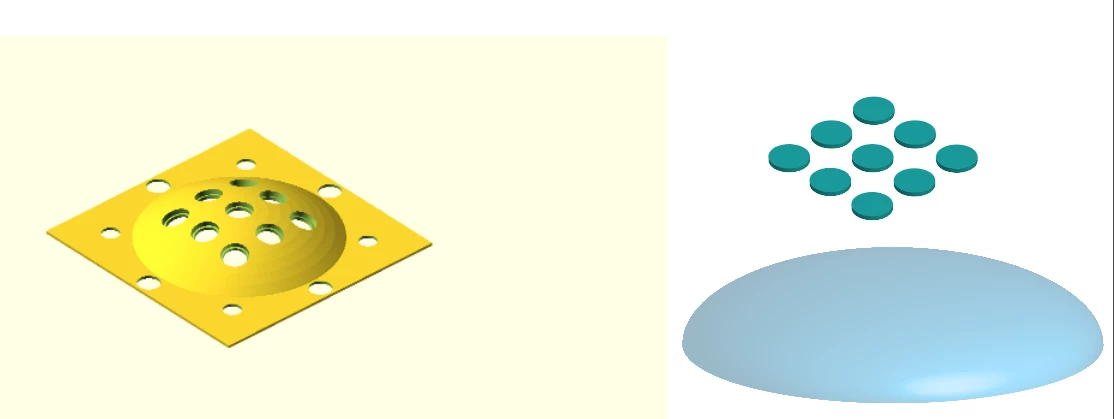
I have an image from a CAD design I made and want to replicate (on the left). I tried to recreate the image with some sort of combination of a 3D hemisphere and some holes in AI (on the right). I tried making a 3D hemisphere and using "map art" to map the holes, but never achieved the desired result. I also tried using warp -> fisheye, but that distorts the circles themselves. Ideally I would like to map something onto a spherical/curved surface. Any tips how I could do that? Thanks


This topic has been closed for replies.
Correct answer Monika Gause

Just how to cut holes at desired positions based on a pattern (9 equidistantly displaced holes). The image is an example, I just wanted to cut holes through the half-dome which I made. I will try the pen tool suggestion, thanks.


Perhaps dive into technical illustration?

http://www.automotiveillustrations.com/tutorials/drawing-tutorials.html

1 reply

Monika Gause
Community Expert
Community Expert
January 8, 2021

Illustrator maps art on surfaces using the Mercator projection.

If you want to drill the holes through an already curved surface, you will need to build it based on the 3D modeling as a template.

Vaiva5E1DAuthor
Participant
January 8, 2021

Thank you. I understand that I will need to build it based on the 3D model as a template (which is what I was trying to do). And I understand that Mercator projection distorts the holes hence it doesn't achieve the desired result. Would you happen to have any pointers? I seem to have exhausted my options. Thanks.

Monika Gause
Community Expert
Community Expert
January 8, 2021

What kind of pointers are you thinking of?

If you need to have an exact version, then probably you need to use a CAD application.

Other than that: trace the ellipses with the pen tool or use the shear tool on each single one.