


stdout?

Copy link to clipboard
Copied
I'm not sure I even know how to ask my question right, I'm super ignorant at this point. When I did a search in Illustrator Scripting for "stdout" I got 0 results so hopefully this is a decent question.
I know that I can use appleScript to open illustrator, open files in illustrator, and run a script if I have it loaded into "/Applications/Adobe\ Illustrator\ CC\ 2015/Presets.localized/en_US/Scripts"
My question is, if that script or illustrator throw an error is there any way to get that error somewhere so I can handle it, instead of Illustrator just setting there with a dialogue up until a human notices.
Can I get that information to stderr, stdout, whatever in my scripting environment. What about alerts, can I redirect them?
If I open a file can I get Illustrator to confirm that the file is open and ready to be manipulated?
Basically I want to be able to say "Do a thing" and have Illustrator say back "I've done that thing".



Explore related tutorials & articles
 10
Replies
10
10
Replies
10




Copy link to clipboard
Copied
not sure if this is what you mean, I'll give it a shot...$.writeln() would be the javascript equivalent to stdout, and you can use it anywhere in your code to write messages to the console.
to log errors, you could enclose your entire script in a try...catch statement
try {
    var idoc = app.activeDocument;
    var ilayer = idoc.layers['bogus layer name']; // this layer does not exist
    $.writeln ('found layer: ' + ilayer.name);
}


catch (e) {
    $.writeln ('error: ' + e);
}
Copy link to clipboard
Copied
I was wrong about needing to have the script located in a particular area for applescript to call it. You just define the path to the script.
tell application "/Applications/Adobe Illustrator CC 2015/Adobe Illustrator.app"
do javascript "#include /Users/jfox/Desktop/temp/savePDFtoRIP.js"
end tell
I was able to get a return of 'undefined' from Illustrator into the terminal.
When I tried to use $.writeIn I got "execution error: Adobe Illustrator got an error: Error 24: $.writ-> (5001)a function."
When I wrapped the whole thing in a try/catch the error changed to "-> (5001)pt: execution error: Adobe Illustrator got an error: Error 24: $.writeIn is not a function." Which I'm interpreting as that the catch (e) writeIn is working, but the one in the body of the script is not. I tried wrapping the writeIn in a function, but it still threw the error.
Maybe 'undefined' is good enough. It means "I have completed" at least, so I can move on with my work.
Copy link to clipboard
Copied
Oh ok, maybe that's not supposed to work that way when mixed with applescript.
If you're able to get "undefined" there might be hope, undefined could be the last value returned by your script, try adding an explicit return statement at the end of your script
return "blah blah blah"
Copy link to clipboard
Copied
When run by the applescript I get "execution error: Adobe Illustrator got an error: Error 30: Illegal 'return' outside of a ->" in the terminal. When I ran the script from illustrator I got "Error 30: Illegal 'return' outside of a function body." That is from within the "try" statement.
EDIT: waitaminute.... I can put the whole thing inside of a function and see if that works.
EDIT 2: Nope. "34.scpt: e$.writeIn ('error: ' + e); (5001) got an error: Error 24: $.writeIn is not a function." and evidently my theory about the error writeIn working was also false.

Copy link to clipboard
Copied
In your errors above you have incorrect spelling.
$.writeln --> there is no caps and the second last letter is L
in caps to show each letter. $.WRITELN
Copy link to clipboard
Copied
I was away from this project for a while.
Qwertyfly, you are absolutely correct. I had mistaken a lower case l for an upper case I. I've corrected that but my my return is still undefined.
Here is my applescript
set theFile to "/~location_of_file~/0000201_ga.eps"
tell application "/Applications/Adobe Illustrator CC 2015/Adobe Illustrator.app"
activate
open file theFile without dialogs
do javascript "#include /~location_of_script~/savePDFtoRIP.js"
end tell
I run the applescript from the terminal using the osascript command.
The javascript that is called looks like this:
#target Illustrator


function doit() {
    try {
        var idoc = app.activeDocument;
        var docName = idoc.name;
        var baseName = docName.replace(/.ai$/,'');
        baseName = baseName.replace(/.eps$/,'');
        var pi = idoc.pathItems;

        if (pi.length > 0){
            var theBiggest = pi[0];
            for (i=1; i<pi.length; i++) {
            if (Math.abs(pi.area) > Math.abs(theBiggest.area)) {
                theBiggest = pi;
                }
            }
            idoc.artboards[0].artboardRect = theBiggest.geometricBounds;
        }

        var saveName = new File ( "/~location_to_save~/" + baseName + ".pdf" );
        saveOpts = new PDFSaveOptions();
        saveOpts.preserveEditability = false;
        idoc.saveAs( saveName, saveOpts );

        idoc.close( SaveOptions.DONOTSAVECHANGES );

        $.writeln (idoc.fullName + ' was saved into ~location_to_save~');
        // https://forums.adobe.com/thread/1967323
    }
    catch (e){
        $.writeln ('error: ' + e);
    }
}
doit();
Everything works great except the terminal says "undefined".
Copy link to clipboard
Copied
not sure why your just getting the undefined. is it just showing the last report to the console
the reason for the last line saying "Result: undefined" is due to the $.writeln being a function that returns a void.
I get this:
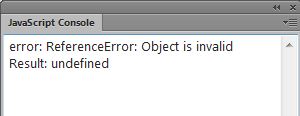
the reason it all seems to work fine but still catches an error is because you close the document then ask for its name.
try this:
#target Illustrator


function doit() {
    try {
        var idoc = app.activeDocument;
        var docName = idoc.name;
        var baseName = docName.replace(/.ai$/,'');
        baseName = baseName.replace(/.eps$/,'');
        var pi = idoc.pathItems;

        if (pi.length > 0){
            var theBiggest = pi[0];
            for (i=1; i<pi.length; i++) {
            if (Math.abs(pi.area) > Math.abs(theBiggest.area)) {
                theBiggest = pi;
                }
            }
            idoc.artboards[0].artboardRect = theBiggest.geometricBounds;
        }

        var saveName = new File ( "/~location_to_save~/" + baseName + ".pdf" );
        saveOpts = new PDFSaveOptions();
        saveOpts.preserveEditability = false;
        idoc.saveAs( saveName, saveOpts );
        var docName = idoc.fullName
        idoc.close( SaveOptions.DONOTSAVECHANGES );

        $.writeln (docName + ' was saved into ~location_to_save~');
        // https://forums.adobe.com/thread/1967323
    }
    catch (e){
        $.writeln ('error: ' + e);
    }
}
doit();
Copy link to clipboard
Copied
Qwerty was right about calling the file name after the file was closed. I converted the name to a string before closing to avoid this.
writeln was printing to the ExtendScript Toolkit console.
The solution ( work around ) I am using is to have Illustrator save out a text file. My master script is waiting for that text file, when it exists, the contents are printed to the console, the .txt file is deleted, and the script moves on.
Here is my code:
#target Illustrator


if (app.documents.length > 0){
    var idoc = app.activeDocument;
    var docName = idoc.name;
    var baseName = docName.replace(/.ai$/,'');
    baseName = baseName.replace(/.eps$/,'');
    var pi = idoc.pathItems;

    if (pi.length > 0){
        var theBiggest = pi[0];
        for (i=1; i<pi.length; i++) {
        if (Math.abs(pi.area) > Math.abs(theBiggest.area)) {
            theBiggest = pi;
            }
        }
        idoc.artboards[0].artboardRect = theBiggest.geometricBounds;
    }

    var saveName = new File ( "~/Location to save to/~" + baseName + ".pdf" );
    saveOpts = new PDFSaveOptions();
    saveOpts.preserveEditability = false;
    idoc.saveAs( saveName, saveOpts );
    messageName = baseName.toString();
    idoc.close( SaveOptions.DONOTSAVECHANGES );

    var message = '012_C. ' + messageName + '.pdf was printed into ~/location/~';
    writeToFile(message);

} else {
    var message = '***** No documents were open when script was called *****';
    writeToFile(message);
}


function writeToFile(info) {
    try    {
        var log = File('~/Location/~/illustratorMessage.txt');
        log.open('a');
        log.write(info);
        log.close()
        }
    catch (e) {
        $.writeln (e);
    }
};
Copy link to clipboard
Copied
getting the timing right between scripts running simultaneously can be tricky.
this sounds like a decent solution.
glad you got it working.
Copy link to clipboard
Copied
P.S. I got the idea of saving a text file from Illustrator from Muppet Mark-QA163s in this post Re: Assigning Text Fields Variables via VBScript post # 10.


Get ready! An upgraded Adobe Community experience is coming in January.
Learn more
 AdChoices