
Inspiring
May 8, 2017
Answered

Tell me how to disable the pen drag

  • May 8, 2017
  • 2 replies
  • 1000 views

This has just started today.  I have a Surface Studio.  In Illustrator CC I have an image where I am trying to sketch shadows as though I were using pen and ink.  I get two or three lines sketched when Illustrator switches to drag as if I had pressed the"H" key.  Since I am in the process of sketching the pen drags the up and off the art board.

As I stated, this has just started this morning and I can't for the life of me figure out how to turn it off.

Any help will be definitely appreciated since I can't go onward with condition.

Thanks,

Frank
    This topic has been closed for replies.
    Correct answer John Mensinger

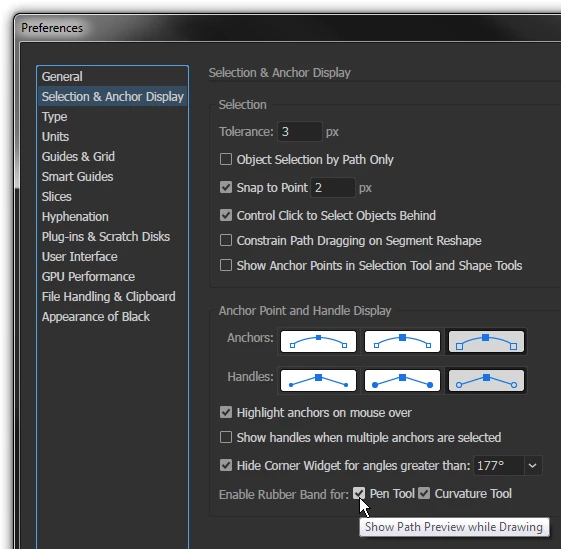
    See Edit > Preferences > Selection & Anchor Display...

    2 replies

    frankhibAuthor
    Inspiring
    May 8, 2017

    Well - I am actually a little embarrassed.  I missed an obvious step to try first; Power the computer off!

    I just powered it back up and everything seems to be working fine.

    One of the things I have noticed though, Illustrator CC on the Surface Studio does get a little wonky at times.  Most of the time, at least with me, it hangs up where the tool I'm using freezes and I can't use it or switch to other tools.  In those instances closing Illustrator and opening it again seems to resolve that particular problem.

    John Mensinger
    Community Expert
    John MensingerCommunity ExpertCorrect answer
    Community Expert
    May 8, 2017

    See Edit > Preferences > Selection & Anchor Display...