
srikanthm14115455
Participant
Nov 2, 2017 12:12 PM UTC
Question

Telugu font not displaying properly in illustrator

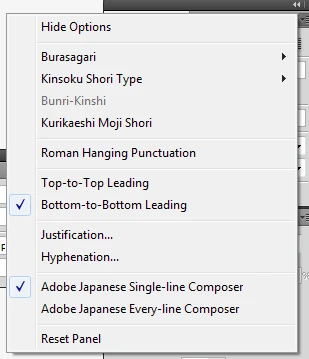
in my system showing "adobe japanese single line composer" and not showing "Middle Eastern & South Asian Single-line Composer" option. due to this reason telugu letters not displaying properly in my illustrator. in Preference i checked "Show Asian OPtion". Please suggest me. Thanks in advance.
    6 replies

    Participant
    Oct 22, 2020 12:38 PM UTC

    Hi

    I am copy pasting some telugu content in illustrator but its not showing properly.

    I have the Indic options selected, I changed the language to Telugu and I check the asian composor also

    Please Suggest a solution 


    Translate
    Om Nath Jha
    Legend
    Dec 5, 2017 6:07 PM UTC

    Hi Srikanth,

    As suggested above, you may need to update the app. CS4 is a perpetual version and it came with language specific licenses. This option (Show Indic Options) would not be available in CS4.

    Regards,

    Om

    Translate
    srikanthm14115455
    Participant
    Nov 2, 2017 3:46 PM UTC

    Thanks for quick replay, we are using cs4 and it showing only "Show Asian Option" in preferences > Type.

    Please suggest.

    Thanks,

    Srikanth

    Translate
    Monika Gause
    Community Expert
    Community Expert
    Nov 3, 2017 7:03 PM UTC

    Update your version of Illustrator.

    Translate
    Anish Singla
    Participating Frequently
    Nov 2, 2017 12:19 PM UTC

    Hi Srikanth,

    In preferences, please check "Show Indic Options" instead of "Show East Asian Options" as "Show East Asian Options" is for Japanese characters and  "Show Indic Options" is for Indian languages.

    Hope This resolves your problem.

    Thanks

    Anish

    Translate
    Participant
    Mar 20, 2020 4:36 AM UTC

    Srikanth, thanks a lot. worked like a charm.

    Translate