MileHighJerome
Known Participant
July 17, 2017
Answered

Text and graphics disappear when I export as a .TIF

  • July 17, 2017
  • 3 replies
  • 17176 views

As the title suggests, I am trying to export my .ai file as a high-res .TIF. However, in doing so, some of the text and graphics disappear. I've tried outlining everything, rasterizing everything, but nothing works. I've attached two screenshots for reference. Please help!

            FILE BEFORE EXPORTING                           FILE AFTER EXPORTING

This topic has been closed for replies.
Correct answer Mike_Gondek10189183

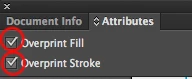
Select All vector objects and remove the checkmarks.

If your documents does not have amy placed images you can select all. Linked images within the section will show the checkmarks but greyed out.

3 replies

Luke Jennings
Inspiring
July 17, 2017

It's also possible the missing type is on a layer that is set to non-printing.

MileHighJerome
Known Participant
July 17, 2017

It's all one layer.

Mike_Gondek10189183
Community Expert
Community Expert
July 17, 2017

You can use view >> overprint preview to test for overprints in the future.

Monika Gause
Community Expert
Community Expert
July 17, 2017

Check if it is set to overprint. THis can be set up in the attributes panel.

MileHighJerome
Known Participant
July 17, 2017

How do I get rid of the overprint attribute? When I use view > overprint preview, the text disappears.

Monika Gause
Community Expert
Community Expert
July 17, 2017

In the Attributes panel as I wrote.