
Known Participant
March 10, 2011
Question

text in perspective

  • March 10, 2011
  • 2 replies
  • 29050 views

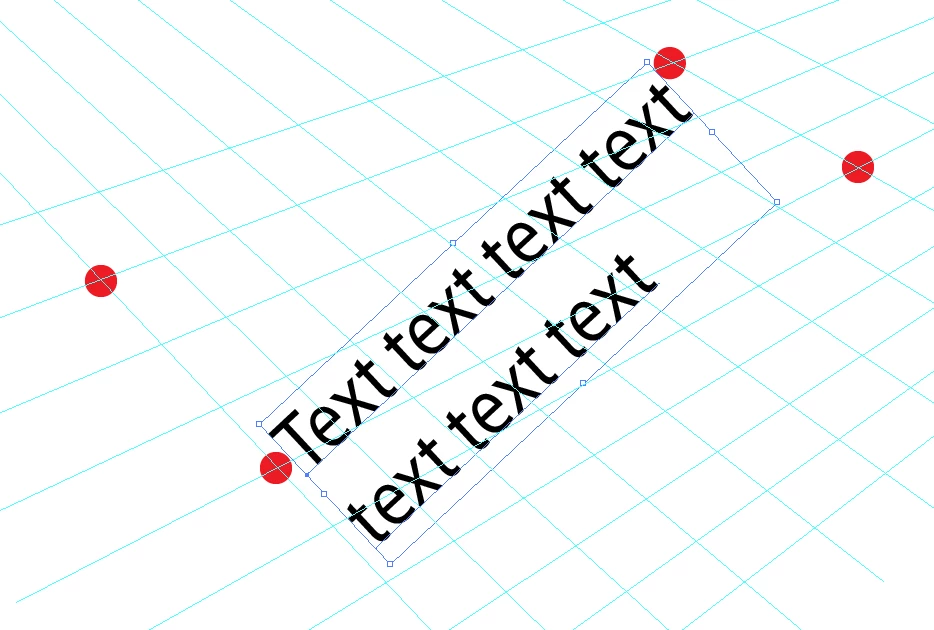
Hi all, I'm trying to manually write text in a two-vanishing point perspective in Illustrator CS4 without using th 3D effect Extrude and Bevel. I created a grid with two vanishing points for alignment purposes. Then I write some text that I want to transform based on the newly created grid (or guides if you wish) using the free transform tool. The problem is that I can move only one point at a time and then the bounding box is reset. What I would like to be able to do is to control the 4 anchors of the bounding box to project the text as disered (The 4 anchors should be located on the red dots of the image below). Is there a technique that can do that ? Thank you
    This topic has been closed for replies.

    2 replies

    Jacob Bugge
    Community Expert
    Community Expert
    March 10, 2011

    plutonak,

    Or you may:

    1) Select the Type and in the Appearance pallete/panel tick Add New Fill, then Effect>Convert to Shape>Rectangle;

    2) Create a quadrilateral based on the red corenrs of the grid (in the front);

    3) Select 1) and 2) and Object>Envelope Distort>Make with Top Object.

    plutonakAuthor
    Known Participant
    March 10, 2011

    thank you both, the "Envelope>Distort>Make with Top Object" helped a lot. Anyway, the anchors of the rectangle become "smooth" instead of "corners" after "Envelope>Distort>Make with Top Object" which is a bit problematic. I would be happy with the smae approach keeping corners of the rectangle as corners. I could get  what follows: it would be perfect with pure corners on the rectangle (since now I have to play with tangent of a spline)

    plutonakAuthor
    Known Participant
    March 10, 2011

    also I found this link useful and confirming the potential "many attempts to finally align everything up and be a very frustrating endeavor":

    http://www.khulsey.com/adobe_illustrator_free_transform.html

    I must say that I thought it would much easier quoting:

    "Our last example shows the distorted vehicle line-art properly placed  into the perspective grid. (below).  This may seem like a lot of steps  to achieve something that would seem to be relatively simple but if you  have tried to use the Free Transform tool, you know how aggravating it  can be if used improperly."

    Larry G. Schneider
    Community Expert
    Community Expert
    March 10, 2011

    You mean something like this. Use a no fill/no stroke box around the text and use Object>Envelope Distort>Make with top object then use the Free-Distort tool (e) to make the object fit your space.