Participant
August 26, 2017
Beantwortet

TOOL - BLOAT TOOL - BLOAT TOOL OPTIONS?

  • August 26, 2017
  • 1 Antwort
  • 3497 Ansichten

WINDOW 10

ADOBE ILLUSTRATOR CC

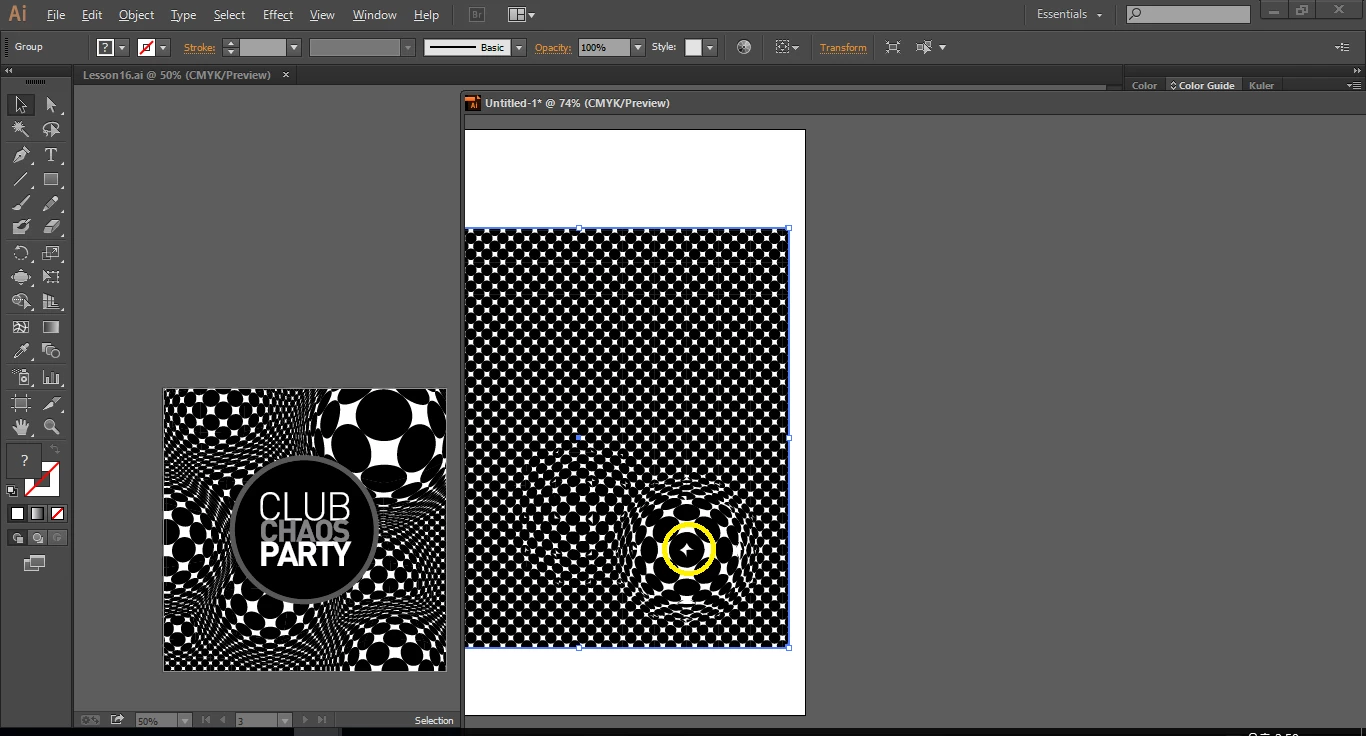
How can I use BLOAT TOOL as in the left example?

(Bloat tool works just by clicking on other versions, but do I have to drag on Adobe Illustrator CC version? Is that a problem?)

How should I change the Bloat tool options?

No matter how the size, Intensity, Detail, Simplify of Bloat tool has changed, white dots are on black dots(Right, yellow).

    Dieses Thema wurde für Antworten geschlossen.
    Beste Antwort von Ray Yorkshire

    Clicking  with the Bloat Tool works ok for me on CC.

    Have you tried resetting preferences?

    Do one of the following:

    1. Press and hold Alt+Control+Shift (Windows) or Option+Command+Shift (Mac OS) as you start Illustrator. Your current settings are deleted.
    2. Remove or rename the AIPrefs file (Windows) or Adobe Illustrator Prefs file (Mac OS). New preferences files are created the next time you start Illustrator.

    1 Antwort

    Ray Yorkshire
    Participating Frequently
    August 26, 2017

    Clicking  with the Bloat Tool works ok for me on CC.

    Have you tried resetting preferences?

    Do one of the following:

    1. Press and hold Alt+Control+Shift (Windows) or Option+Command+Shift (Mac OS) as you start Illustrator. Your current settings are deleted.
    2. Remove or rename the AIPrefs file (Windows) or Adobe Illustrator Prefs file (Mac OS). New preferences files are created the next time you start Illustrator.