
Inspiring
February 26, 2018
Question

Tool Panel doesn't "Fit" or icons too small

  • February 26, 2018
  • 2 replies
  • 411 views

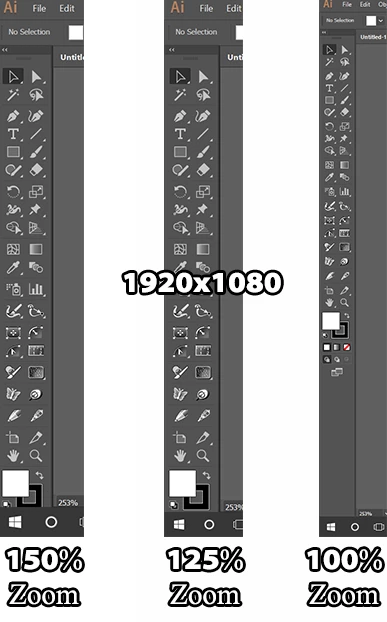
I have my windows desktop connected to my 60" tv resolution 1920x1080, and of course suggested zoom 150% which helps me see everything much better and more clearly. However after installing trials of the astute graphics plugs in noticed it extends the tool panel below the application window and i can't access parts of it. of course lowering the zoom to 100% shows everything but then the icons are too small. So far the only fix i cant figure is over all lowering the resolution entirely which has been somewhat helpful in the matter but obviously having to switch the resolution back and forth can get to be annoying. I tried and can create a second panel next to it like with the options panel on the right, but cannot remove the icon from the tool panel. Are there any alternative solutions?

This topic has been closed for replies.

2 replies

Ray Yorkshire
Participating Frequently
February 27, 2018

I`d move the Windows Taskbar from the bottom of the screen to the side right, and they might just squeeze in, but of course you should not have to do that.

And if you decide to try Astute Graphics free plugin SubScribe that's another four icons, and you will be right back where you started.

Adding other plugins like HotDoor CadTools would be about another 10 tool icons

and with maybe the same From CValleys FILTERiT 5 and Xtream Path 2...

You would be working in the basement or using binoculars

Monika Gause
Community Expert
Community Expert
February 26, 2018

I know the feeling.

Unfortunately if you need the controls in the bottom of the tool panel, there's no other way.

If you don't need them, then you can try to create custom tool panels: Custom Tools panels |

And of course make a feature request: http://illustrator.uservoice.com