
Participating Frequently
May 9, 2018
Answered

trapping spot colors in illustrator before placing in InDesign

  • May 9, 2018
  • 2 replies
  • 1391 views

hi there. I need to trap two color graphics before placing these graphics in an InDesign document. One color is always black, the other is always a PMS color. I understand how to trap simple 2 color graphics with overprinting strokes but what about more complex graphics. Say, grayscale artwork that needs to trap to a solid color? Graphics with pieces that can't simply be stroked because the stroke isn't simply on the outsides of the artwork?

Thanks for the assist.

Renee
    This topic has been closed for replies.
    Correct answer Mario Arizmendi

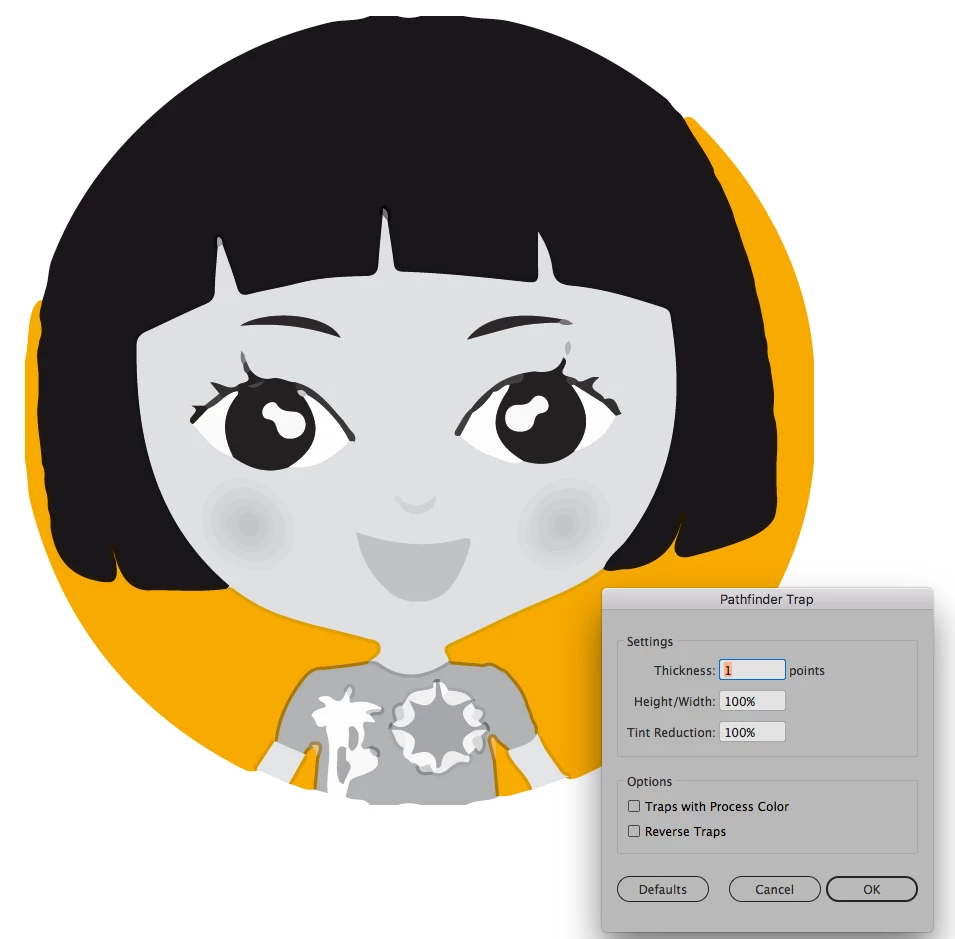
    Have you tried the automatic trap option under the pathfinder window?

    In files like this, this option works well cause Illustrator automatically apply shoke or spread form light colors to darkest colors, in this particular case the oranges spreads to the black fill. You have the option to reverse traps too

    2 replies

    JETalmage
    Inspiring
    May 10, 2018
    ...her hair is one piece and stroking her hair in orange would create an orange stroke around her face.

    I wonder if i can select only the parts of the graphic that require trapping and deselect, for example, the images on the t-shirt where trapping isn't required.

    Again, there are multiple ways to manually build traps, in which common sense removes the confusion. There's nothing preventing you from simply duplicating a subpath of a compound path, or just a portion of a closed path, and giving that duplicated path a fill of none and an overprinting stroke.  (In other words, there is nothing requiring you to make every trap go all the way around a whole shape. )

    JET

    JETalmage
    Inspiring
    May 9, 2018
    Say, grayscale artwork that needs to trap to a solid color?

    So long as the grayscale objects are tints of your defined black Swatch, those tints will still print to the same separation as the solid black.

    Graphics with pieces that can't simply be stroked because the stroke isn't simply on the outsides of the artwork?

    The question is unclear. Show an example of a specific case. Generally speaking:

    Are you familiar with the terms "choke" and "spread"? There are multiple ways to manually build a trap. You can apply overprinting to a stroke or a fill. You can also create non-overprinting intermediate objects to "knock out" portions of underlying objects, even though the topmost object overprints.

    JET

    Participating Frequently
    May 9, 2018

    Thanks for your help. Yes, I am familiar with choke and spread. This piece is going to a 2 color press. My initial idea was to apply a an orange stroke to the figure and set it to overprint but her hair is one piece and stroking her hair in orange would create an orange stroke around her face. There are several pieces like this so i'm really looking for a quick fix, if you know what i mean.

    Mario Arizmendi
    Mario ArizmendiCorrect answer
    Legend
    May 9, 2018

    Have you tried the automatic trap option under the pathfinder window?

    In files like this, this option works well cause Illustrator automatically apply shoke or spread form light colors to darkest colors, in this particular case the oranges spreads to the black fill. You have the option to reverse traps too