
Participant
December 10, 2019
Answered

Unable to create new file in Illustrator 2020 on macOS Mojave

  • December 10, 2019
  • 7 replies
  • 65639 views

Hello!


I've just updated to Illustrator 2020 (running on macOS Mojave) and for some reason I am unable to create a new file. I can open and save files with no problem but am unable to create new files; ie nothing happens either from 'Create new..' or using the menu bar. I'm probably missing something very obvious but has anyone else encountered this problem?


Thanks!


{Renamed By MOD}
 

Correct answer carlosgarro

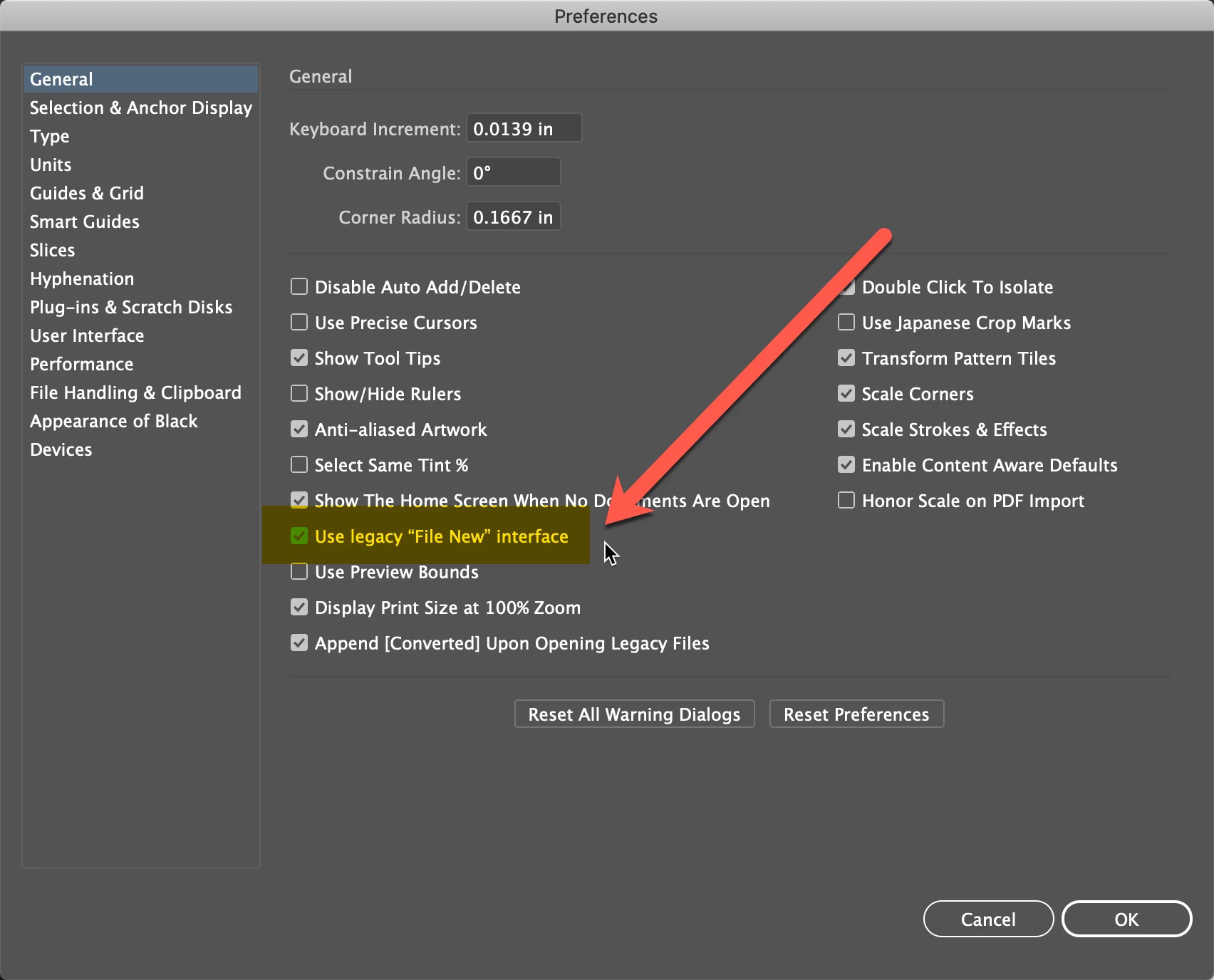
Just in case the Preference is here:

Preferences > General > Use legacy "File New" interface

7 replies

Participant
July 7, 2021

I FOUND a problem file.


1) Go to the folder C:\Users\166(...user name)\AppData\Roaming\Adobe\Adobe Illustrator 24 Settings\en_GB(...depending on what language you have, if it does not help, go to the folder with another language)\x64


2) Delete or drag to another folder the file """PresetDocumentProfileDataV2. json" "" Done, we are happy!

Like to help others with the same problem))

Participant
May 13, 2021

The update sucks. Regreting paying for the license. -_-


Thank you to the guys who found the solution:


edit/preferences/general and check the box of (legacy"create new" format)


adobe: please stop thinking all your users are dumb.

Participant
February 18, 2021

Hi Adobe,

Why have you buried being able to create a new file? I just downloaded Illustrator 2021 and the "New Document" dialogue box only allows me access to templates?! I can't just create a blank new document of a size I need. That is ridiculous! Thank goodness for this group and the answers of Preferences > General > Use legacy "File New" interface. Why in the world would you build a New Document dialogue box that doesn't allow you to create your own file to the specs you want! It's a basic function and should be default! Please fix this in any versions going forward.

Andulamb
Participant
December 17, 2020

This is absolutely ridiculous, Adobe. I shouldn't have to choose a template to make a new file. What the hell were you people thinking?

Monika Gause
Community Expert
Community Expert
December 17, 2020

Surprise! All new Illustrator files are based on some sorts of template.


Can you please tellus what is your issue precisely?

Participant
August 24, 2020

hi dear i hope you're alright

i've had this problem like a about a month and i recently found out the solution

you just need to go to edit/preferences/general and check the box of (legacy"create new" format) or something like that I'm not sure if it is 100% what i wrote

and that's it . it will work like a charm

Participant
August 29, 2020

you saved my day

Srishti Bali
Community Manager
Community Manager
December 15, 2019

Hi there,


I would like to know if the steps suggested by Rishabh helped resolve the issue. If not, please share few screenshots of what happens when click Create New button on screen?

Also, please do share when did this start happening? Are there any recent changes made to your system? For example, any antivirus, system updates or web extensions installed recently. 


Regards,

Srishti

Participant
August 21, 2020

This started happening after one of the last updates I did (I think it was 3 updates ago).

and there we no changes at all on my computer (no new antyvirus or system updates)


I've tried all the steps suggested with no results.


I've also tried do delete Illustrator and installed again, but the problem remains the same.


Regarding what happens when I click "New file", nothing happens..

no menu openning, nothing... it's like I haven't clicked the "new menu"item.

Monika Gause
Community Expert
Community Expert
August 21, 2020

Is there a printer connected, turned on and set up as the default printer?

diver up to date? Printer deinstalled when they are no longer there?

Rishabh_Tiwari
Community Manager
Community Manager
December 10, 2019

Hi there, 


Sorry to hear about the trouble you are facing with Illustrator. I would request if you share a few more details like:


  1. Do you have a default printer set? If not, please Print as PDF as your default printer.
  2. You can also try resetting the preferences for Illustrator by following the steps below:
  • Close Illustrator.
  • Click on the Finder icon on the dock, choose Go on the top> Go To Folder.
  • In the Go To Folder dialog box, type "~/Library". Click Go.
  • Open the Preferences Folder > rename the Illustrator  24 Settings folder to Illustrator  24 Settings folder.old
  • Under Preferences, Open Adobe folder and rename Adobe Illustrator folder to Adobe Illustrator.old
  • Go back to library->open caches->rename  com.adobe.illustrator to com.adobe.illustrator.old
  • Go back to library->open application support-> open adobe->rename the Illustrator  24 folder to Illustrator  24 folder.old

Disclaimer: Please note that resetting preferences will remove all the custom settings and Illustrator will launch with default settings. This way all your old settings will be saved in .old folders and Illustrator will recreate new folders with default settings.  


Let us know if this helps or if you need any further assistance.


Regards

Rishabh

Participant
August 21, 2020

I've tried this but I'm still unable to create new files with the new Illustator.

what can I do?