
marcf89693710
Participant
January 13, 2020
Question

Underline Text in illustrator missing when outlined

  • January 13, 2020
  • 2 replies
  • 2088 views

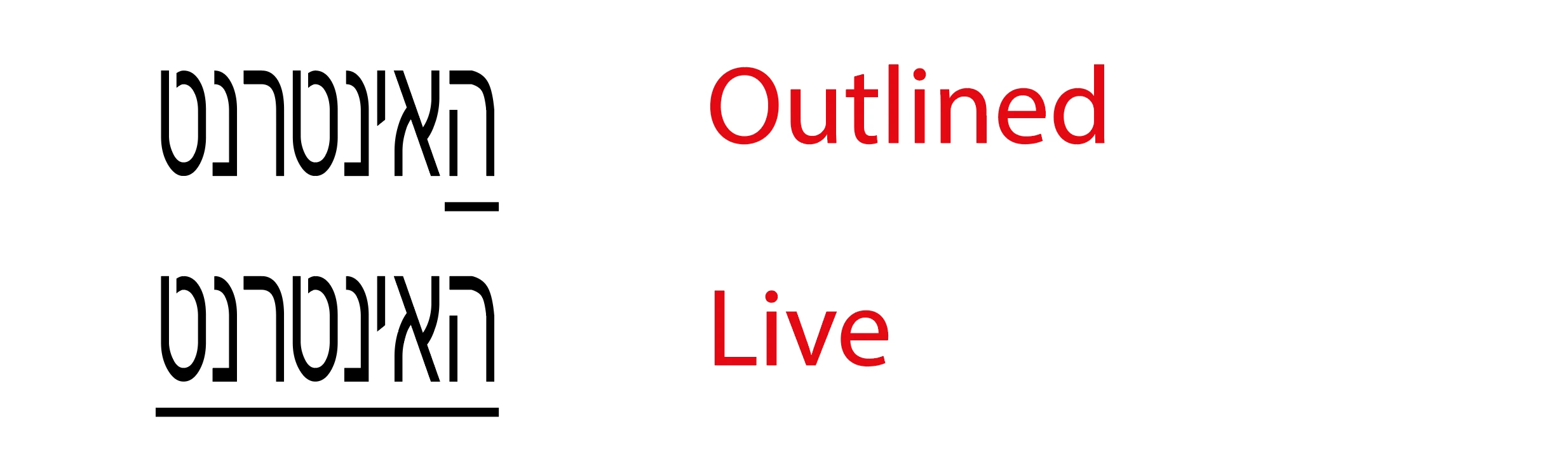
Anybody having problems with the lastest Illustrator 24.0 when part underlining text/word and then when you outline the textbox the underline is missing? I've checked the file in Illustrator 2018 and it worked fine! Any idea's welcome.
This topic has been closed for replies.

2 replies

cliffclof
Inspiring
March 31, 2023

This is stupid, why can't i do something as basic as underline a font.  I'm using roboto.

Are you flipping kidding me, why do you keep making all of your UIs harder to use???    You have to show options to see this now?     Dumb as.

Monika Gause
Community Expert
Community Expert
March 31, 2023

As already said: outline your text with Object > Flatten transparency.


And you always had to "Show options" directly after installing Illustrator in order to see the underline. BTW: underlines are typografically not the best thing to do.

Monika Gause
Community Expert
Community Expert
January 13, 2020

Try Object > Flatten transparency instead.

marcf89693710
Participant
January 13, 2020

Thanks yeah that seemed to work, though just asking if this is a bug as we follow a normal procedure for sending files to the printers by selecting all and creating outlines, I'm puzzled why it worked in 2018 but this funtion is hit and miss in 2020.

Monika Gause
Community Expert
Community Expert
January 13, 2020

I don't know if it's a bug. Can only tell you that for outlining fonts in InDesign flattening transparency has long been the standard method of choice for the exact same reason. So maybe it's been Illustrator that has not behaving correctly in the past.


Outlining text should be avoided for a lot of reasons.