Inspiring
November 5, 2020
Answered

Uninstall Variable Fonts

  • November 5, 2020
  • 3 replies
  • 3929 views

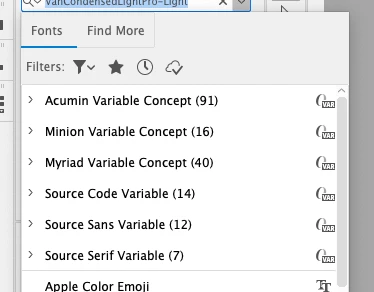
How does one uninstall the Concept and Variable fonts?
 

This topic has been closed for replies.
Correct answer Ashutosh_Mishra

Hi there,


Thanks for reaching out. In order to remove fonts, please follow the help articles I have shared below:

1. For macOS: https://support.apple.com/en-in/guide/font-book/fntb2bcb512d/mac

2. For Windows: https://support.microsoft.com/en-us/windows/how-to-install-or-remove-a-font-in-windows-f12d0657-2fc8-7613-c76f-88d043b334b8

If the fonts have been activated by Adobe Fonts, please follow this help article to deactivate them. Hope it helps.


Regards,

Ashutosh

3 replies

January 8, 2023

Are you working on a Mac?

If yes, these annoying Variable Concept or Variable Color fonts are located in one of the folders named fonts, Fonts, VariableFonts, AcadFonts, etc. (I'm not exactly shure which one as I can't check it because I removed them).


  1. Right click on the app, choose Show Package Contents from the context menu
  2. Do a search for 'font'
  3. In the search results open all the folders in tabs or windows (select them, right click, choose Open in tabs or with alt pressed Open in windows)
  4. Start throwing out all the fonts you don't need
  5. Check the above folders after each Illustrator update, some might be put back


Happy cleaning!


Ton Frederiks
Community Expert
Community Expert
November 5, 2020

I don't think you will be able to remove them easily.

The AcuminVariableConcept.otf, MinionVariableConcept-Roman.otf, SourceCodeVariable-Roman.otf and SourceCodeVariable-Roman.otf are installed in the Illustrator application and are required fonts for InDesign.

Participating Frequently
March 9, 2021

It's actually quite easy. Just search for the font name (or go to Indesign 2021>Resources>Required>Fonts) and rename them. To me it looks like Indesign works just fine without them 😉

Ashutosh_Mishra
Ashutosh_MishraCorrect answer
Inspiring
November 5, 2020

Hi there,


Thanks for reaching out. In order to remove fonts, please follow the help articles I have shared below:

1. For macOS: https://support.apple.com/en-in/guide/font-book/fntb2bcb512d/mac

2. For Windows: https://support.microsoft.com/en-us/windows/how-to-install-or-remove-a-font-in-windows-f12d0657-2fc8-7613-c76f-88d043b334b8

If the fonts have been activated by Adobe Fonts, please follow this help article to deactivate them. Hope it helps.


Regards,

Ashutosh

Eric__J
Participant
April 29, 2021

In my case its Acumin Variable that seems to be pre-installed by Adobe and cannot be removed, via Font Book or any other way so far. It is very anoying.

Monika Gause
Community Expert
Community Expert
April 29, 2021

They are in the Illustrator application package (on the Mac)

On Windows it should be the Support files folder > Required


If you move something out of there, you will have to at least watch out if it affects Illustrator when working.
