


Participant
September 18, 2018
Answered

URGENT photos going negative in Illustrator (deadline in 3 hours 9.18.18--help!)

  • September 18, 2018
  • 6 replies
  • 709 views

I'm working with a preset Illustrator template that is causing my black and white photos to show as negatives when printed. But they look normal on the screen. How do I fix that so that it also looks normal when I print it? My deadline is in 3 hours (3 p.m. PST)

    This topic is closed to new replies. Start a new post to keep the conversation going.
    Correct answer Mike_Gondek10189183

    Mac or Windows???

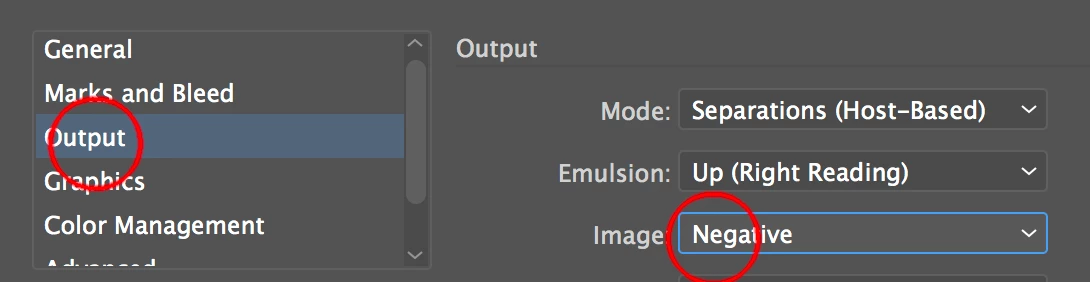
    Do you have your print settings set to negative?

    Make sure mode is in Composite, and your image will then go to positive as should be.

    6 replies

    Joely10623436
    Community Expert
    Community Expert
    September 19, 2018

    Did you cross the Deadline?

    lambiloon
    Community Expert
    Community Expert
    September 19, 2018

    Hi please share us a screenshot so we can help you in better way.

    Thanks.

    Ali Sajjad / Graphic Design Trainer / Freelancer / Adobe Certified Professional
    jane-e
    Community Expert
    Community Expert
    September 18, 2018

    alyssas45233711​

    Do the images print okay when they are in another document?

    Did any of these answers help? Without more info, we are just making our best guesses.

    Mike_Gondek10189183
    Community Expert
    Mike_Gondek10189183Community ExpertCorrect answer
    Community Expert
    September 18, 2018

    Mac or Windows???

    Do you have your print settings set to negative?

    Make sure mode is in Composite, and your image will then go to positive as should be.

    Luke Jennings
    Inspiring
    September 18, 2018

    You need to give more details.

    Are you saving to a PDF from Illustrator, using the default settings, then opening the PDF in Acrobat or Reader to print it?

    My guess is you need to update your printer driver. Can you try printing it somewhere else?

    Do you have the original BW images? Try opening and re-saving them in Photoshop.

    Monika Gause
    Community Expert
    Community Expert
    September 18, 2018

    Are you sure it's caused by Illustrator? Could be the printer, the printer driver, the printer's color adjustment, the image files ...

    You might want to tell us more details.

    When you save a copy of this as a PDF/X file and print through Acrobat, does that work?