



Copy link to clipboard
Copied
I have searched for the answer to this and can't find one.
I am using a graphic from the pattern styles in my Illustrator. (latest version). I need it to fit inside the object at a smaller size ratio. Is this possible and how is it done?


 1 Correct answer


As Monika said, you can use the Scale tool.
Select the object that has the pattern fill.
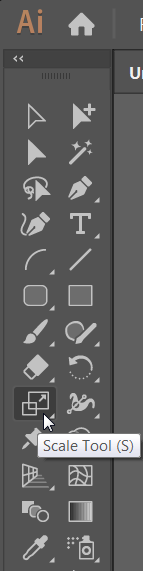
Double-click on the Scale tool in the Tools panel.
Remove the check mark from 'Transform Objects' and type a Scale percentage.
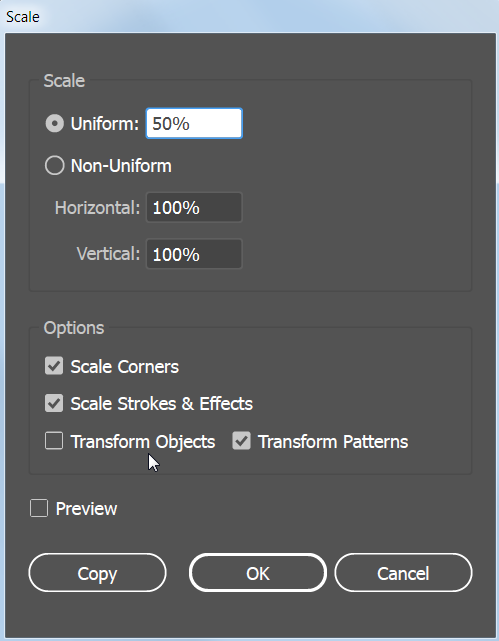
This works with all of the transformation tools. For example, you can double-click the Rotate tool to rotate only the pattern, or the Shear tool to shear only the pattern.


Explore related tutorials & articles
 9
Replies
9
9
Replies
9


Copy link to clipboard
Copied
Have you tried clipping mask ?
please share a screenshot for the style and the object to better understand your question

Copy link to clipboard
Copied
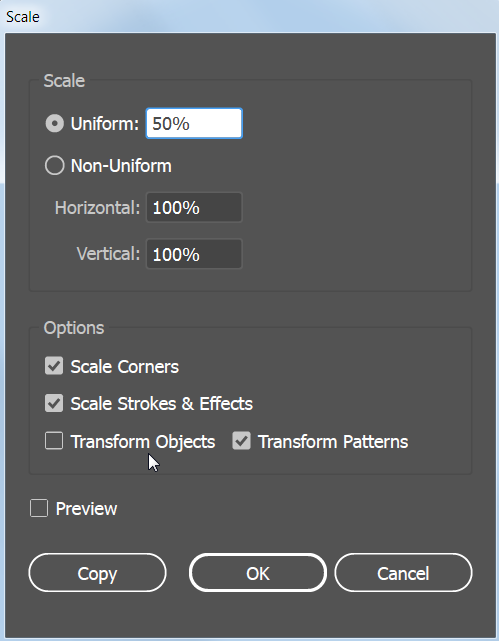
Double click the scalte tool (object selected) and uncheck the "transform object", but check "transform pattern"
Copy link to clipboard
Copied
As Monika said, you can use the Scale tool.
Select the object that has the pattern fill.
Double-click on the Scale tool in the Tools panel.
Remove the check mark from 'Transform Objects' and type a Scale percentage.

This works with all of the transformation tools. For example, you can double-click the Rotate tool to rotate only the pattern, or the Shear tool to shear only the pattern.
Copy link to clipboard
Copied
When I do the scale tool, clicking on the object works but clicking on the pattern nothing changes. Here is a screenshot of a lamp shade I am trying to fill. It's a Vonster style pattern Thanks.
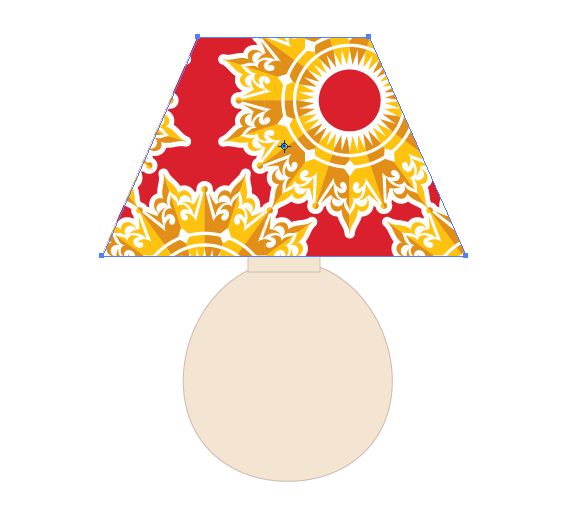 to fill. Thanks.
Copy link to clipboard
Copied
The technique should work with any type of pattern.
Do you have a check mark on Transform Patterns, and no check mark on Transform Objects?
Copy link to clipboard
Copied
Okay, I finally got this to work. Must have had something clicked wrong. This is great info! Thanks, all.
Copy link to clipboard
Copied
Don't use the tool to click on the object.
Select the object and then double click the tool.

Copy link to clipboard
Copied
You can also hold down the tilde key ( ~ above the tab key on most keyboards) to transform only the pattern, and not the container.
Copy link to clipboard
Copied
As Monika said, you double-click the tool. After you select the object with the pattern. Find the Scale tool in the Tools panel and double-click it right in the Tools panel.


Get ready! An upgraded Adobe Community experience is coming in January.
Learn more
 AdChoices