
Using RTL features with Dhivehi Language in Illustrator CC 2019
Hi.
I understand that officially there isn’t even basic support for Thaana script of the Dhivehi Language (spoken in the Maldives) in Adobe CC. However, RTL features meant for other languages have enabled local designers to manage Thaana text in Adobe applications, albeit with difficulty. Unfortunately, I have not been able to pull this off in Adobe Illustrator CC 2019.
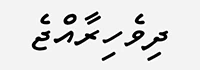
Here is how the local name of the Maldives should appear in Thaana script, with vowels running above and below the base characters:
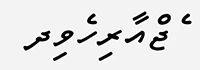
Here is how it appears in a text box in Illustrator CC 2019, with Adobe Composer:
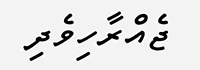
When I switch to Middle Eastern & South Asian Composer, the vowels align with the right base characters. However, the base characters themselves are still running from left to right:
Interestingly, when I insert an Arabic character into the paragraph, the entire paragraph including the Thaana script changes to RTL:
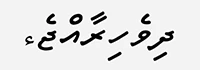
This is a very crude hack and the Arabic character needs to be in every paragraph. Is there a better way?
 AdChoices