

Syntax_One
Known Participant
January 6, 2021
Answered

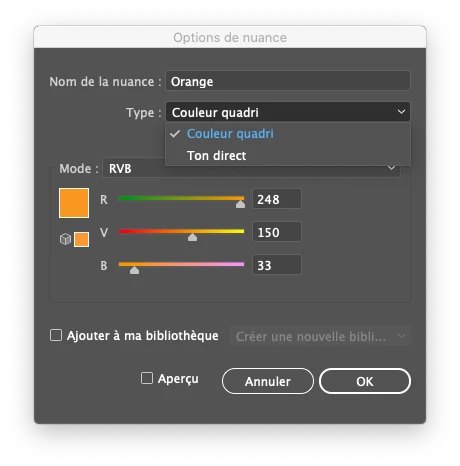
Why Process and Spot options when creating a RGB color?

  • January 6, 2021
  • 1 reply
  • 1415 views

Hi!


We all know that a spot color is a special premixed ink that is used instead of, or in addition to, process inks, and that requires its own printing plate on a printing press.


So why is there the possibility to choose Spot color or Process Color in Color Type when I create a RGB color? It doesn't make sense to me!


Thank you!
 

This topic has been closed for replies.
Correct answer Dave Creamer of IDEAS

The Color Type is really about the printing method--and, as you noted, it's meaningless for on-screen documents. It's more likely the programmers did not want to bother to change the dialog box for every color mode and various output methods. Even if they did add On-Screen Color to the Color Type menu, but it really wouldn't matter. 

1 reply

Kurt Gold
Community Expert
Community Expert
January 6, 2021

The term may be misleading, but I think that many users who are using RGB files (only) would miss the ability to change colours globally by modifying spot RGB swatches.


I think that is the reason why they are thankfully there.


Syntax_One
Known Participant
January 6, 2021

Thank you for your answer!


However, as you can see, it is possible to create global RGB colors:


Dave Creamer of IDEAS
Community Expert
Dave Creamer of IDEASCommunity ExpertCorrect answer
Community Expert
January 7, 2021

The Color Type is really about the printing method--and, as you noted, it's meaningless for on-screen documents. It's more likely the programmers did not want to bother to change the dialog box for every color mode and various output methods. Even if they did add On-Screen Color to the Color Type menu, but it really wouldn't matter. 

David Creamer: Community Expert (ACI and ACE 1995-2023)