


Active Hyperlink in INDT file

Copy link to clipboard
Copied
I'm building a INDT file based on a clients branding specs. These files are used by a team of designers to create custom work for clients. We've built a Rules and Reminders page that the designer can refer to if they have any questions about using the file or the branding specs. I want to create a link inside the INDT file that the designer can click on and take them to the R&R page. Some basic info and link that lives on the side of the art board.

Is there a way to make this an active link inside the doc or does it have to be exported out as a PDF file for the button to work? I know they can open the hyperlink panel and click the link, but want to remove a step if possible.


 8
Replies
8
8
Replies
8




Copy link to clipboard
Copied
An INDT file is exactly the same as an INDD file except it opens as untitled. So no, you can't do this.
Copy link to clipboard
Copied
I get the difference between the 2 doc types. Not really the question here Bob. I should be able to have a link in the document that works instead of exporting to a PDF. Seems a bit silly have a program this large not be able to perform the funtion of a basic text editing window like the one I'm typing in now.

Copy link to clipboard
Copied
The link as you have shown will work only once exported, not from within the Indesign document.
I was thinking about this idea, but then it may not be practical. Have your R&R document placed in a CC Library, organized within folders, and shared amongst your users.
Copy link to clipboard
Copied
Hi Jeffery,
Thanks for this suggestion. I have our script team working to see if they can create something for us, but this is a good suggestion. While our R&R pages live in a central hub (Sharepoint) we could make quick access doc in a CC Library so they don't have to track anything down. I guess I'm just trying to make everything as simple as possible for the team, and the easist is always a "one click" solution.
thanks again for your suggestion.

Copy link to clipboard
Copied
Hi David,
well, the only way I can think of is to access the link via the EPUB Interactivity Preview Panel in InDesign.
Just tested and it works. From my German InDesign 2022 on Windows 10:
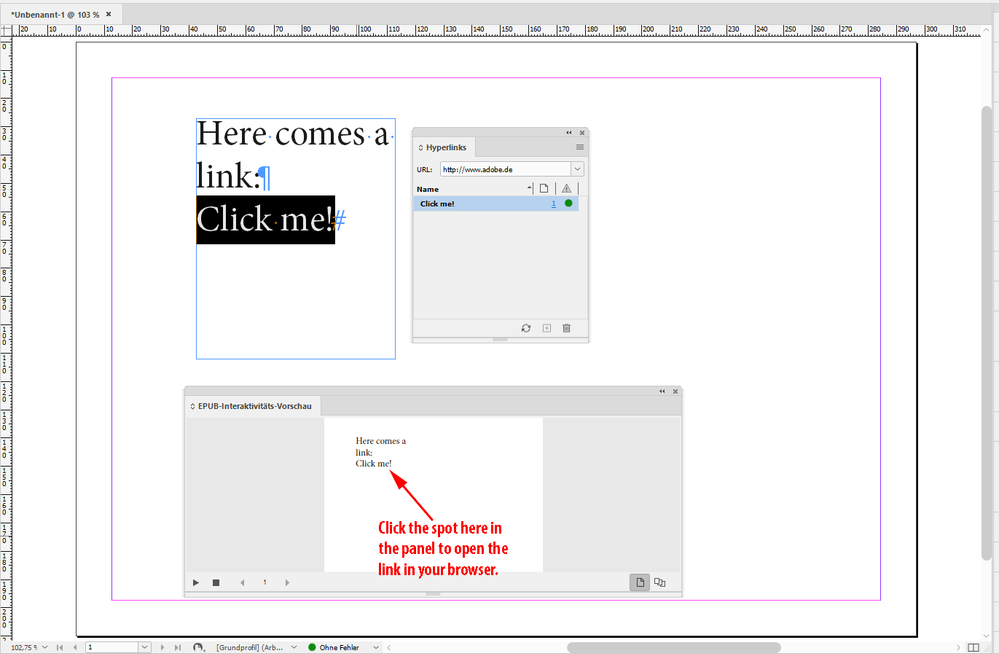
Regards,
Uwe Laubender
( ACP )
Copy link to clipboard
Copied
Thanks for this suggestion. They could also click from the hyperlinks panel too, I believe. Our team doesn't use these panels at all, so it would take some getting use to. I guess I'm just looking for a "one-click" solution. Time is money around these parts.
Thanks
Copy link to clipboard
Copied
"I have our script team working to see if they can create something for us, but this is a good suggestion."
They should be able to come up with an InDesign startup script that will present a link or a new menu command.
If not, contact me with a private message through the forum.
Regards,
Uwe Laubender
( ACP )
Copy link to clipboard
Copied
Great. Thank you so much


Get ready! An upgraded Adobe Community experience is coming in January.
Learn more
 AdChoices