
Exit
  • Global community
    • Language:
      • Deutsch
      • English
      • Español
      • Français
      • Português
  • 日本語コミュニティ
  • 한국 커뮤니티
0

add the label value for the second column

Participant ,
Oct 30, 2022 Oct 30, 2022

Hi,

I wanted to display the alphanumeric value in the dialog where I split the Listbox into two columns. For the first column I used to get the expected deals as used for the first column I used to display the values in the second column, but it display's only the last value. With this, I have attached the code I used. Thanks in advance


var MSIDvalue = [];
var InddMSIDValues = [];
var getXMLMSIDvalue = [];
var xmlTree = GetXMLFile();
var content = new XML(xmlTree);
var getXmlId =getAllAttributeValues ("MSID");
var myGroup = app.activeDocument;
var allPageItemsOfGroup = myGroup.allPageItems;
for(var n=0;n<allPageItemsOfGroup.length;n++){
var myObject = allPageItemsOfGroup[n].getElements()[0];
if(myObject.constructor.name === "TextFrame" )
{
var myFrame = app.activeDocument.textFrames;
var mySelectedXMLItem = myFrame[n].associatedXMLElement;
if(mySelectedXMLItem != null && mySelectedXMLItem.markupTag.name != null)
{
node_TBGUID = myFrame[n].associatedXMLElement.xmlAttributes.itemByName("MSID").value;
MSIDvalue.push(node_TBGUID);
}
}
}

var dlg = new Window( "dialog", "Modified Contents" );
// create list box with two titled columns
var list = dlg.add ('ListBox', [0, 0, 500, 550], '',
{numberOfColumns: 2, showHeaders: true,
columnTitles: ['Document Content', 'XML Content']});
// add an item for the first row, with the label value for the first column
var getMSIDvalue = MSIDvalue.toString().split(",");
for(var k = 0;k<getMSIDvalue.length;k++)
var item1 = list.add ('item', getMSIDvalue[k]);
// add the label value for the second column in that row.
var getXMLMSIDvalue = getXmlId.toString().split(",");
for(var l = 0;l<getXMLMSIDvalue.length;l++)
item1.subItems[0].text = getXMLMSIDvalue[l];


dlg.show();

// Read the XML file
function GetXMLFile()
{
myDoc = app.activeDocument;
myLinks = myDoc.links;
for (j = myLinks.length - 1; j >= 0; j--)
{
myName = myLinks[j].filePath;
var ext = myName.substring(myName.length-3,myName.length) ;
if (ext=="xml")
{
myXMLFile = File(myName);
var myResult = myXMLFile.open("r");
if(myResult == true)
{
var myXMLDefaults = myXMLFile.read();
myXMLFile.close();
var myXMLDefaults = new XML(myXMLDefaults);
return myXMLDefaults;
}
}//for
}
}

function getAllAttributeValues(attributeName){
var allAttributes = [];
var allNodes = content[0].xpath("//*[@"+attributeName+"]");
for(var i = 0; i < allNodes.length(); i++){
allAttributes.push(allNodes[i].attribute(attributeName).toString());
}
if(allAttributes.length > 0){
return allAttributes;
}
else{
return null;
}
}
-Monisha
TOPICS
How to , Scripting , Type
544
Translate
Report
Community guidelines
Be kind and respectful, give credit to the original source of content, and search for duplicates before posting. Learn more
community guidelines

correct answers 1 Correct answer

Community Expert , Oct 31, 2022 Oct 31, 2022

Hi @MonishaRajendran, does this help?


var dlg = new Window("dialog", "Modified Contents");

// create list box with two titled columns
var list = dlg.add('ListBox', [0, 0, 500, 550], '',
    {
        numberOfColumns: 2, showHeaders: true,
        columnTitles: ['Document Content', 'XML Content']
    });

// add an item for the first row, with the label value for the first column
var getMSIDvalue = MSIDvalue.toString().split(",");
var getXMLMSIDvalue = getXmlId.toString().split(",");
$/*debug*
...
Translate
Community Expert ,
Oct 30, 2022 Oct 30, 2022

Hi @MonishaRajendran, a cannot see the problem immediately. Could you please post a small sample indesign file with .xml linked file for us to test your script with?

- Mark

Translate
Report
Community guidelines
Be kind and respectful, give credit to the original source of content, and search for duplicates before posting. Learn more
community guidelines
Participant ,
Oct 30, 2022 Oct 30, 2022

Hi @m1b 

I am including the XML file and the InDesign document as an attachment. By using the script, I was able to get the CDATA values from the XML. The value of each CDATA element is displayed in a dialog box. But for now I can't able to display the XML CDATA values.


-Monisha
Translate
Report
Community guidelines
Be kind and respectful, give credit to the original source of content, and search for duplicates before posting. Learn more
community guidelines
Community Expert ,
Oct 31, 2022 Oct 31, 2022

Hi @MonishaRajendran , If I trace getXmlID (which you are calling in the dialog) with your sample doc open it returns null:


var MSIDvalue = [];
var InddMSIDValues = [];
var getXMLMSIDvalue = [];
var xmlTree = GetXMLFile();
var content = new XML(xmlTree);
var getXmlId =getAllAttributeValues ("MSID");


$.writeln(getXmlId) //returns null


And if I check allAttributes.length in your getAllAttributeValues function it returns 0


function getAllAttributeValues(attributeName){
    var allAttributes = [];
    var allNodes = content[0].xpath("//*[@"+attributeName+"]");
    for(var i = 0; i < allNodes.length(); i++){
        allAttributes.push(allNodes[i].attribute(attributeName).toString());
    }
    $.writeln(allAttributes.length) //returning 0
    if(allAttributes.length > 0){
        return allAttributes;
    }else{
        return null;
    }
} 


Translate
Report
Community guidelines
Be kind and respectful, give credit to the original source of content, and search for duplicates before posting. Learn more
community guidelines
Community Expert ,
Oct 31, 2022 Oct 31, 2022

Hi @MonishaRajendran, does this help?


var dlg = new Window("dialog", "Modified Contents");

// create list box with two titled columns
var list = dlg.add('ListBox', [0, 0, 500, 550], '',
    {
        numberOfColumns: 2, showHeaders: true,
        columnTitles: ['Document Content', 'XML Content']
    });

// add an item for the first row, with the label value for the first column
var getMSIDvalue = MSIDvalue.toString().split(",");
var getXMLMSIDvalue = getXmlId.toString().split(",");
$/*debug*/.writeln('getMSIDvalue = ' + getMSIDvalue);
$/*debug*/.writeln('getXMLMSIDvalue = ' + getXMLMSIDvalue);

for (var k = 0; k < getMSIDvalue.length; k++) {

    var item1 = list.add('item', getMSIDvalue[k]);

    if (k < getXMLMSIDvalue.length)
        // add the label value for the second column in that row.
        item1.subItems[0].text = getXMLMSIDvalue[k];

}

dlg.show();


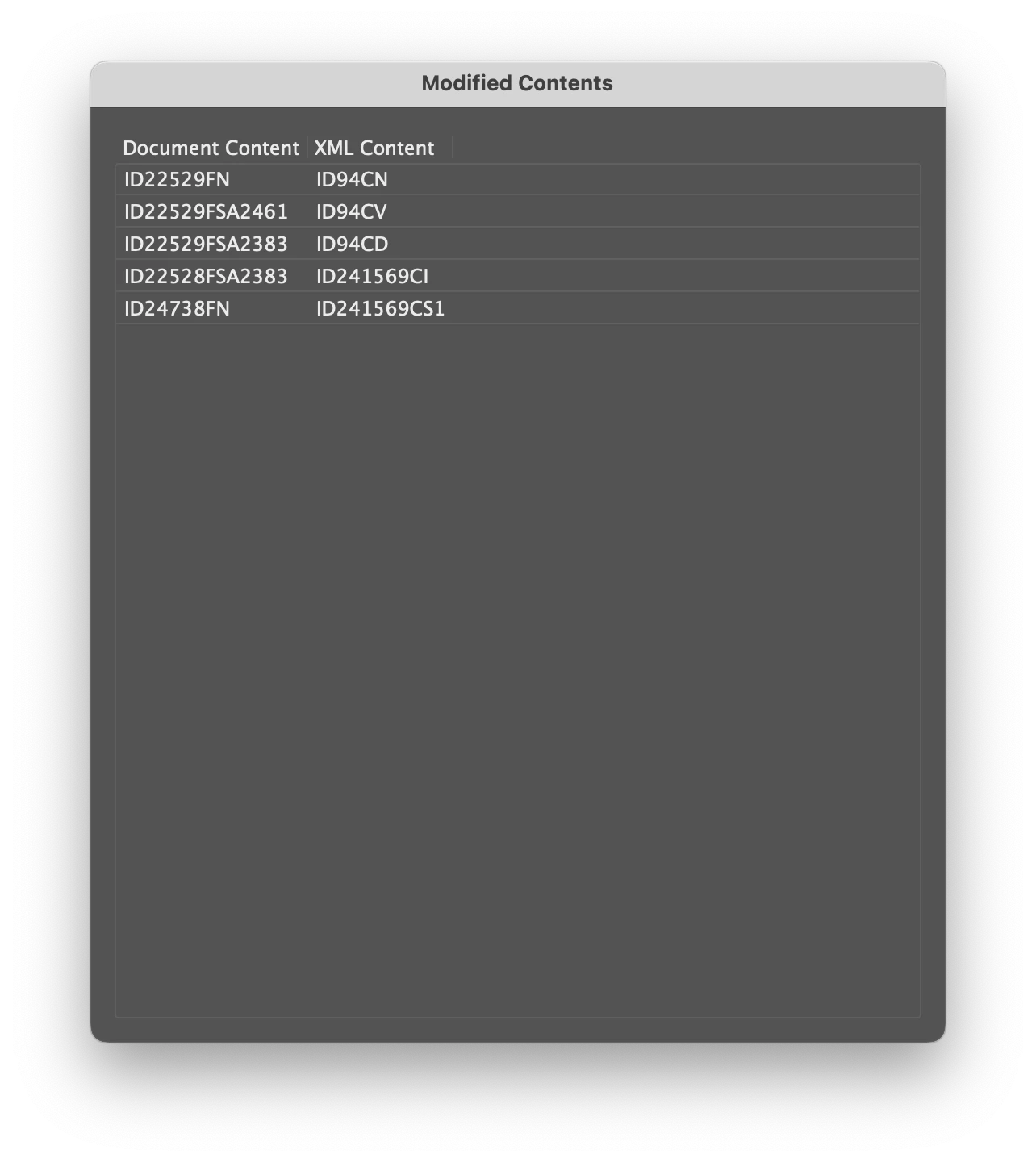
This is the dialog section. The problem here was that you were running through the entire "k" loop first, and then running through the "l" loop on the last item only.

But I suspect there are other problems, because (see the writelns in the code above) there are way more elements in the getXMLMSIDvalue array than the getMSIDvalue array. I suspect they won't match up.

Anyway, hope this moves you forward with your script.

- Mark

Screenshot 2022-11-01 at 09.41.32.png

Translate
Report
Community guidelines
Be kind and respectful, give credit to the original source of content, and search for duplicates before posting. Learn more
community guidelines
Community Expert ,
Nov 30, 2022 Nov 30, 2022
LATEST

Hi @MonishaRajendran 

Was this resolved?

Translate
Report
Community guidelines
Be kind and respectful, give credit to the original source of content, and search for duplicates before posting. Learn more
community guidelines