- Home
- InDesign
- Discussions
- Re: Adding Camera metadatas as variables
- Re: Adding Camera metadatas as variables
Adding Camera metadatas as variables

Copy link to clipboard
Copied
Hello, as mentioned, I would like to be able to insert some data from a series of photographs (about 1000) automatically, within the Indesign captions.
Currently I am able to recover some data from these (color profile, size, name of the picture etc.) via text variables, while I cannot recall others (some information on the lens used, shutter speed etc.) although present in the metadata of the photographs. Furthermore, I can't change the format of the Creation date, and I can't get the shooting time (also present in the info panel).
Can someone help me? Many thanks!


 27
Replies
27
27
Replies
27


Copy link to clipboard
Copied
ID's caption feature is one of the strangest animals in the Adobe app suite. It's highly optimized for a subset of users who work within a fully managed environment like a magazine or catalog shop, where every photo is pre-processed to have certain metadata including a generic caption, so that the Caption function can go biff-bam-boom, automatic caption, move on.
It's between limited, clumsy and useless for everyone else, including anyone who might need other meta or EXIF data.
I'm not even sure it could be scripted unless there's an open-format EXIF data reading function available; that is; I don't thnk you can script what ID itself can't read.
Copy link to clipboard
Copied
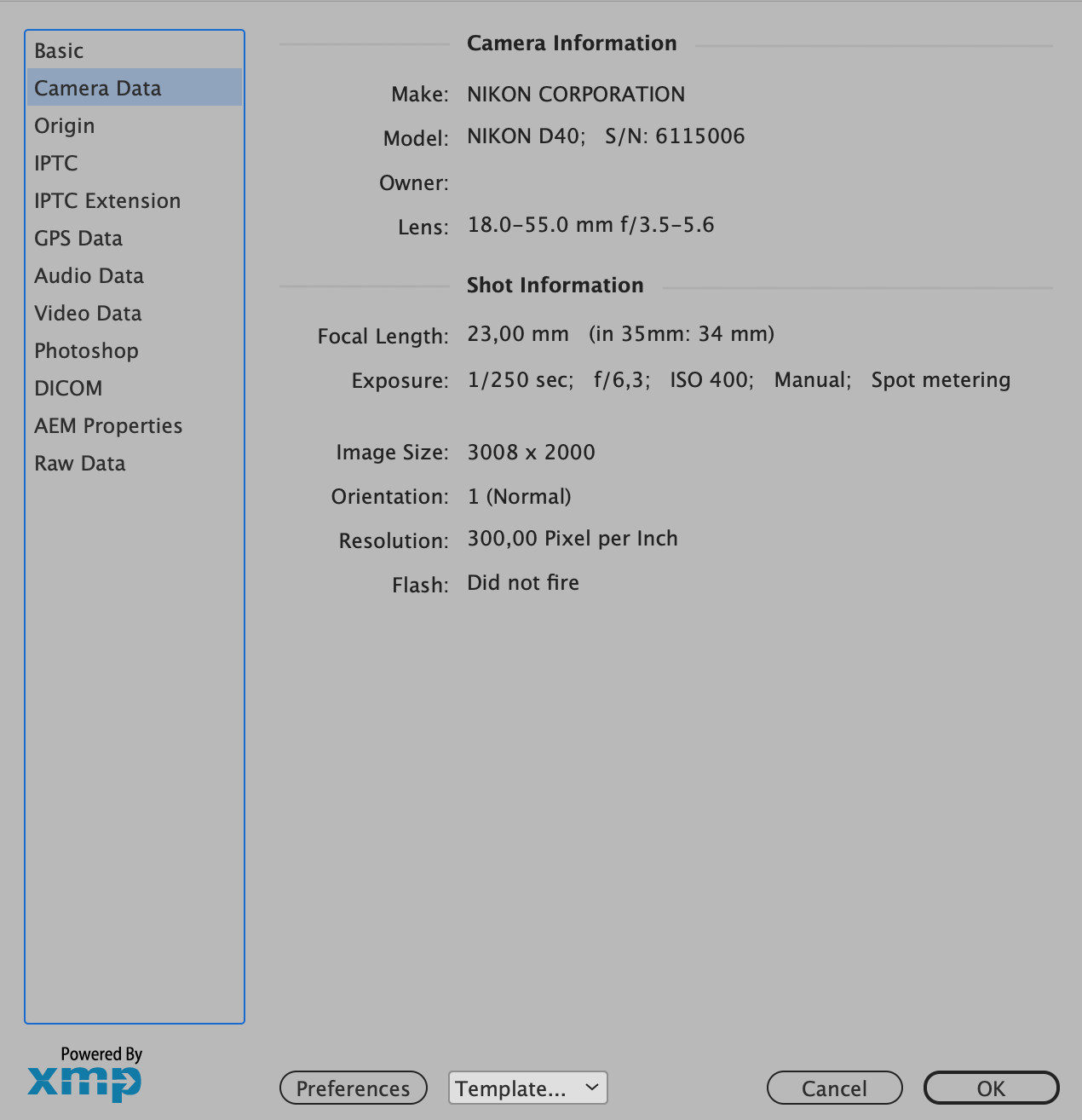
ID can read it! See image attached, but cannot translate it into variables, it seems...

Copy link to clipboard
Copied
ID can read it! See image attached, but cannot translate it into variables, it seems...
I may have misunderstood—you are not using the Caption Setup/Generate Cation tool?
It is possible to get a placed image’s EXIF via scripting. This example gets the creation date value (DateTimeOriginal property) in Photoshop for a selected image:
var exifp = "DateTimeOriginal"
var b;
var img = app.documents[0].selection[0];
if (img.constructor.name == "Image") {
    getEXIF(img.itemLink.filePath, exifp);
    alert(exifp + ": " + b)
};

/**
* Opens Photoshop and runs psScript
* @ param File path to open
* @ param the EXIF property to get
* @ return EXIF value
*/

function getEXIF(pa, n){
    var bt = new BridgeTalk();
    bt.target = "photoshop";
    bt.body = psScript.toString() + "\rpsScript('"+pa+"', '"+n+"');";
    bt.onResult = function(resObj) { b = resObj.body}
    bt.onError = function( inBT ) { alert(inBT.body); };
    bt.send(10);

    //the photoshop script to run on the opened file
    function psScript(pa, n) {
        var f = open (File(pa));
        var xmp = new XMPMeta(f.xmpMetadata.rawData);
        return xmp.getProperty(XMPConst.NS_EXIF, n)
    }
}


Copy link to clipboard
Copied
It can be done by opening image in Photoshop and reading EXIF data there.
Copy link to clipboard
Copied
Ok... but doing this for more than 1500 photos could be annoying...
Copy link to clipboard
Copied
Copy link to clipboard
Copied
Ok... but doing this for more than 1500 photos could be annoying...
By @pirullo

Done - you just need to confirm if you work on a PC...

TextFrame at the bottom left is filled with info extracted for the highlighted Rectangle - as per @rob day's post.
Now it's just a case of digging out info you want - and placing it wherever you want.
Copy link to clipboard
Copied
while I cannot recall others (some information on the lens used, shutter speed etc.)
Hi @pirullo , I can get Lens and Shutter Speed for Live Cation Metadata. Is your XMP capture from Photoshop or InDesign? Here I’m getting the Lens:

Copy link to clipboard
Copied
my xmp is from indesign, Lens and other information seems to be there, but when I call them via text variables or caption it doesn't return them all...
Copy link to clipboard
Copied
The XMP from InDesign’s File>File Info... would be for the InDesign Document itself, not the linked images. The Link Info panel lists the XMP info that InDesign can see and you can copy that info via the Link panel’s Copy Info:

Copy link to clipboard
Copied
hello here i am again...
still trying to obtain EXIF data from 2000 photos via Indesign caption.
As you can see in the screenshot I don't understand why I cannot recall datas from certain pictures, even if they are present in the File info box.
I have a set of old photos, shot in 2013. I'm working on a big book with tousand of them.
I found out that pictures exported from NEF to JPG a lot of years ago (2013) are fine, I can recall almost every shot data.
If I try to export others now it doesn't work, I cannot see data with live captions.
As you understand pictures are from the same set, same camera, etc. so I guess it's a matter of software or exportation?
I'm using Photoshop 2020 and Bridge 2022 without any result.
Copy link to clipboard
Copied
Copy link to clipboard
Copied
yes but doesn't affect the issue anyway
Copy link to clipboard
Copied
Can you share some of the "good" and "bad" images?
Please click my nickname if you prefer to do it privately.
Copy link to clipboard
Copied
Copy link to clipboard
Copied

Copy link to clipboard
Copied
Why is this happening? Software version?
Sent from Gmail Mobile
Copy link to clipboard
Copied
Copy link to clipboard
Copied
Both ways don’t work… does anyone have Lightroom or similar?
Sent from Gmail Mobile
Copy link to clipboard
Copied
On another note, is it possible to determine how the good one was exported? Maybe the xmp says this
Copy link to clipboard
Copied


Copy link to clipboard
Copied


Copy link to clipboard
Copied
Haven't figured out - yet 😉 - how to get to the raw data through InDesign - but not a problem through Photoshop:

Copy link to clipboard
Copied
Haven't figured out - yet 😉 - how to get to the raw data through InDesign [...]

And done 😄 But now I need to get the list of all available Namespaces and Paths / Keywords - and add to IDT...
Everything from there:
https://developer.adobe.com/xmp/docs/XMPNamespaces/
and from other places - like this one:
And there is A LOT to add...
But - like everything in IDT - go big or go home 😉

-
- 1
- 2

Get ready! An upgraded Adobe Community experience is coming in January.
Learn more
 AdChoices