Exit
  • Global community
    • Language:
      • Deutsch
      • English
      • Español
      • Français
      • Português
  • 日本語コミュニティ
  • 한국 커뮤니티
0

adding empty lines (or paragraphs)

Engaged ,
Oct 26, 2012 Oct 26, 2012

Hi,

I'm wondering if it's possible to script this:

When I select a piece of text, the info panel gvies me the number of lines selected. What I then have to do in the opposite frame is adding the same number of empty lines, so that the next paragraph lines up with the paragraph in the other frame.

Why? In one frame I have "old text" in the other frame I have the "new" text and all the paragraphs have to line up (on the even pages the french text is put, on the odd pages the Dutch equivalent). Using tables is not an option due to previous automatisations.

What I would like to have is, when I have put an insertion point (with the type tool) in the opposite frame, a script which asks for the numbers of lines to be added (info panel), and adds that number at the insertion point of that frame. If the script would be able to give me a dialog box with the number of lines already filled in (but editable), even better.

Simply put, if the info panel shows me 40 lines, I have to put 40 "enters" (with the same parastyle) in the opposite frame to align both next paragraphs.

If there's another solution then a script, I'd loved to hear it too.

thnkx

TOPICS
Scripting
1.4K
Translate
Report
Community guidelines
Be kind and respectful, give credit to the original source of content, and search for duplicates before posting. Learn more
community guidelines
Community Expert ,
Oct 26, 2012 Oct 26, 2012

Interesting problem. You can do it automatically, though you can't then insert paragraphs because you then (obviously) change the number of paragraphs and you end up with different numbers of paragraphs in the two frames. You might get around that by inserting forced line breaks, but a much neater method is to add space after the shorter paragraph. It's also much quicker.

It requires named text frames, though. Open the Layers panel (F7) and name the text frame with Dutch text NL, the one with French text, FR. then place the cursor in a paragraph and run the script.

if (app.selection.length > 0 && app.selection[0] instanceof InsertionPoint)

    {

    this_par = app.selection[0].paragraphs[0];

    this_par_index = get_index (this_par);

    other_par = other_frame (this_par.parentTextFrames[0]).parentStory.paragraphs[this_par_index];

    this_BL = this_par.lines[-1].baseline;

    other_BL = other_par.lines[-1].baseline;

    if (this_BL < other_BL)

        this_par.spaceAfter = other_BL - this_BL

    else

        if (this_BL > other_BL)

            other_par.spaceAfter = this_BL - other_BL

    }

function get_index (p)

    {

    return p.index == 0 ? 0 : p.parentStory.insertionPoints.itemByRange (0, p.index).paragraphs.length;

    }

function other_frame (frame)

    {

    var name = (frame.name == 'NL' ? 'FR' : 'NL');

    return app.selection[0].parent.parent.textFrames.item (name)

    }

Peter

Translate
Report
Community guidelines
Be kind and respectful, give credit to the original source of content, and search for duplicates before posting. Learn more
community guidelines
Engaged ,
Oct 26, 2012 Oct 26, 2012
LATEST

Great effort, works fine, but ... we don't have always the same numbers of paragraphs on both sides. I didn't specify this enough. Let me explain it a bit more:

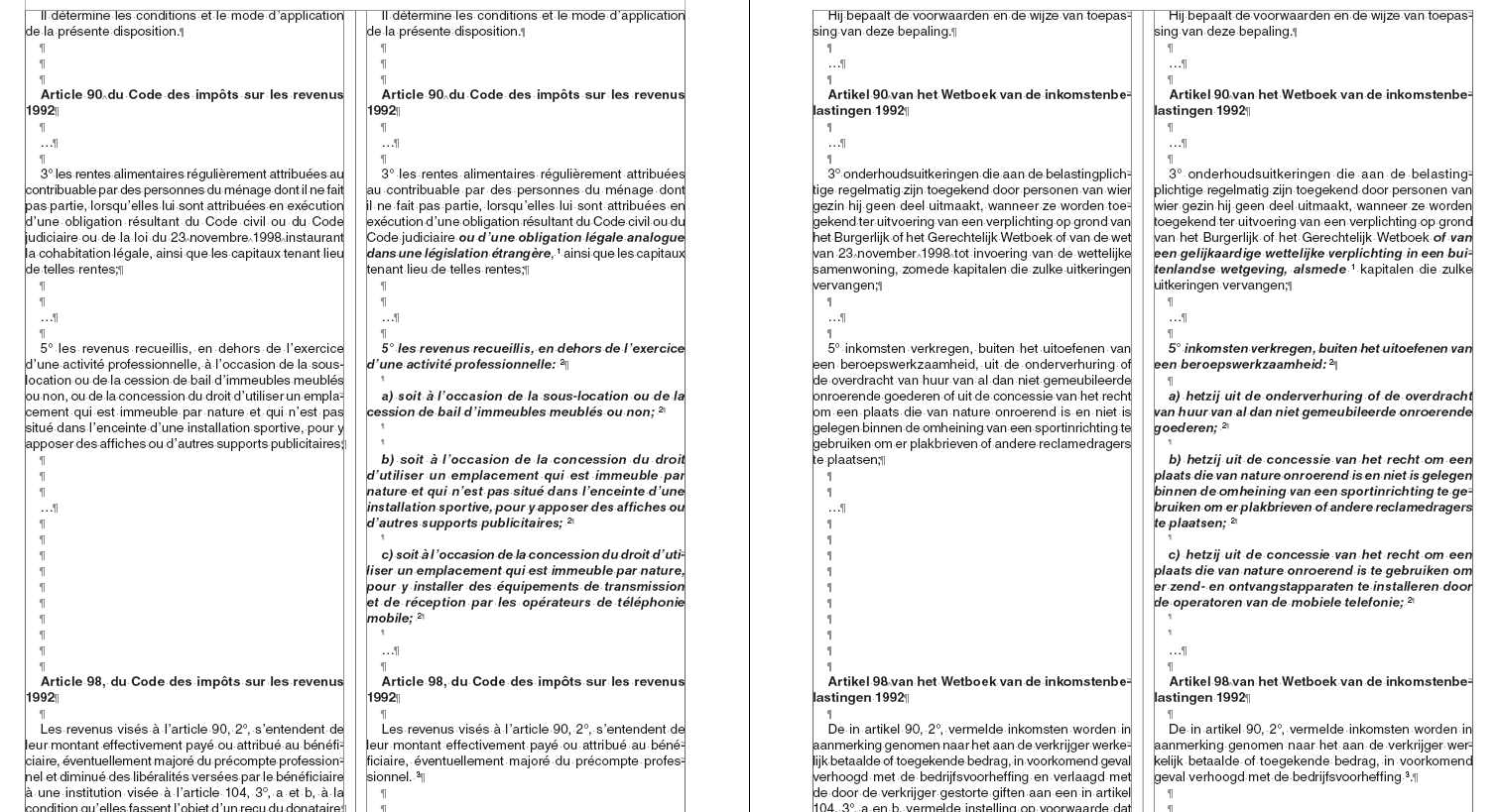
Gov's doc have sometime coordinated texts which have to be alined vertically, "old" french - "new" french and the same goes for the Dutch part. This gives us 4 columns, 2 french and 2 dutch.

They don't always have the same number of paragraghs. So, we need to get the same number of "returns" and not "the better option - space".

Attached a screenshot of the type of document (result done by hand).

The problem starts with the table function in Word (cells have the same lenght; but not the same number of returns). As said, due to automatisation we cannot use the table function (too limited also) in Indesign.

It's the convert to text which causes all the problems.

Thankx for the efforts made, we can use the script above for other purposes already.

frames.jpg

Translate
Report
Community guidelines
Be kind and respectful, give credit to the original source of content, and search for duplicates before posting. Learn more
community guidelines