


- Home
- InDesign
- Discussions
- Re: Adding keyboard shortcuts to menu items create...
- Re: Adding keyboard shortcuts to menu items create...

Copy link to clipboard
Copied
Dear all,
I wanted to create a custom menu by script and assign (on the numeric keyboard) shortcuts to the menu items so that I could run one script with small variations instead of modifying a few (currently seven) separate scripts and assigning a shortcut to each of them. But now I realized that custom menus aren’t visible from the “Keyboard Shortcuts” dialog box. (What a disappointment!)
Am I missing something here? Or, is there a workaround?
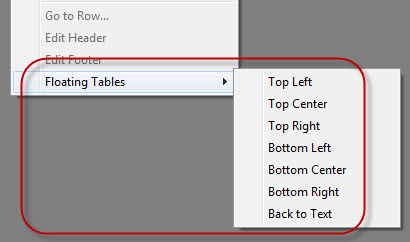
My idea was to trigger the main script -- Floating Tables.jsx – from the menu item handler passing the menu title as argument.
var tableMenu = app.menus.item("$ID/Main").submenus.item("Table");

// "Floating Tables" sub-menu
try {
    var subMenu = tableMenu.submenus.item("Floating Tables");
    subMenu.title;
}
catch(err) {
    var subMenu = tableMenu.submenus.add("Floating Tables", LocationOptions.AT_END);
}

var topLeftAction = app.scriptMenuActions.add("Top Left");
var topLeftListener = topLeftAction.eventListeners.add("onInvoke", FloatingTablesHandler);
var topLeftMenuItem = subMenu.menuItems.add(topLeftAction);

var topCenterAction = app.scriptMenuActions.add("Top Center");
var topCenterListener = topCenterAction.eventListeners.add("onInvoke", FloatingTablesHandler);
var topCenterMenuItem = subMenu.menuItems.add(topCenterAction);

var topRightAction = app.scriptMenuActions.add("Top Right");
var topRightListener = topRightAction.eventListeners.add("onInvoke", FloatingTablesHandler);
var topRightMenuItem = subMenu.menuItems.add(topRightAction);

var bottomLeftAction = app.scriptMenuActions.add("Bottom Left");
var bottomLeftListener = bottomLeftAction.eventListeners.add("onInvoke", FloatingTablesHandler);
var bottomLeftMenuItem = subMenu.menuItems.add(bottomLeftAction);

var bottomCenterAction = app.scriptMenuActions.add("Bottom Center");
var bottomCenterListener = bottomCenterAction.eventListeners.add("onInvoke", FloatingTablesHandler);
var bottomCenterMenuItem = subMenu.menuItems.add(bottomCenterAction);

var bottomRightAction = app.scriptMenuActions.add("Bottom Right");
var bottomRightListener = bottomRightAction.eventListeners.add("onInvoke", FloatingTablesHandler);
var bottomRightMenuItem = subMenu.menuItems.add(bottomRightAction);

var backToTextAction = app.scriptMenuActions.add("Back to Text");
var backToTextListener = backToTextAction.eventListeners.add("onInvoke", FloatingTablesHandler);
var backToTextMenuItem = subMenu.menuItems.add(backToTextAction);

function FloatingTablesHandler(event) {
    var args = [event.parent.title];
    app.doScript(mainScriptFile, ScriptLanguage.JAVASCRIPT, args, UndoModes.ENTIRE_SCRIPT, "\"" + scriptName + "\" Script");
}
The main script reads the argument like so:
alert("The argument -- " + args[0]);
If memory serves me right, Rorohiko’s APID ToolKit can create “Shortcut-assignable” menus. I don't remember this for sure at the moment because made such menus long ago.
BTW the question was asked here, but it wasn’t answered.
Regards,
Kasyan


 1 Correct answer

Hi Kasyan,
If what you're asking is whether it's possible to assign a keyboard
shortcut in the regular way to a menu item created by a script, then
sure, of course you can.
Add the menu item, and then assign whatever k.shortcut you want --
you'll find your menu items under the "Scripts" category in the keyboard
shortcuts dialog.
Ariel

 20
Replies
20
20
Replies
20

Copy link to clipboard
Copied
Hi Kasyan,
If what you're asking is whether it's possible to assign a keyboard
shortcut in the regular way to a menu item created by a script, then
sure, of course you can.
Add the menu item, and then assign whatever k.shortcut you want --
you'll find your menu items under the "Scripts" category in the keyboard
shortcuts dialog.
Ariel
Copy link to clipboard
Copied
Thank you very much, Ariel!
It's so-o-o obvious!  How could I miss it? For sure, I grow old and become senile.
I'm sorry for the late reply: I've been too busy and just got back to scripting.
Thank you again.
Kasyan
Copy link to clipboard
Copied
Now I encountered another problem: I can assign shortcuts to custom menu items but InDesign doesn't keep them after restart so every time I start up/restart Indy, I have to assign them again.
I checked out the indk-file located in the "InDesign Shortcut Sets" folder and the assigned shortcuts are there -- even after restart:

However, it isn't used when the menu is loaded on start up.
Any ideas?
Kasyan

Copy link to clipboard
Copied
Hi Kasyan
You need to set up indesign that it loads the correct shortcut set.
I think you should be able to do this through the UI when all the documents are closed and then close indesign when all the documents are close.
Then next time it opens it should be ok.
HTH
Trevor
Copy link to clipboard
Copied
Thank you for your reply, Trevor.
The correct set (my custom) is always loaded. I checked it. But the shortcuts assigned to the menu items created by script disappear after restart.
I made the same menu with APID ToolKit and the shortcuts assigned to this menu are in place after restart. I'm going to generate a small plug-in and use it instead of the regular start up script for creating menu. If it works, I'll post the code.
Kasyan

Copy link to clipboard
Copied
Hi Kaysan,
Did you tried putting your script in to the startup folder, so that the menu items are created on startup and available?
If you already tried this and still facing the issue. Then the problem may be the shortcut set is loaded before the menu item is created.
Thanks
Green4ever
Copy link to clipboard
Copied
Hi Green4ever,
Yes, the script was in the startup folder. As far as I know, that's the only way to use custom menus.
Kasyan

Copy link to clipboard
Copied
Hi Kasyan,
Have you take a look to: Indiscripts :: How to Create your Own InDesign Menus, written by Marc Autret?
Copy link to clipboard
Copied
Thanks, Obi-wan Kenobi.
It's an interesting article, but it doesn't solve this particular problem.
Kasyan
Copy link to clipboard
Copied
Hi Kasyan,
Why not write a little script that would create keyboard shortcuts and the user manually launch after starting Indy?
As when we start a car: first one goes in, then the engine is started! without this start, the car will not go far !!!! 
Copy link to clipboard
Copied
Unfortunately It's impossible to do this by script. 
— Kas


Copy link to clipboard
Copied
@Kayan – I see the same problems with keyboard shortcuts sets. After a restart of InDesign the assigned KBSC of a menu generated by a startup script is removed.
I found no solution to that. Just a hint how we can edit the indk file, but this will not help at all:
Make a new KBSC set. Assign a keyboard shortcut to your startup script.
Go to preferences and open the new indk file in a text editor. Find the menu name for your menu action and look at the code:
(I did this with a startup script by Gerald Singelmann)
Assign a keyboard shortcut in the UI.
The code for the KBSC is defined in XML notation like that:
<shortcut>
<action-id value="0xff002000 + 1" name="KBSCE Scripts menu:.Group Remembers Layers"></action-id>
<context>DefaultContext</context>
<string>Ctrl+Cmd+G</string>
</shortcut>
As long as the session persists this is working.
But the next time InDesign will be restarted the the value of action-id will be changed and the KBSC cannot be found in the GUI.
Uwe
Copy link to clipboard
Copied
Hi Uwe,
I've solved the problem by creating the menu with Rorohiko's APID ToolKit. Now keyboard shortcuts assigned to menu items (In the "Active Page Item" product area) don't disappear after restart. The APID menu looks almost the same way as the one created with InDesign's "built-in" scripting. The only difference: no separator between menu items. (Maybe I haven't found how to do this yet.)
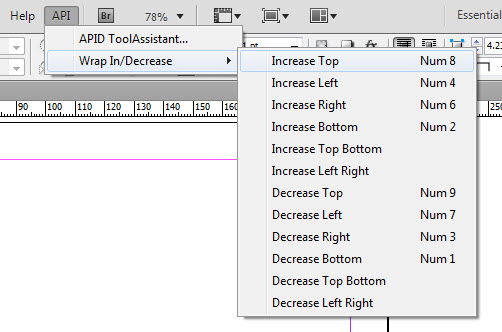
I'll try to post the code in the next post. At the moment, when I'm answering to your post, I can't find the "Use Advanced Editor" link. A while ago all controls on the forum without (or, to be more precise against) my will became Russian and that's unbearable to me.
Regards,
Kasyan
P.S.
It turns out to get to the advanced editor I have to post the message and then edit it. What a user friendly forum software!  Argh!
Argh!
Here's the code:
if (theItem.eventCode == "enableMenus") {
    theItem.tempDataStore = 1;
    var mainScriptFile = new File(app.filePath + "/Scripts/Scripts Panel/Wrap Increase-Decrease/Wrap Increase-Decrease.jsx");
}
else if (theItem.eventCode.substr(0, 4) == "menu") {
    var args = [theItem.eventCode];
    app.doScript(mainScriptFile, ScriptLanguage.JAVASCRIPT, args);
}
else if (theItem.eventCode == "docLoaded") {
    app.registerMenuItem("menuIncTop","Main:0x90B50kActivePageItemMenuKey:Wrap In/Decrease:Increase Top");
    app.registerMenuItem("menuIncLeft","Main:0x90B50kActivePageItemMenuKey:Wrap In/Decrease:Increase Left");
    app.registerMenuItem("menuIncRight","Main:0x90B50kActivePageItemMenuKey:Wrap In/Decrease:Increase Right");
    app.registerMenuItem("menuIncBottom","Main:0x90B50kActivePageItemMenuKey:Wrap In/Decrease:Increase Bottom");
    app.registerMenuItem("menuIncTopBottom","Main:0x90B50kActivePageItemMenuKey:Wrap In/Decrease:Increase Top Bottom");
    app.registerMenuItem("menuIncLeftRight","Main:0x90B50kActivePageItemMenuKey:Wrap In/Decrease:Increase Left Right");

    app.registerMenuItem("menuDecTop","Main:0x90B50kActivePageItemMenuKey:Wrap In/Decrease:Decrease Top");
    app.registerMenuItem("menuDecLeft","Main:0x90B50kActivePageItemMenuKey:Wrap In/Decrease:Decrease Left");
    app.registerMenuItem("menuDecRight","Main:0x90B50kActivePageItemMenuKey:Wrap In/Decrease:Decrease Right");
    app.registerMenuItem("menuDecBottom","Main:0x90B50kActivePageItemMenuKey:Wrap In/Decrease:Decrease Bottom");
    app.registerMenuItem("menuDecTopBottom","Main:0x90B50kActivePageItemMenuKey:Wrap In/Decrease:Decrease Top Bottom");
    app.registerMenuItem("menuDecLeftRight","Main:0x90B50kActivePageItemMenuKey:Wrap In/Decrease:Decrease Left Right");
}
Here are the events listened by the plug-in: enableMenus, menu*, docLoaded
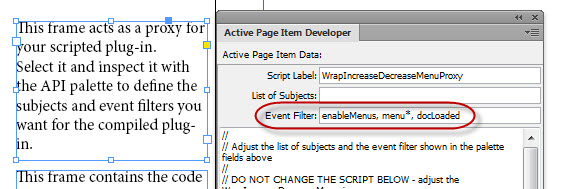
P.P.S.
In the APID menu I use evenCode instead of menu title/name (in a regular menu).

Copy link to clipboard
Copied
Hello,
To get a separator menu item, use the '-' character, I think.
P.
Copy link to clipboard
Copied
Kasyan
You need to reset you site preferences on firefox you can do this through the clear history tab
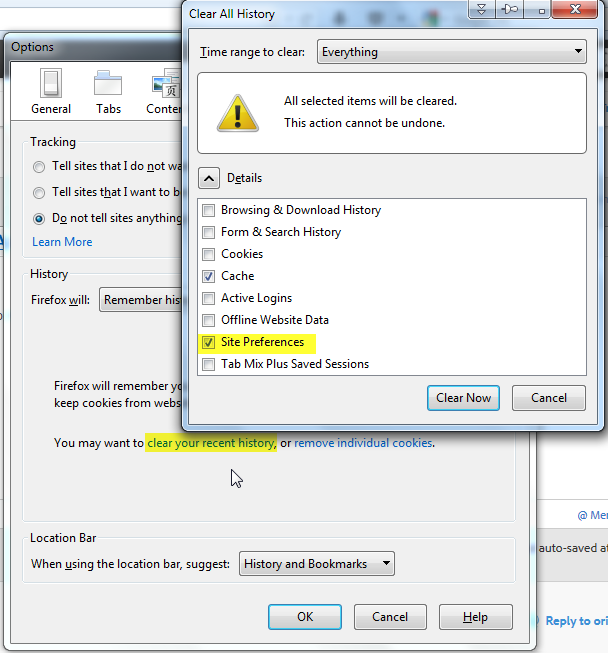
I might even solve your Russian problem, but certainly not all of your Russian problems.
Trevor
Copy link to clipboard
Copied
Hi Trevor,
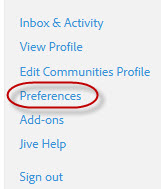
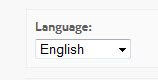
I've found the setting: Preferences > Language.
Kasyan
Copy link to clipboard
Copied
The screenshot I posted was mainly for sorting out the advanced editor, I gather you got that fixed.
Copy link to clipboard
Copied
Yes, it works now. Thanks, Trevor.
— Kas

Copy link to clipboard
Copied
HI Good morning..........
I have a some problem at my script please help i want find at bold text change to apply character style please help me
app.findTextPreferences = NothingEnum.nothing;
app.changeTextPreferences = NothingEnum.nothing;
app.findTextPreferences.appliedFont = app.fonts.item = "ZapfCalligr BT Bold";
app.changeTextPreferences.appliedCharacterStyle = "Bold";

Copy link to clipboard
Copied
Hi mac magesh,
Please don't revive threads that have had no activity since so long, the last comment on this thread has been made in 2014. Also the query you posted is not related in any way with the thing discussed in this thread. On the flip side your query will not get any attention when posted on such an old thread.
-Manan


Get ready! An upgraded Adobe Community experience is coming in January.
Learn more
 AdChoices