

Answered
Adding Paragraph Style Properties Causing Errors
Hi Experts, im trying to add paragraph styles via scripting, it works fine but when i add (next style) or (based on) it cause error (invalid parameter) i can set off (next style) in first one! and let based on work or reverese adding the styles but i think there are better solution , i think this happened because the script not adding the paragraph styles yet!, but how to avoid this problem ? and thanks a lot in advance , here is the code :
//Adding Paragraph Styles by Script
var myDoc = app.activeDocument;

    //Adding First Style
    var myParagraphPoemStyle1 = myDoc.paragraphStyles.item("Style1" );
    !myParagraphPoemStyle1.isValid && myParagraphPoemStyle1 = myDoc.paragraphStyles.add({
        name: "Style1",
        nextStyle: myDoc.paragraphStyles.item("Style2"),
    })

     //Adding Next Style
    var myParagraphPoemStyle2 = myDoc.paragraphStyles.item("Style2" );
    !myParagraphPoemStyle2.isValid && myParagraphPoemStyle2 = myDoc.paragraphStyles.add({
        name: "Style2",
        basedOn : myDoc.paragraphStyles.item("Style1"),
    })
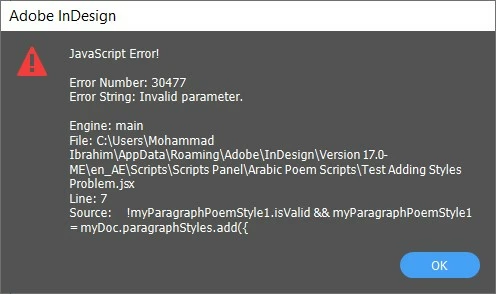
the error message :
 AdChoices