Exit
  • Global community
    • Language:
      • Deutsch
      • English
      • Español
      • Français
      • Português
  • 日本語コミュニティ
  • 한국 커뮤니티
0

Adding Two list in Running Figure Numbering

Guest
Apr 17, 2017 Apr 17, 2017

Hi All,

I am creating a running figure numbering as Figure 2-1, Figure 2-2.......Figure 2-5. After these Figure numbers I added some figure caption like Figure 2-6(a), Figure 2-6(b) and Figure 2-6(c), i removed these figure caption from automatic numbering. Now I again want to create automatic numbering but it should start like from Figure 2-7. But as soon as I am changing style to figure caption it picks up from Figure 2-6 where I last ended the automatic numbering. If anyone could provide suggestion would very thankful

167
Translate
Report
Community guidelines
Be kind and respectful, give credit to the original source of content, and search for duplicates before posting. Learn more
community guidelines
Guide ,
Apr 18, 2017 Apr 18, 2017
LATEST

Hi

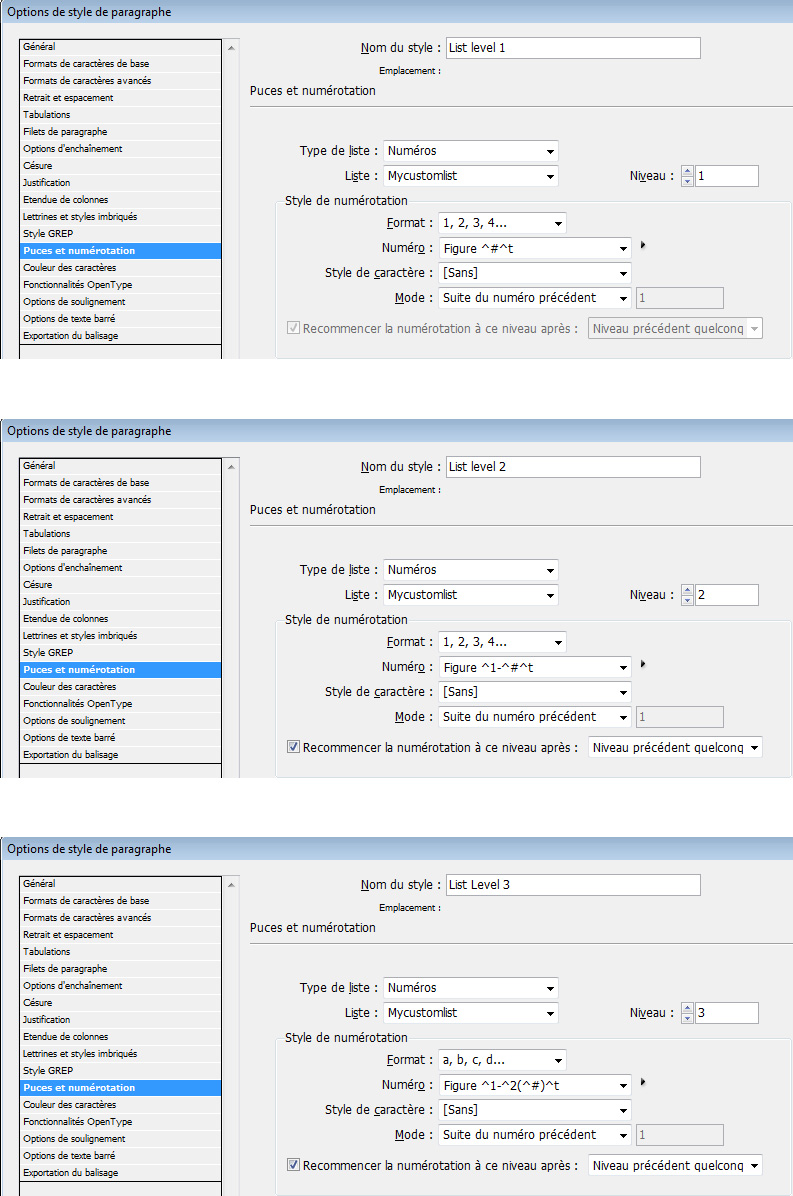
If I understand your request correctly, you just need 3 levels, all automatically numbered and based on the same list (Mycustomlist in the example below):

level2.jpg

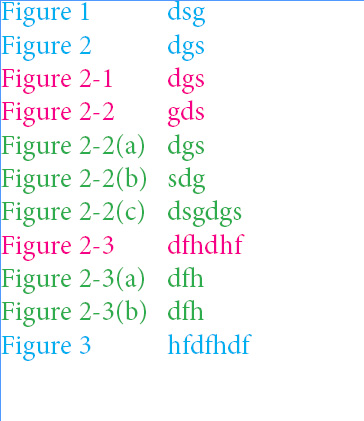
Result:

result.jpg

Translate
Report
Community guidelines
Be kind and respectful, give credit to the original source of content, and search for duplicates before posting. Learn more
community guidelines