Exit
  • Global community
    • Language:
      • Deutsch
      • English
      • Español
      • Français
      • Português
  • 日本語コミュニティ
  • 한국 커뮤니티
0

Beginner CS4 - bullets, hanging indents, second line probs

Guest
Feb 18, 2011 Feb 18, 2011

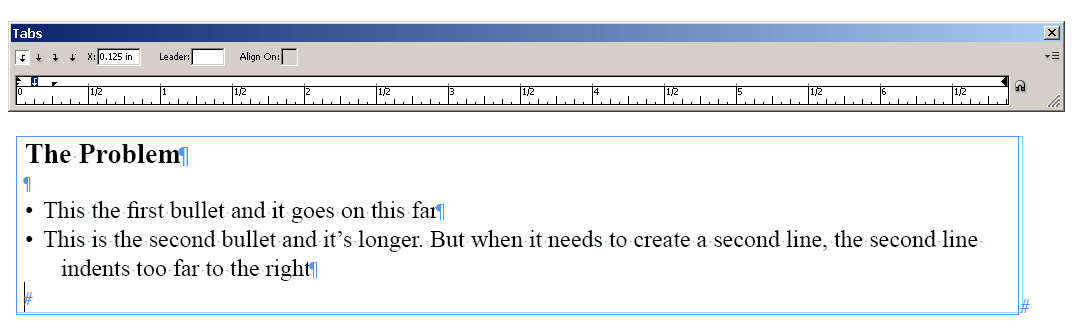
I've been wrestling with a simple problem and despite online instruction, can't get my bullets to line up correctly. I set up bullets with a left indent of .25", first line indent of -.25 in and a tab set at .125" to make the distance closer between bullets and text. But unless I use the default settings and eliminate my tab -- which creates a too big distance between bullet and text, the second line refuses to hang properly -- it's indenting more to the right than the first line.
bullets.jpg

I'm not a very experienced user, sorry to say, so thanks for any help.

20.7K
Translate
Report
Community guidelines
Be kind and respectful, give credit to the original source of content, and search for duplicates before posting. Learn more
community guidelines
Mentor ,
Feb 18, 2011 Feb 18, 2011

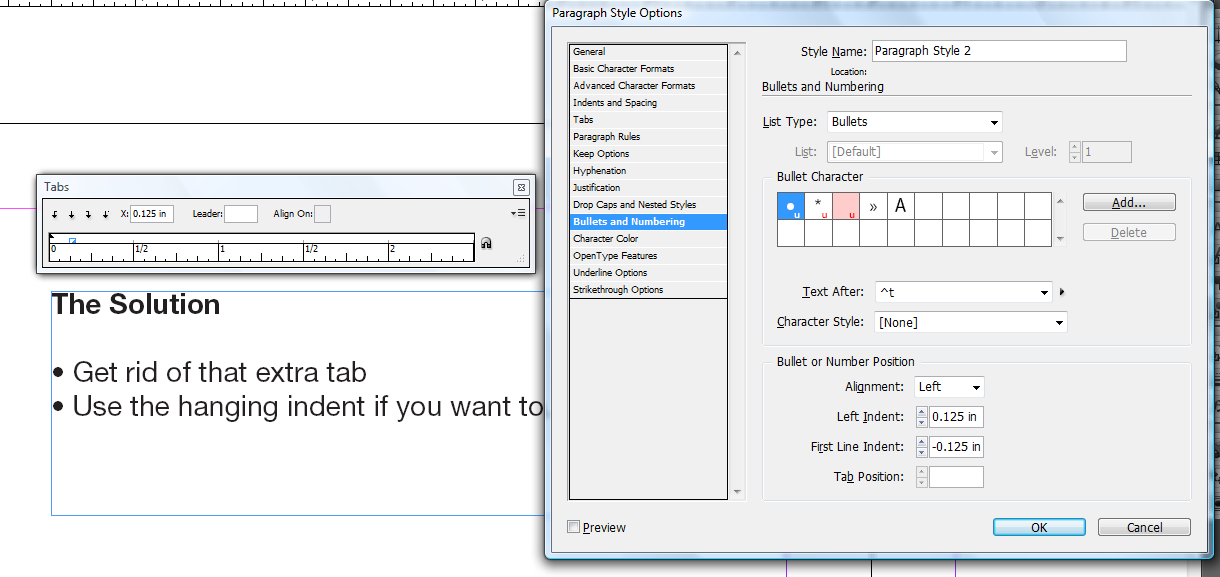
That extra tab combined with the hanging indent is tripping you up.

Try to get used to setting a bullet style from the Paragraph Styles panel.

Tab Bullets Shot.png

Translate
Report
Community guidelines
Be kind and respectful, give credit to the original source of content, and search for duplicates before posting. Learn more
community guidelines
Guest
Feb 18, 2011 Feb 18, 2011

I've tried this, but I get an error message: Invalid indent value. Indents cannot extend outside text frame. It's funny, I'm using as a template a file we did a year  ago where the bullets did what they were supposed to. I've just cut a few tables from it and changed the text.  Thanks if you can explain what I'm doing wrong (besides everything!).

Translate
Report
Community guidelines
Be kind and respectful, give credit to the original source of content, and search for duplicates before posting. Learn more
community guidelines
Community Expert ,
Feb 18, 2011 Feb 18, 2011

The error message you got indicates that you tried to set the negative indent before the positive indent. Do it the other way around.

Bob

Translate
Report
Community guidelines
Be kind and respectful, give credit to the original source of content, and search for duplicates before posting. Learn more
community guidelines
New Here ,
Feb 18, 2011 Feb 18, 2011
LATEST

Bingo!  Thanks -- and here I was fussing for hours.  Should have come here sooner.

Translate
Report
Community guidelines
Be kind and respectful, give credit to the original source of content, and search for duplicates before posting. Learn more
community guidelines
Community Expert ,
Feb 18, 2011 Feb 18, 2011

Anyone new to InDesign who's serious about learning it should buy Sandee Cohen's Visual Quick Start Guide: http://amzn.to/erzJBL

Best $20 you'll ever spend.

Bob

Translate
Report
Community guidelines
Be kind and respectful, give credit to the original source of content, and search for duplicates before posting. Learn more
community guidelines