Exit
  • Global community
    • Language:
      • Deutsch
      • English
      • Español
      • Français
      • Português
  • 日本語コミュニティ
  • 한국 커뮤니티
0

Change any paragraph style by script

New Here ,
Mar 26, 2011 Mar 26, 2011

Hi !!!

Is it possible change a selected paragraph with any paragraph style by script?

Example:

My paragraph style is:

Font: Garamond, size 7pt, color: black, align justfy (or any selected paragraph style)

Script to set the selected paragraph with paragraph style describe above to:

Font: Humanist, sise 8pt, color: black, align justfy

Drop caps: number of lines: 3, one or more caracteres: 2

TOPICS
Scripting
1.4K
Translate
Report
Community guidelines
Be kind and respectful, give credit to the original source of content, and search for duplicates before posting. Learn more
community guidelines

correct answers 1 Correct answer

Explorer , Mar 30, 2011 Mar 30, 2011

Thanks for your script, Foxy Ford!

Try this

var myPara = app.selection[0].paragraphs[0];
var myChar = myPara.characters[0];
myPara.dropCapCharacters = 1;
myPara.dropCapLines = 2;
myPara.dropcapDetail = 1;
myPara.firstLineIndent = 0;

myPara.dropCapStyle = "My Style"

// My Syle must be created into Character Style, of course.

Translate
Explorer ,
Mar 29, 2011 Mar 29, 2011

Of course you can.

In paragraph it's possible to set every property, check the reference guide.

If you prefer you can set the appliedParagraphfstyle.

In this way you can apply an existing paragraph style and set all the properties you want in one shot.

Translate
Report
Community guidelines
Be kind and respectful, give credit to the original source of content, and search for duplicates before posting. Learn more
community guidelines
New Here ,
Mar 29, 2011 Mar 29, 2011

This is my problem.

I´m looking for this set property, but I dont find anything about it.

Can you help me?

Thanks anyway!

Translate
Report
Community guidelines
Be kind and respectful, give credit to the original source of content, and search for duplicates before posting. Learn more
community guidelines
New Here ,
Mar 29, 2011 Mar 29, 2011

I got it.

But there is a trouble.

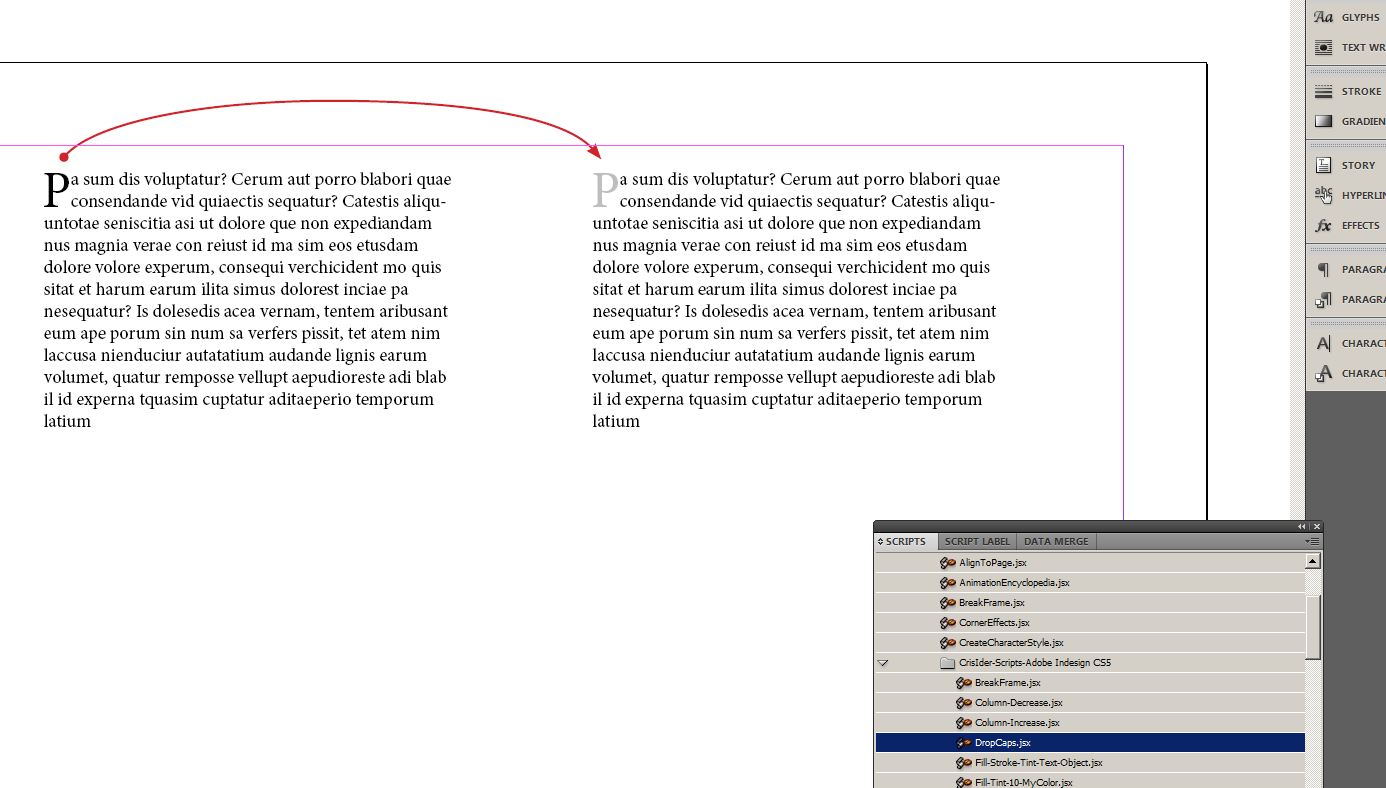
How can I change into this script the first caracter dropcaps to fill tint 30% Black?

var myPara = app.selection[0].paragraphs[0];
var myChar = myPara.characters[0];
myPara.dropCapCharacters = 1;
myPara.dropCapLines = 2;
myPara.dropcapDetail = 1;
myPara.firstLineIndent = 0;

Capturar.JPG

Translate
Report
Community guidelines
Be kind and respectful, give credit to the original source of content, and search for duplicates before posting. Learn more
community guidelines
LEGEND ,
Mar 29, 2011 Mar 29, 2011

Set myPara.dropCapStyle to a character style that specifies your tint.

Translate
Report
Community guidelines
Be kind and respectful, give credit to the original source of content, and search for duplicates before posting. Learn more
community guidelines
Explorer ,
Mar 30, 2011 Mar 30, 2011
LATEST

Thanks for your script, Foxy Ford!

Try this

var myPara = app.selection[0].paragraphs[0];
var myChar = myPara.characters[0];
myPara.dropCapCharacters = 1;
myPara.dropCapLines = 2;
myPara.dropcapDetail = 1;
myPara.firstLineIndent = 0;

myPara.dropCapStyle = "My Style"

// My Syle must be created into Character Style, of course.

Translate
Report
Community guidelines
Be kind and respectful, give credit to the original source of content, and search for duplicates before posting. Learn more
community guidelines